
Calls are answered and then drop after about 32 seconds. This article explains why that happens and what to change on your PBX, SBC or firewall to fix it.
What you see
From your PBX's point of view the call looks normal at first. The INVITE arrives, your PBX answers with a 200 OK, and audio may already flow in both directions. The ACK that should confirm the answer never arrives, so your PBX keeps resending the 200 OK until it gives up.
-
Inbound calls drop roughly 32 seconds after they are answered.
-
Your SIP trace shows the same 200 OK sent over and over, with no ACK in between.
-
Your PBX ends the call itself by sending a BYE.
-
Your logs mention a retransmission timeout or a missing ACK.
-
Outbound calls usually work. On those calls your PBX sends the ACK instead of waiting for one.
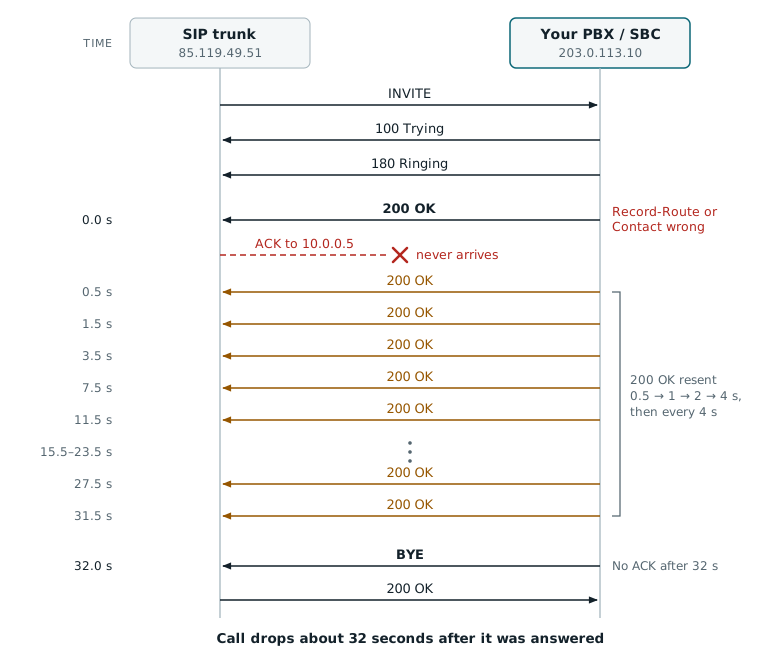
An ACK timeout seen from your PBX. Your PBX answers, never receives the ACK, resends the 200 OK for 32 seconds and then hangs up. We send an ACK for every 200 OK, but each one takes the same broken route. Times count from the first 200 OK; vertical spacing is not to scale.
Why exactly 32 seconds?
Until the ACK arrives, your PBX keeps resending the 200 OK. RFC 3261 (section 13.3.1.4) sets the schedule with two timers:
|
Timer |
Value |
Meaning |
|---|---|---|
|
T1 |
500 ms |
First resend. The interval doubles each time. |
|
T2 |
4 s |
Longest interval between resends. |
|
64 × T1 |
32 s |
Your PBX gives up and sends BYE. |
Some PBXs use other timer values, so the call may drop a few seconds earlier or later.
Why the ACK gets lost
The ACK for a 200 OK is a new request. It does not automatically retrace the path of the INVITE. Our platform works out where to send it from two headers in your 200 OK:
-
Record-Route lists the proxies the ACK must pass through on its way to you. We use them in reverse order (RFC 3261, section 12.1.2). The BYE and any re-INVITE later in the call follow the same route.
-
Contact is the final destination: your PBX. RFC 3261 (section 12.1.1) defines it as the address for later requests in the call, "which includes the ACK for a 2xx response".
If either header points to an address we can't reach, the ACK is lost. Every retry is lost the same way, so the call fails after 32 seconds.
Where the ACK goes
In these examples 85.119.49.11 is our UAC, which sends the ACK, and 85.119.49.51 is our load balancer, which sends you the INVITE.
|
Situation |
ACK path |
Result |
|---|---|---|
|
Headers correct |
85.119.49.11 → 85.119.49.51 → 203.0.113.10 (your PBX) |
Delivered |
|
Private addresses behind your public SBC |
85.119.49.11 → 85.119.49.51 → 203.0.113.10 (your SBC) → 192.168.1.20 (your PBX) |
Delivered |
|
Private IP as next hop (Record-Route) |
85.119.49.11 → 85.119.49.51 → 10.0.0.5 |
Not routable |
|
Record-Route missing |
85.119.49.11 → 203.0.113.10 directly |
Skips our edge proxy, may be blocked |
|
Private IP as next hop (Contact) |
85.119.49.11 → 85.119.49.51 → 192.168.1.20 |
Not routable |
When a private IP address is fine
A private address in Record-Route or Contact is not wrong by itself. What matters is the address our load balancer sends the ACK to next:
-
the Record-Route entry directly above ours in your 200 OK, or
-
your Contact, if there is no Record-Route entry above ours.
That next hop must be reachable from our network. Everything behind it is handled by your own equipment, so private addresses there are fine.
A common example is an SBC with a public address in front of a PBX on your LAN. The SBC record-routes itself with its public address, so our load balancer sends the ACK to the SBC, and the SBC delivers it to the private Contact of the PBX:
SIP/2.0 200 OK
Via: ... (2 Via headers, unchanged)
Record-Route: <sip:192.168.1.1;lr>                    <-- private, behind your SBC: fine
Record-Route: <sip:203.0.113.10;lr>                   <-- your SBC: public, next hop
Record-Route: <sip:85.119.49.51;lr;ftag=6a3f1c2b>     <-- our load balancer
Contact: <sip:[email protected]:5060>         <-- private, behind your SBC: fine
The ACK goes 85.119.49.11 → 85.119.49.51 → 203.0.113.10 (your SBC) → 192.168.1.20 (your PBX). Only 203.0.113.10 has to be reachable for us.
Outbound calls follow the same rule in the other direction. There your PBX sends the ACK, and it must route it using the Record-Route headers from our 200 OK. If it ignores them, we resend our 200 OK and end the call after 32 seconds.
Record-Route headers: wrong and correct
Every proxy that needs to stay in the signalling path adds a Record-Route header to the INVITE. RFC 3261 (section 12.1.1) says your side must copy all Record-Route values from the request into the response, including URI parameters, and must keep them in the same order.
In practice: the Record-Route lines in your 200 OK should be identical to the ones in the INVITE you received. Your own trace may show one Record-Route header or several, with other addresses than in these examples. The rule is the same.
Reference: the INVITE you receive
INVITE sip:[email protected]:5060 SIP/2.0
Via: SIP/2.0/UDP 85.119.49.51:5060;branch=z9hG4bK3f9a.7c1e2b04
Via: SIP/2.0/UDP 85.119.49.11:5060;branch=z9hG4bK-524287-1
Record-Route: <sip:85.119.49.51;lr;ftag=6a3f1c2b>
Max-Forwards: 69
From: <sip:[email protected]>;tag=6a3f1c2b
To: <sip:[email protected]>
Call-ID: 8f14e45f-ceea-4b67-a1d9-3c7e81b2f0a4
CSeq: 1 INVITE
Contact: <sip:[email protected]:5060>
Content-Type: application/sdp
Wrong: Record-Route headers missing
SIP/2.0 200 OK
Via: ... (2 Via headers, unchanged)
                                                  <-- Record-Route header missing
From: <sip:[email protected]>;tag=6a3f1c2b
To: <sip:[email protected]>;tag=as5f2e91d0
Contact: <sip:[email protected]:5060>
What happens: without a route, the ACK is sent straight to your Contact address and skips the edge proxy that sent you the INVITE. It arrives from an address your firewall may not allow, or never leaves our network.
Wrong: private IP address added
SIP/2.0 200 OK
Via: ... (2 Via headers, unchanged)
Record-Route: <sip:10.0.0.5;lr>                       <-- private IP added
Record-Route: <sip:85.119.49.51;lr;ftag=6a3f1c2b>
Contact: <sip:[email protected]:5060>
What happens: your own SBC, SIP proxy or PBX record-routes itself with its LAN address. Our edge proxy forwards the ACK to `10.0.0.5`, which does not exist on the internet. The same happens when a device replaces one of our entries with a private address.
Wrong: parameters stripped
SIP/2.0 200 OK
Via: ... (2 Via headers, unchanged)
Record-Route: <sip:85.119.49.51>                      <-- ;lr and ftag removed
Contact: <sip:[email protected]:5060>
What happens: without `;lr` our side has to treat each hop as an old-style strict router, which changes how the ACK is addressed. Parameters such as `ftag` carry information our proxies need to route requests within the call. Removing them can cause the ACK to be misrouted or dropped.
Correct: how it should look
SIP/2.0 200 OK
Via: SIP/2.0/UDP 85.119.49.51:5060;branch=z9hG4bK3f9a.7c1e2b04
Via: SIP/2.0/UDP 85.119.49.11:5060;branch=z9hG4bK-524287-1
Record-Route: <sip:85.119.49.51;lr;ftag=6a3f1c2b>
From: <sip:[email protected]>;tag=6a3f1c2b
To: <sip:[email protected]>;tag=as5f2e91d0
Call-ID: 8f14e45f-ceea-4b67-a1d9-3c7e81b2f0a4
CSeq: 1 INVITE
Contact: <sip:[email protected]:5060>
Content-Type: application/sdp
Same values, same parameters, same order as in the INVITE. Writing them on one line is equivalent and also correct:
Record-Route: <sip:203.0.113.10;lr;ftag=6a3f1c2b>, <sip:85.119.49.51;lr>
Contact header: wrong and correct
Even with correct Record-Route headers, the last hop of the ACK goes to the address in your Contact header. The BYE and any re-INVITE (used for hold and transfer) go there too. The Contact in your 200 OK must therefore be an address and port that we can reach over the internet.
|
|
Contact header |
Why |
|---|---|---|
|
Wrong |
|
Private LAN address of your PBX (RFC 1918). It can't be reached from the internet. |
|
Wrong |
|
Internal hostname. It only resolves inside your network, not in public DNS. |
|
Wrong |
|
Public IP, but a port your firewall doesn't forward to the PBX (for example, only 5060 is forwarded). |
|
Correct |
|
Your public IP address and the port that is forwarded to your PBX. |
|
Correct |
|
An FQDN that resolves to your public IP in public DNS. |
Private and public IP addresses (RFC 1918)
RFC 1918 reserves three IPv4 address blocks for private networks. Anyone may use them internally without registering them, so the same address, say 192.168.1.20, exists in millions of offices at once. Because they are not unique, internet routers do not forward traffic to them.
A public IP address is globally unique and reachable over the internet. Your router uses NAT to translate between the private addresses inside your network and the public address the outside world sees. When a private address ends up in a SIP header, it points to a device inside your network that nobody outside can reach.
|
Private block |
Range |
Notes |
|---|---|---|
|
|
10.0.0.0 – 10.255.255.255 |
Common in larger company networks and data centres. |
|
|
172.16.0.0 – 172.31.255.255 |
Only 172.16 up to 172.31 is private. 172.32.0.0 and up is public. |
|
|
192.168.0.0 – 192.168.255.255 |
Default on most office and home routers. |
A few other ranges are not reachable from the internet either and cause the same problem in a SIP header: 100.64.0.0/10 (carrier-grade NAT, RFC 6598), 169.254.0.0/16 (link-local) and 127.0.0.0/8 (loopback).
How to fix it
-
Capture a failing call. Record an inbound call that drops, on the PBX or SBC that is connected to the SIP trunk. For example:
tcpdump -i any -n -s 0 -w ack-timeout.pcap port 5060Open the file in Wireshark under Telephony → VoIP Calls → Flow Sequence, or watch calls live with
sngrep. If you use TLS, enable SIP debug logging on your PBX instead, because the capture will be encrypted. -
Compare Record-Route in the INVITE and the 200 OK. Put the INVITE and the first 200 OK side by side. The Record-Route lines must match exactly: same values, same parameters, same order. Look out for private addresses.
-
Check the Contact header in the 200 OK. It must contain your public IP address or a public FQDN, and a port that is forwarded to your PBX.
-
Set your public address on the PBX or SBC. Tell your PBX or SBC which public address to use in its SIP headers. If you run your own SBC or SIP proxy that adds a Record-Route header, it must advertise its public address too.
-
Asterisk (PJSIP): in the transport, set `external_signaling_address=203.0.113.10`, `external_media_address=203.0.113.10` and `local_net=192.168.1.0/24`
-
Asterisk (chan_sip, legacy): set `externaddr=203.0.113.10` and `localnet=192.168.1.0/255.255.255.0`
-
FreeSWITCH: set `ext-sip-ip` and `ext-rtp-ip` to your public IP in the SIP profile
-
Kamailio: `listen=udp:10.0.0.5:5060 advertise 203.0.113.10:5060`
-
Other PBXs and SBCs: look for Public IP, External address or NAT in the network or SIP trunk settings
-
-
Allow all of our signalling addresses. The ACK, BYE and re-INVITE come from our SIP signalling addresses, just like the INVITE. Make sure your firewall allows all of them on your SIP port, not only the one you see most often.
-
Test again. Make an inbound test call and keep it up for at least a minute. In the trace you should see one 200 OK followed by an ACK, with no retransmissions.
Still dropping?
Contact Voice Support and include:
-
A packet capture (`.pcap`) or SIP debug log of a failing call
-
The Call-ID of that call
-
Date and time of the call, with time zone
-
Caller and callee number
-
Make, model and software version of your PBX, SBC and firewall