
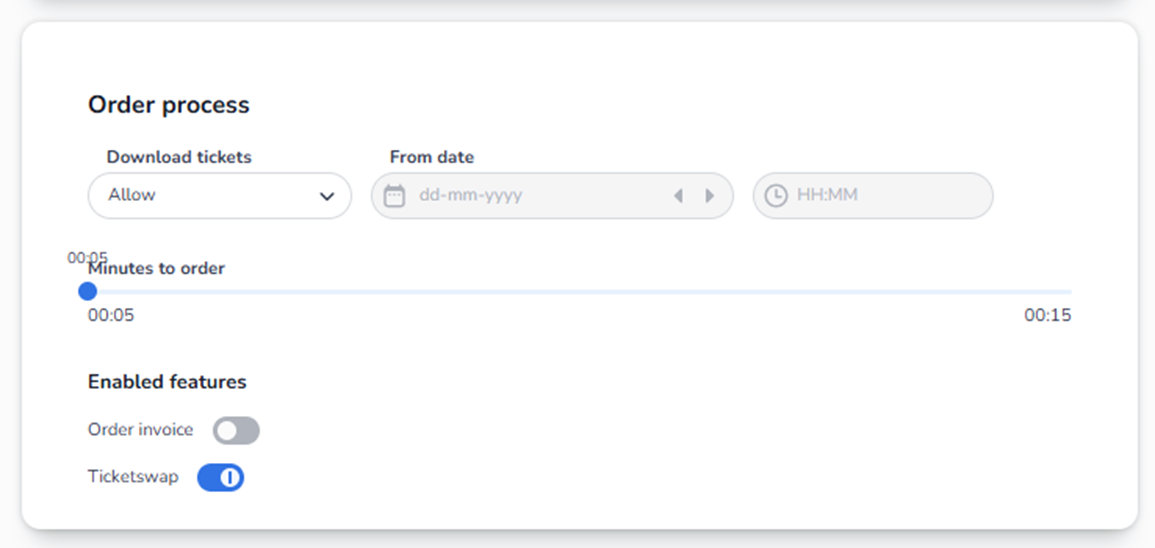
Event settings → Order process
Here you see the order process, you can also switch the minutes of order you can make to maximum of 15 minutes. Also you can adjust the time when buyers can download their tickets, for example 1 week before the event.
You can enable features, like order invoice or ticketswap.
Overview
The Order process section controls how ticket purchasing behaves during checkout.
This section determines:
-
When tickets can be downloaded
-
How long tickets are reserved during checkout
-
Whether invoices are enabled
-
Whether resale (Ticketswap) is allowed
These settings directly affect customer experience and ticket availability.
Section Breakdown
-
Download Tickets
Field: Dropdown (e.g. “Allow”)
This controls whether customers can download their tickets.
What You See:
-
A dropdown menu
-
Options such as “Allow” (and possibly other configurations depending on platform setup)
What It Does:
If set to Allow:
-
Customers can download their tickets after purchase.
-
Tickets become available via email or account.
If disabled or restricted:
-
Tickets may not be downloadable immediately.
-
You may control when access becomes available.
-
From Date (Ticket Availability Timing)
Fields:
-
Date picker (calendar icon)
-
Time selector (HH:MM)
This defines when ticket download becomes available.
What You See:
-
Calendar input field
-
Arrow buttons to move date forward/backward
-
Time input field
-
Timezone indicator
How It Works:
If a date and time are set:
-
Customers can only download tickets starting from that moment.
If left empty:
-
Tickets are typically downloadable immediately after purchase (depending on other configuration).
Why This Is Important:
Used for:
-
Preventing early ticket distribution
-
Security control
-
Coordinating release timing for high-demand events
-
Minutes to Order (Reservation Timer)
To change this guide to Minutes to order within the order process of event settings and use the slider to change it.
Control: Slider
This is one of the most critical settings.
What It Controls:
How long tickets remain reserved in a customer’s cart during checkout.
Example:
If set to 5 minutes:
-
Customer selects tickets.
-
Tickets are locked for 5 minutes.
-
If payment is not completed within 5 minutes:
-
Reservation expires.
-
Tickets return to available inventory.
-
What You See:
-
A slider with a time range (e.g., 00:05 to 00:15)
-
Current selected time displayed above the slider
Why This Matters:
Short time (e.g., 5 minutes):
-
Prevents inventory being blocked too long
-
Good for high-demand events
Long time (e.g., 15 minutes):
-
More comfortable for buyers
-
Higher risk of inventory being temporarily locked
This directly impacts:
-
Conversion rate
-
Fair ticket distribution
-
Scalping risk
-
Sales speed during launches
-
Enabled Features
This section contains toggle switches.
Blue toggle = Enabled
Grey toggle = Disabled
A. Order Invoice
Toggle: On / Off
When enabled:
-
Buyers can request an invoice for their order.
-
Additional invoice details may be collected.
When disabled:
-
Invoice functionality is not available during checkout.
Use this if:
-
You sell to business customers
-
You need formal invoicing support
B. Ticketswap
Toggle: On / Off
When enabled:
-
Ticket resale integration is activated.
-
Customers may resell tickets through supported resale platforms (if integrated).
When disabled:
-
Resale functionality is blocked.
Important:
This impacts:
-
Secondary market behavior
-
Customer flexibility
-
Fraud prevention strategies
How All Settings Work Together
The order process controls the entire checkout flow:
-
Customer selects tickets.
-
Tickets are reserved for X minutes.
-
Customer completes payment.
-
Tickets become downloadable (based on availability timing).
-
Optional features (invoice / resale) apply.
Risk Awareness (For Agent Understanding)
If users report:
-
“My tickets disappeared during checkout”
→ Check Minutes to Order timer. -
“Customers cannot download tickets”
→ Check Download Tickets setting and From Date. -
“Customers cannot request invoices”
→ Check Order Invoice toggle. -
“Tickets are being resold unexpectedly”
→ Check Ticketswap toggle.
Summary
Order Process = Checkout Logic Controller
It determines:
-
Reservation behavior
-
Download timing
-
Invoice availability
-
Resale permissions
Misconfiguration here can cause:
-
Lost sales
-
Inventory blocking
-
Customer frustration
-
Operational confusion