
Overview
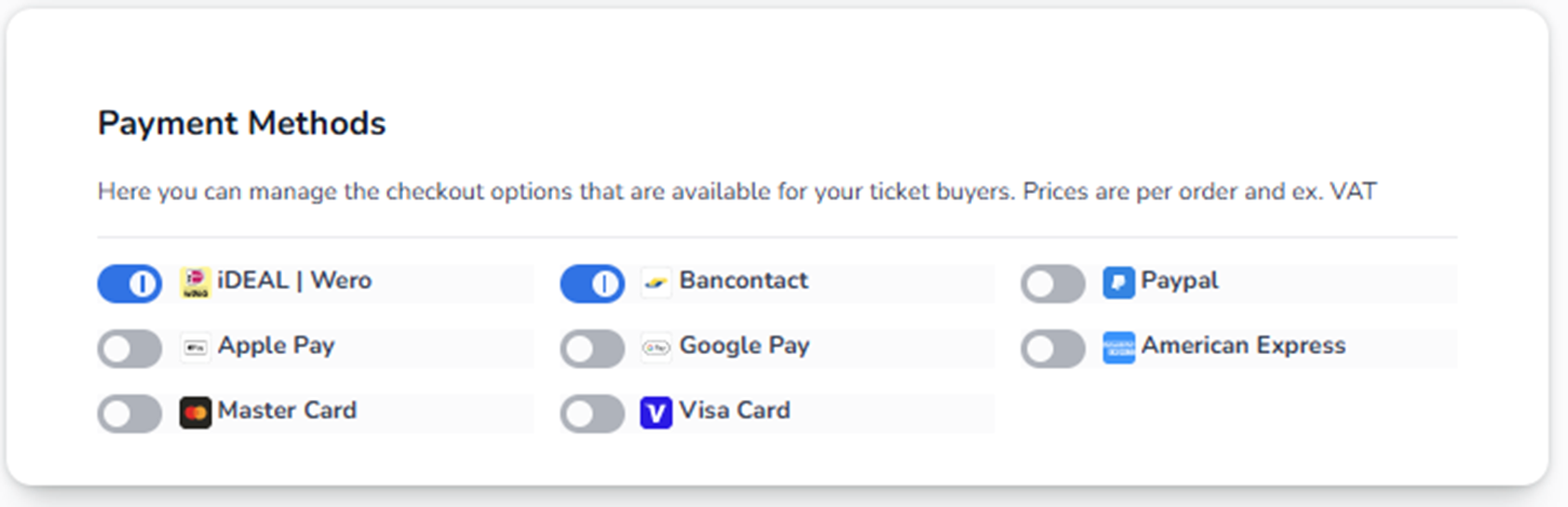
The Payment Methods section controls which payment options are available to buyers during checkout.
This directly affects:
-
How customers can pay
-
Conversion rate
-
International accessibility
-
Transaction success
If a payment method is disabled here, buyers will not see it in checkout.
What You See on This Screen
You see a list of available payment providers, each with:
-
Provider name
-
Provider logo
-
Toggle switch (On / Off)
Examples of payment methods may include:
-
iDEAL
-
Bancontact
-
PayPal
-
Apple Pay
-
Google Pay
-
Visa
-
MasterCard
-
American Express
Klarna is an installment payment service, currently KLARNA IS NO PAYMENT METHODE
The exact list may vary depending on account configuration and region.
How the Toggle Works
Each payment method has a switch:
Blue Toggle = Enabled
The payment method is available during checkout.
Grey Toggle = Disabled
The payment method is hidden from buyers.
Changes apply once saved (if a save button is present in your configuration).
How This Affects Checkout
If a payment method is enabled:
-
It appears as a selectable option during payment.
-
Buyers can choose it to complete their order.
If disabled:
-
Buyers will not see it.
-
It cannot be used.
Strategic Considerations
Local Events
Enable region-specific methods.
Example:
-
Netherlands → iDEAL
-
Belgium → Bancontact
International Events
Enable broader payment methods:
-
Visa
-
MasterCard
-
PayPal
-
Apple Pay
-
Google Pay
This increases conversion for international buyers.
High Conversion Setup (Best Practice)
Enable:
-
At least one major credit card (Visa / MasterCard)
-
One local dominant method
-
One digital wallet (Apple Pay / Google Pay)
This reduces checkout friction.
Operational Impact
If users report:
-
“Customers cannot pay”
→ Check if the payment method is disabled. -
“International buyers cannot complete payment”
→ Ensure credit cards are enabled. -
“PayPal not visible”
→ Verify PayPal toggle is enabled. -
“Apple Pay not showing”
→ Check both toggle and browser/device compatibility.
Financial Notes
The note at the top mentions:
“Prices are per order and ex. VAT.”
This means:
-
Pricing configuration may exclude VAT.
-
VAT calculation happens separately.
-
Payment method does not affect VAT logic directly.
Risk Awareness
Disabling too many methods may:
-
Reduce conversion
-
Increase cart abandonment
-
Exclude international buyers
Enabling too few methods limits accessibility.
Summary
Payment Methods controls:
-
Which payment providers buyers can use
-
Checkout flexibility
-
Conversion optimization
-
Regional accessibility
This section directly influences revenue performance.