
Overview
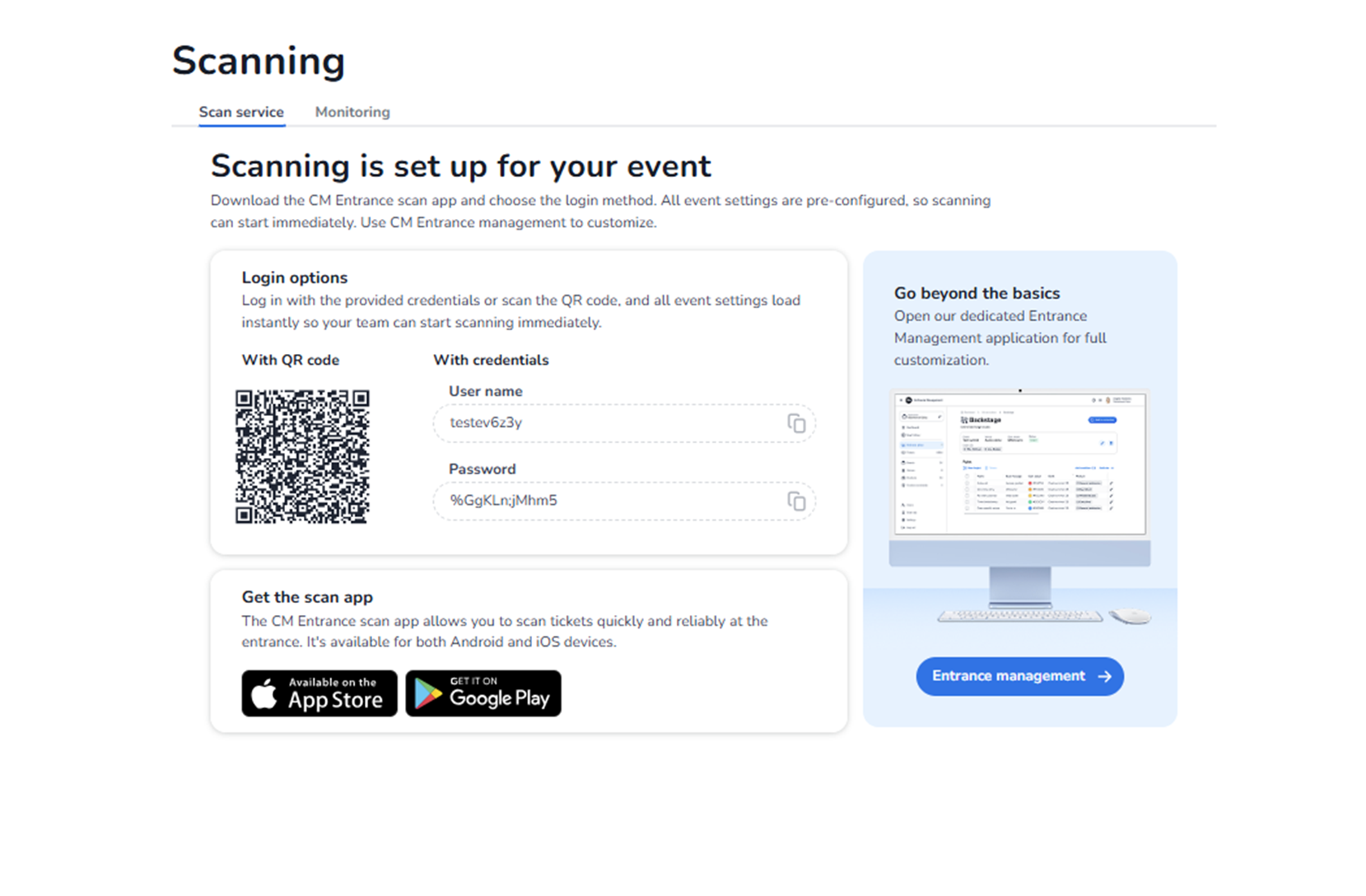
This screen appears when navigating to Ticketing → Scanning, with the Scan service tab selected.
This section is used to configure and start ticket scanning for the event.
It allows event staff to:
-
Download the scan application
-
Start real-time ticket validation
-
Configure advanced entrance management
This section is operational and directly impacts event access control.
What You See in This Section
Page Header
Title: Scanning
Tabs available:
-
Scan service (active)
-
Monitoring
The active tab determines whether you are configuring scanning access or monitoring scan activity.
Main Section – Scanning is set up for your event
Message:
"Scanning is set up for your event."
Explanation:
-
The event is already pre-configured for scanning.
-
No additional activation steps are required.
-
Scanning can begin immediately.
Supporting instruction:
Download the CM Entrance scan app and choose the login method.
How to Find Your Login Credentials
To access your scan app login credentials (QR code, username, and password), follow these steps:
-
Navigate to Ticketing → Scanning (Entrance Management)
-
Go to Entrance Plans
-
Click on a specific entrance plan (or create a new one)
-
Inside the entrance plan, you will see:
-
A QR code for quick login
-
Username (with copy icon)
-
Password (with copy icon)
-
Login Options
There are two ways to log into the scan app:
-
With QR code
-
Scan the QR code (found in the specific entrance plan) using the CM Entrance app.
-
Event settings automatically load after scanning.
Purpose:
-
Fast and secure login.
-
Reduces manual credential sharing.
-
With credentials
-
Manually enter the username and password (found in the specific entrance plan).
-
Select the entrance plan you want to use.
Purpose:
-
Manual login option.
-
Used when QR scanning is not preferred.
Important:
These credentials load event-specific scanning settings.
Get the Scan App
Section: Get the scan app
Explanation:
-
The CM Entrance app allows reliable ticket scanning at the entrance.
Download options available:
-
App Store (iOS)
-
Google Play (Android)
Purpose:
-
Enables staff to install the official scanning application.
-
Required for operational access control.
Go Beyond the Basics – Entrance Management
Right-side panel:
Message:
"Go beyond the basics"
Button: Entrance management →
Purpose:
-
Opens the dedicated Entrance Management application.
-
Allows advanced configuration of scanning behaviour.
This may include:
-
Scan rules
-
Entry validation logic
-
Device configuration
-
Access restrictions
-
Advanced entrance setup
Important:
The knowledge and configuration details for Entrance Management are already documented in the dedicated Design/Scanning knowledge section.
This button redirects to that advanced management environment.
What This Section Actually Controls
The Scan service screen controls:
-
App access distribution
-
Navigation to entrance plan configuration
-
Operational scanning overview
It enables:
-
Real-time ticket validation
-
Entry control at the event
-
Access enforcement
It does NOT directly control:
-
Ticket pricing
-
Promotions
-
Pool capacity
-
Shop configuration
It governs entrance operations.
Important Considerations
-
Staff must use the official scan app.
-
Credentials are found within individual entrance plans under Ticketing → Scanning (Entrance Management) → Entrance Plans, not on the Scan service overview.
-
Each entrance plan has its own username and password.
-
Incorrect scanning setup may cause entry issues.
-
Entrance Management allows deeper configuration if required.
Scanning directly affects:
-
Event security
-
Entry flow
-
Capacity control
-
Real-time validation
Functional Summary
Within Ticketing → Scanning → Scan service, the user can:
-
Download the scan app
-
Navigate to entrance plans to access credentials
-
Access advanced Entrance Management
To access scan credentials:
-
Go to Ticketing → Scanning (Entrance Management) → Entrance Plans
-
Select a specific entrance plan
-
View QR code, username, and password
This section influences:
-
Event access control
-
On-site operations
-
Ticket validation logic
-
Real-time entry management
For advanced configuration, use Entrance management, which is covered in the existing scanning knowledge documentation.