
The lexicon in HALO is a word management system that allows you to control how specific terms are handled during translation, text-to-speech, and speech recognition.
By effectively managing your lexicon, you ensure consistent translation, pronunciation, and recognition across all HALO applications. This leads to improved user experiences and maintains your brand integrity in multilingual environments.
This guide explains how to create and manage lexicon entries effectively and what their function is within HALO.
What is a Lexicon
A lexicon is a collection of words and terms that you can define in your profile to customize how the system handles specific vocabulary. It provides precise control over translation behavior, pronunciation, and speech recognition, ensuring that brand names, technical terms, and other special words are processed exactly as intended.
Accessing the Lexicon
You can find the lexicon option in the navigation panel within your profile settings. This feature allows you to maintain consistency across all HALO applications by standardizing how specific terms are translated, pronounced, and recognized.
Creating and Managing Lexicon Entries
Types of Lexicon Entries
There are four types of lexicon entries you can define:
-
Do Not Translate: Keep the term exactly as written, it is never changed by HALO’s automatic translation. Text channels only.
-
Alias: Replace the term with an alternative word or phrase. On the voice channel the alias is the spoken form (e.g. “CM.com” → “C M dot com”); on text channels the alias rewrites the term in the response. Use the Applies to setting to control where it applies: Voice, Text, or Both.
-
Spell Out: Spell the term out letter by letter. E.g. the word “test” will be pronounced “T E S T.” Voice only.
-
Keyterms: Bias speech recognition toward these terms so the voice agent transcribes them more reliably. Useful for brand or product names it would otherwise mishear. Voice only; it affects how speech is recognized, not how it is pronounced. A keyterm is at most 50 characters, and a profile can define up to 1000 keyterms.
The Applies to setting is available for Alias entries only. The other types have a fixed channel: Do Not Translate is text only, while Spell Out and Keyterms are voice only.
When you add a lexicon entry, automatic translation is always turned off for that term, independent of the entry type — so protected terms keep their exact form.
Keyterms only improve speech recognition on the voice channel; they have no effect on text responses or on pronunciation, and the value field is not used.
Creating a New Lexicon Entry
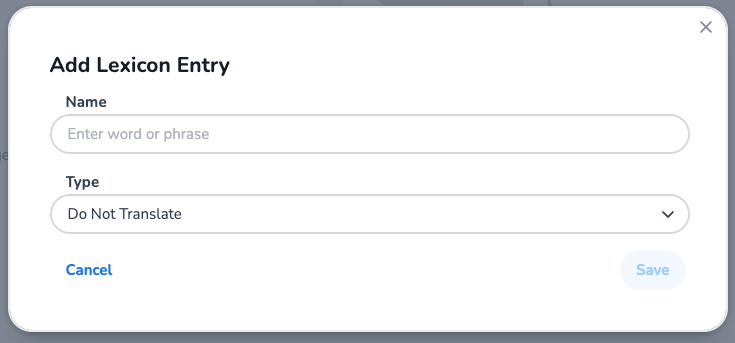
Initiate Creation: Click the blue "+" sign to create a new lexicon entry.
Name: Enter the word or term you want to add to the lexicon. This should be the exact text that appears in your content.
Type: Choose how the term should be handled (see the types described above).
Applies to (Alias only): Choose whether the alias applies to Voice, Text, or Both. New aliases default to Both.
Value: Provide the replacement or pronunciation guidance where relevant:
-
For Alias: enter the replacement word or phrase.
The value field is not used for Do Not Translate, Spell Out, or Keyterms.
A few examples are:
|
Name |
Type |
Value |
Result |
|---|---|---|---|
|
Netherlands |
|
|
The word “Netherlands” will never be translated and always shown as “Netherlands” |
|
Test |
|
|
The word “test” will be pronounced “T E S T.” |
|
W3C |
|
|
Every occurrence of W3C is spoken (and, when Applies to includes Text, written) as “World Wide Web Consortium.” |
|
ChatGPT |
|
|
The voice agent is more likely to correctly transcribe “ChatGPT” when a caller says it. |
Managing Your Lexicon
Searching and Filtering
-
Search: Find entries by name, type, or value
-
Sort: Organize entries by name, type, or creation date
Updating Entries
Modify existing lexicon entries to refine translation, pronunciation, and recognition settings as your needs evolve.
Removing Entries
Delete lexicon entries that are no longer needed to keep your lexicon organized and relevant.
Benefits of using the Lexicon
Using lexicon in HALO ensures:
-
Brand Consistency: Prevent translation of company names and brand terms
-
Pronunciation Accuracy: Control how technical terms and names are spoken
-
Recognition Accuracy: Help voice agents recognise domain terms they would otherwise mishear
-
Content Quality: Maintain professional standards across multilingual content
-
User Experience: Deliver natural-sounding speech and accurate translations
Example Usage
Brand Name Protection
Scenario: The term "Conversational AI Cloud" is your brand name that should never be translated.
Solution: Add "Conversational AI Cloud" to lexicon with type Do Not Translate
Pronunciation Override
Scenario: "http://CM.com " should be pronounced as "CM" rather than "C-M dot com"
Solution: Add "http://CM.com " with type Alias, value "CM", and Applies to Voice
Technical Term Handling
Scenario: Ensure "API" is spelled out as "A-P-I" rather than pronounced as a word
Solution: Add "API" with type Spell Out
Speech Recognition Accuracy
Scenario: Callers frequently say your product name, but the voice agent mishears it during transcription
Solution: Add the product name with type Keyterms so speech recognition is biased toward it
Best Practices
-
Regular Review: Periodically review your lexicon entries to ensure they remain relevant
-
Consistent Naming: Use clear, descriptive names for lexicon entries
-
Test Pronunciation: Verify that pronunciation overrides work as expected
-
Team Coordination: Share lexicon standards across your organization for consistency
E-learning Video
For further guidance, watch our e-learning videos: