
API credentials are a set of secure tokens or keys that authenticate your identity when accessing an API. They ensure that the interaction is authorized and secure, acting like a username and password for interacting with the API.
We support 3 types, choose the most appropriate one for your use case.
-
Default - Can access profiles and events
-
Admin - Can access and create profiles, events, exports and segments
-
Restricted - Can only access events
You can create, view and delete credentials. These token are stored and managed on a CM platform level, not per individual app. When creating a token on an app, it gets the permission of that app based on the selected type.
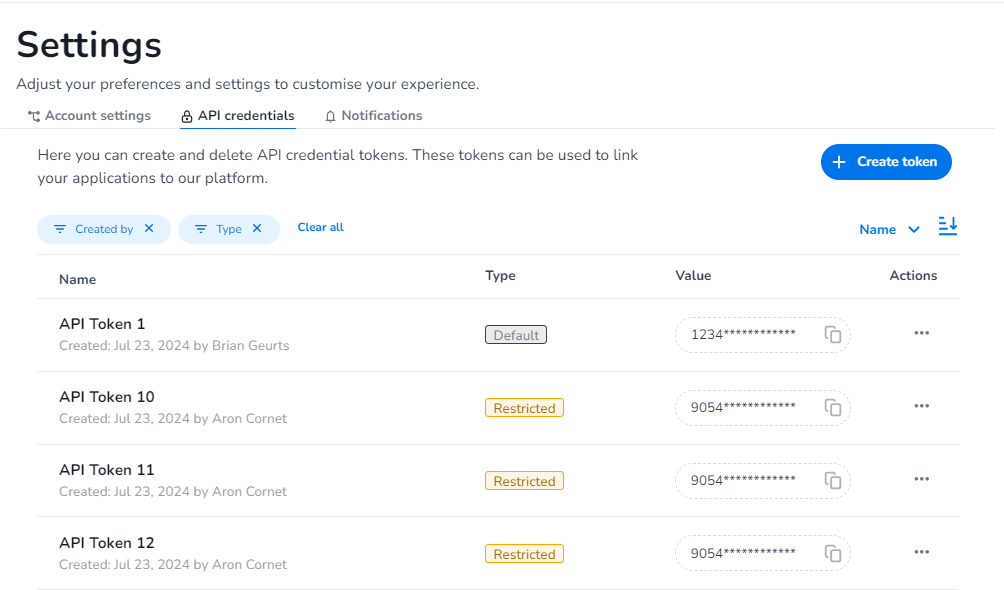
Platform breakdown
An API credential is in itself an abstraction around a set of Platform resources that together will serve the function of a usable token. Below will be explained what the different resources are and what function they serve in the grand scheme. In the following diagram is the total setup visible. The resources outlined in blue are the resources that we have direct control over and will need to be created in order for a API credential to be usable.
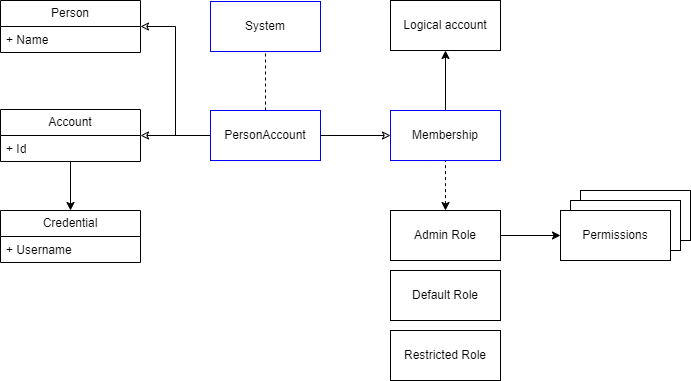
First a PersonAccount needs to be created. This entity is nothing more than a shell for the combination of a Person and an Account where an Account holds one or more credentials. Important to note is that for a denoted API account the username will be used for storing the value of the token. This means that a user will be using this value in their use for X-CM-PRODUCTTOKEN.
Secondly a System needs to be created. This will serve the purpose of registering a readable name for the API key.
Lastly a Membership needs to be created. This will form the authorization link between the Account and a specific Logical Account with specific Role. This Role has one or more permissions assigned to it.