
The translation glossary lets you decide how specific words are translated by Auto Translations. For each word you choose one of two actions: Translate it in a fixed way, or Never translate it. You set it up in Settings → Conversation tools → Translation glossary. The glossary applies to everyone in your Agent Inbox environment.
The translation glossary only works on top of Auto Translations. For the basics, see How Do I Use Auto Translations? and How Do I Configure Auto Translations?
When Do I Use It?
-
Never translate: for brand names, product names and other words that must stay as they are. For example, your company name or a product line.
-
Translate: for terms that need one fixed translation. For example, a Dutch shop term that must always become the same English term.
Open the Translation Glossary
-
Click the three-dotted menu in the bottom-left corner of the Agent Inbox.
-
Choose Settings → Conversation tools.
-
Choose Translation glossary.
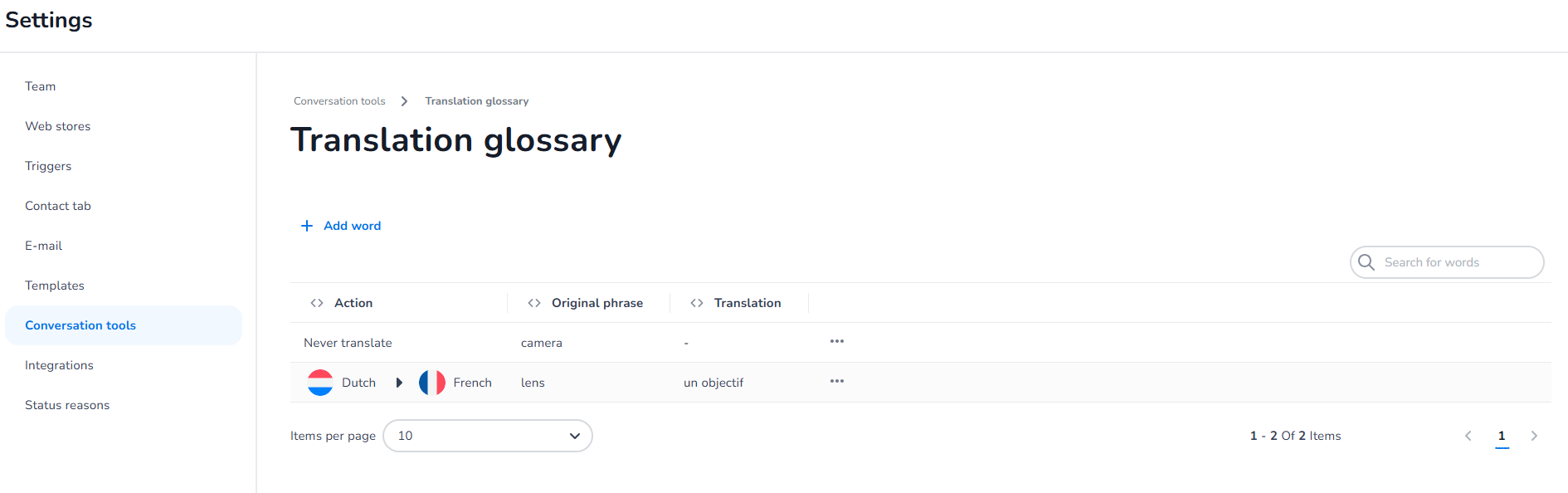
If you do not see Translation glossary, the feature is not switched on for your environment.
Add a Word
-
Choose Add word.
-
Under Action, choose Translate or Never translate.
-
For Never translate: enter the Original phrase.
-
For Translate:
-
In Translate from, select the language of the original phrase.
-
Enter the Original phrase.
-
In Translate to, select the language to translate into. It must differ from the Translate from language.
-
Enter the Translation.
-
-
Check the Preview. It shows the result, for example: Dutch "Bezorgmoment" → English "Delivery slot".
-
Choose Add.
The word now appears in the list. To translate the same phrase into more languages, add one entry per Translate to language.
Find, Edit or Delete a Word
-
Use Search for words to find an entry.
-
The list shows Action, Original phrase and Translation.
-
To change or remove an entry, open its menu and choose Edit or Delete.
How Does the Glossary Affect Translations?
-
It is used both when customer messages are translated for the agent and when the agent's reply is translated for the customer.
-
A Translate entry is used when text is translated into its Translate to language. Regional variants count as the same language: an entry for French also applies to French (Belgium).
-
A Never translate entry is used for every language.
-
Changes apply to messages translated after you save. Messages that were already translated keep their earlier translation.
What Are the Limits?
|
Field |
Limit |
|---|---|
|
Original phrase |
Required, at most 200 characters |
|
Translation |
Required for Translate, at most 500 characters |
|
Duplicates |
The same phrase with the same action and language pair can be added only once |