-
Open the Entrance Management app on the scanner.
Or use the following website on your phone:
https://entrance-scanning.cm.com/login
2, Log in using the created username and password. (You can also log in by scanning the QR codes).
3, Select the service that should be used for this specific scanner.
4, The scanner will now load the tickets.
(Make sure there is an active internet connection during this step.)
5, Once everything is loaded, you can start scanning.
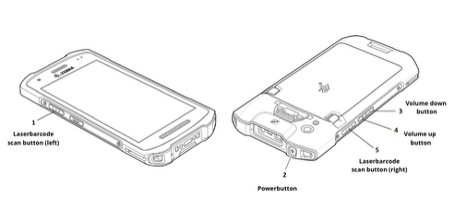
Activate the laser by holding down one of the scan buttons on the left or right side of the device while aiming the laser at a QR code.