
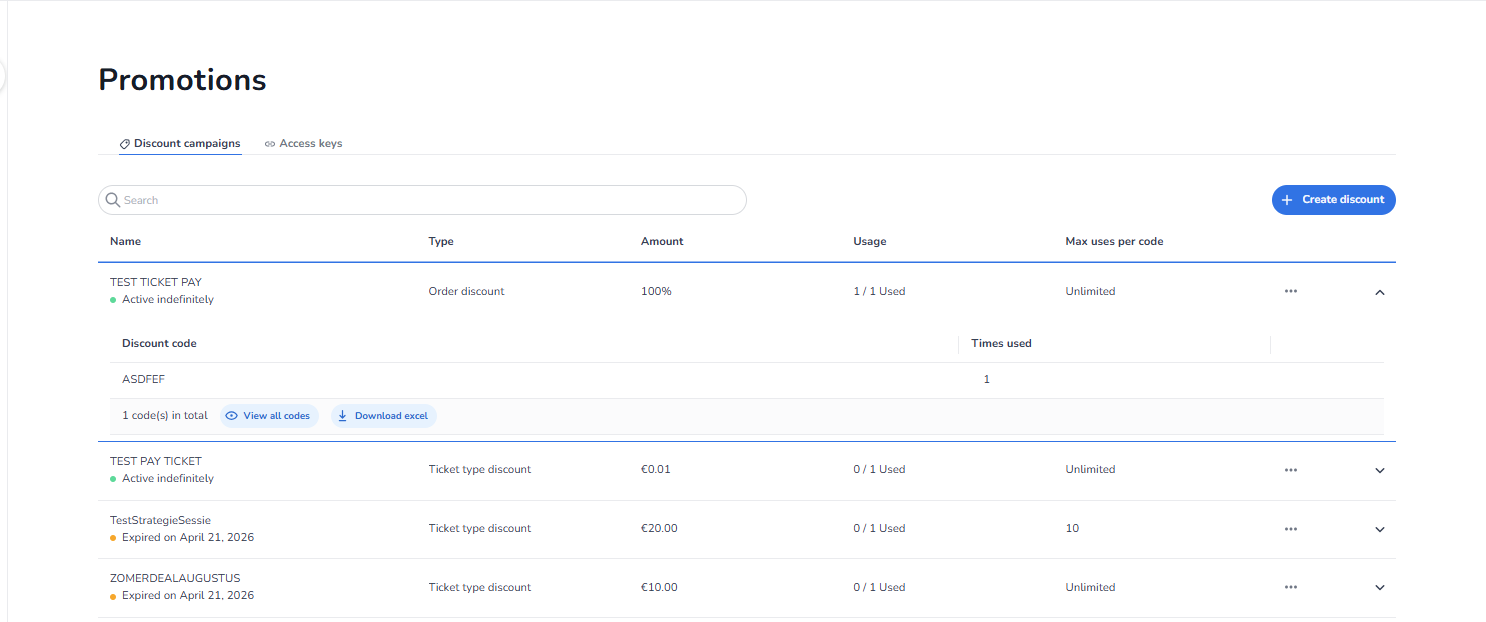
Ticketing → Promotions → Discount Campaigns
Overview
This screen appears when the user navigates to Ticketing → Promotions. It is used to manage promotional configurations such as discount campaigns and access keys for the selected event. Promotions influence pricing behaviour during checkout and can be used for marketing campaigns, partnerships, or controlled access.
What You See in This Section
The Promotions section contains two tabs:
-
Discount campaigns — Manage discount codes and campaigns.
-
Access keys — Manage access keys for controlled ticket sales.
What a Discount Campaign Is
A Discount Campaign allows event organizers to create a discount code that customers can enter during the ticket purchase process. When the correct code is entered at checkout, the campaign applies the configured discount to the order or to specific tickets.
Examples of discount codes include:
-
EARLYBIRD10
-
PARTNER20
-
VIPDISCOUNT
-
STUDENT15
These codes reduce the price according to the campaign configuration. Discount campaigns are commonly used for limited-time promotions or targeted marketing offers.
How Discount Campaigns Work
The typical flow of a discount campaign is:
-
A discount campaign is created in the Promotions section.
-
A discount code is defined.
-
The discount type and value are configured.
-
Customers receive the code through marketing or promotion.
-
During checkout, the customer enters the code.
-
The system applies the discount automatically.
The discount can apply to:
-
The entire order
-
Specific ticket types
What You Can Configure
Within Ticketing → Promotions → Discount campaigns, users can manage promotional discount campaigns for an event.
Users can:
-
Create discount codes
-
Define discount value (percentage or fixed amount)
-
Apply the discount to specific tickets or the whole order
-
Set validity periods
-
Configure usage limits
-
Activate or deactivate campaigns
-
Edit existing discount campaigns
These settings control how and when the discount is applied during checkout.
Campaign Overview — What You See Per Campaign
Each campaign in the overview shows:
-
Name — The name of the discount campaign.
-
Type — Either Order discount (applies to the full order) or Ticket type discount (applies to specific ticket types).
-
Amount — The discount value, either a percentage or a fixed amount.
-
Usage — How many times the code has been used out of the total available uses.
-
Max uses per code — The maximum number of times a single code can be used. Shows Unlimited if no limit is set.
Clicking the arrow on the right expands the campaign to show the individual discount codes and how many times each code has been used.
Managing a Discount Campaign
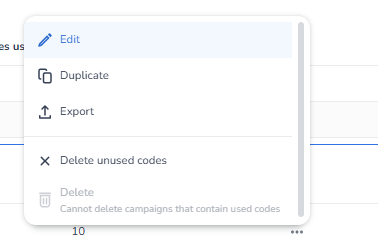
When clicking the three dots (⋯) next to a campaign, the following options appear:
-
Edit — Edit the campaign settings.
-
Duplicate — Create a copy of the campaign.
-
Export — Export the campaign data.
-
Delete unused codes — Deletes all codes within the campaign that have not been used yet. This option is available even if some codes have already been used.
-
Delete — Deletes the entire campaign. This option is only available if none of the codes within the campaign have been used. If one or more codes have been used, the campaign cannot be deleted.
Common Use Cases
Discount campaigns are commonly used for:
-
Early bird promotions (e.g., EARLYBIRD10)
-
Limited-time sales
-
Partner promotions
-
Student or member discounts
-
Marketing campaigns
-
Special event promotions
These campaigns help event organizers drive ticket sales and marketing engagement.
Important Concept
A discount campaign only affects pricing during checkout. This means:
-
Tickets remain visible in the shop
-
Customers must enter the correct discount code
-
The discount is applied according to the campaign rules
Discount campaigns therefore control price reductions, not ticket visibility.
What This Section Controls
The Discount Campaigns section manages:
-
Discount codes
-
Promotional price reductions
-
Campaign validity periods
-
Discount usage limits
-
Checkout price adjustments
It influences:
-
Ticket pricing during checkout
-
Marketing promotions
-
Campaign performance
It does not control:
-
Ticket visibility
-
Pool capacity
-
Shop layout
-
Tracking configuration
Functional Summary
Within Ticketing → Promotions → Discount campaigns, users can:
-
View existing discount campaigns
-
Search for campaigns
-
Create new discount codes
-
Edit or manage existing campaigns
This section is the central place to manage promotional price reductions for an event.