
Scanner Overview
Cm works with professional handheld scanners to ensure fast and reliable ticket scanning. We use the Zebra TC26 and Zebra TC27 scanners. These devices are specifically designed for intensive event use and are known for their speed, reliability, and ease of use.
Both scanner types operate in the same way and have identical buttons and controls. This means the instructions in this manual apply to both the Zebra TC26 and TC27.
Scanner Buttons & Controls
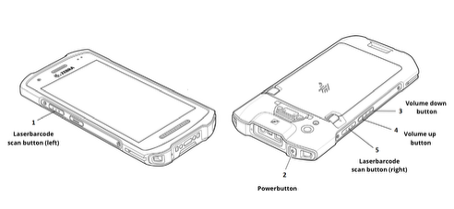
Power button
The scanner can be switched on by pressing and holding the power button on the top of the device for a few seconds, until the screen lights up and the device starts.
To switch the scanner off, press and hold the same power button and follow the on-screen instructions to power down the device safely.
(Yellow) Scan buttons
The yellow scan buttons are located on both sides of the scanner. Press either scan button to scan tickets or barcodes.
Volume buttons
The volume buttons are located on the side of the scanner and can be used to adjust the sound level.
Figure caption:
Overview of the scanner buttons and controls (Zebra TC26 / TC27).
CHARGING THE TC26 / TC27 SCANNER
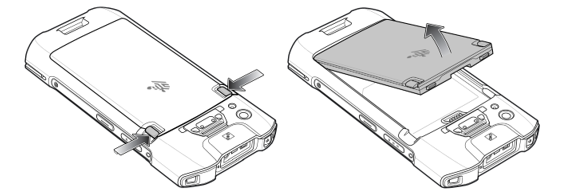
The scanner is charged by charging its battery. Below you’ll find the instructions on how to remove the battery from the scanner in order to charge it separately.
Removing the battery
For convenience, place the scanner face down on a flat surface.
Press both release buttons on the back of the battery at the same time and gently pull the battery upwards to remove it from the scanner.
Charging options
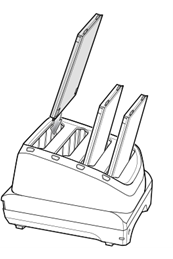
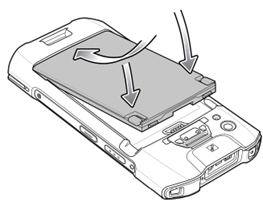
You can charge the battery in a separate charging dock (if available). To reinsert the battery, first slide the bottom of the battery into place. Then push the battery into the device until you hear a click.
Reinserting the Zebra battery
To reinsert the battery, first slide the bottom of the battery into place. Then push the battery into the device until you hear a click.
Charging Zebra with USB C
Alternatively, you can charge the scanner directly by connecting a USB-C charger to the port at the bottom of the scanner. In this case, the battery does not need to be removed.
TIPS:
-
Always make sure the scanner is powered off or not in active use while charging.
-
Use the original charger or a certified USB-C cable for best performance.