
AIT Detection Service in Safeguard Plus helps you detect and reduce Artificially Inflated Traffic (AIT) in your messaging. It analyses traffic patterns, destinations and behavior to flag or stop suspicious activity before it turns into large, unexpected costs.
It helps you:
-
Detect unusual or suspicious messaging patterns early.
-
Reduce fraud‑related costs from AIT and similar abuse.
-
Protect both you and your end customers from misuse.
-
Gain more visibility into where and how suspicious traffic happens.
Explanations
Why should I use AIT Detection Service?
You should use AIT Detection Service if you want to:
-
Reduce the risk of Artificially Inflated Traffic (AIT)
Fraudulent flows can generate large volumes of messages to specific numbers, ranges or countries just to create revenue for fraudsters. AIT Detection Service helps identify these abnormal patterns. -
Avoid large, unexpected invoices
A single fraud incident can result in a big spike in traffic and costs before you notice it. With AIT detection, suspicious traffic can be detected and (depending on configuration) slowed down, flagged or blocked earlier. -
Protect your customers and brand
Repeated, unwanted messages can damage trust with your end users. By catching suspicious behavior quickly, you limit the impact on your customers and your reputation.
What is Artificially Inflated Traffic (AIT)?
Artificially Inflated Traffic is messaging traffic that is generated deliberately to create revenue, not to deliver real value to your business or your end users. Typical signs include:
-
Very high volumes to a small set of numbers or ranges
-
Traffic to destinations you usually do not use
-
Repeated messages that do not match normal customer behavior
-
Patterns that start suddenly and grow quickly without a clear business reason
AIT is often caused by:
-
Compromised web forms or APIs
-
Abused API keys or accounts
-
Malicious testing or “click‑farms”
-
Collusion between fraudsters and destination networks or services
How does AIT Detection Service work (high‑level)?
On a high level:
-
Your traffic passes through Safeguard Plus.
-
AIT Detection Service analyses traffic behavior using rules, thresholds and patterns.
-
When traffic matches suspicious patterns, Safeguard Plus can:
-
Flag the traffic as suspicious,
-
Block the traffic, depending on your configuration.
-
-
Events are logged and made available for analysis and support, so you can see what was triggered and why.
Does AIT Detection Service affect all my traffic?
In general:
-
AIT Detection Service applies to the accounts and products where Safeguard Plus is enabled.
-
Within those accounts, it monitors traffic that passes through the CM.com messaging platform.
-
Only SMS traffic is being scanned.
If you manage multiple environments or accounts (for example, separate accounts for test and production), the exact scope depends on which accounts have Safeguard Plus / AIT Detection Service configured. Check per account what is enabled by checking the finalized orders for the account.
Configurations
How do I get AIT Detection Service enabled or changed?
You need to order Safeguard Plus via your CM.com Account Manager. Once the order is finalised, AIT Detection Service will start scanning your traffic. You will also gain access to the AIT Detection Center.
-
For where to find and configure Safeguard (including the AIT Detection Center), see Where do I configure Safeguard?.
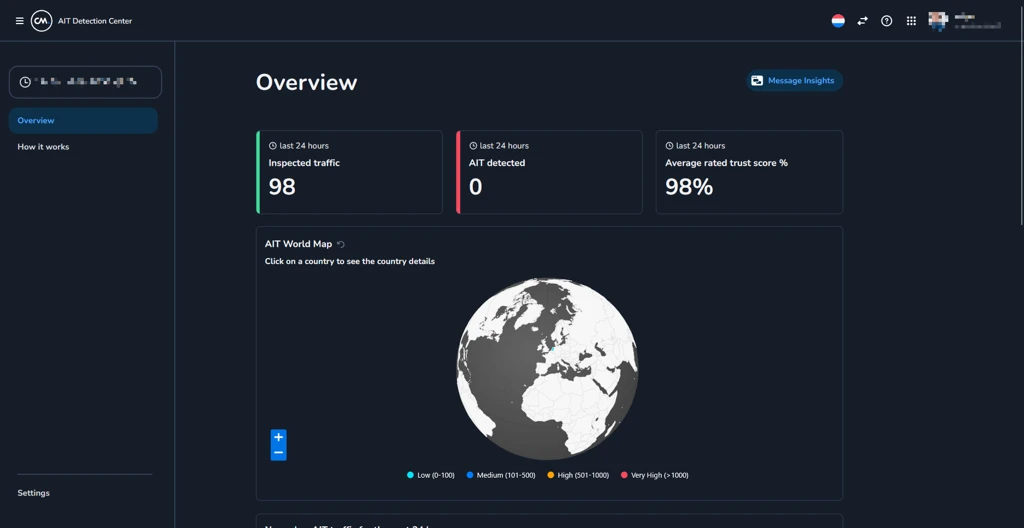
What can I configure in AIT Detection Service?
Depending on your setup, you can typically configure:
Actions when suspicious traffic is detected
-
Monitor only – flag and log suspicious traffic but do not block it
-
Block – block traffic that clearly matches AIT patterns (for example specific countries, ranges, or numbers)
Sensitivity / thresholds
-
AIT Detection Service uses a Trust score to determine how trustworthy traffic is.
-
You can configure from which Trust score traffic is treated as trustworthy and should not be blocked.
-
You can change this Trust score threshold in the AIT Detection Center, which also shows trends in your traffic and AIT-related attacks.
-
Over time, you can adjust the threshold to minimize false positives and false negatives based on what you see in your own traffic.
-
AIT Detection Service cannot guarantee that all AIT traffic is caught or that no valid messages are ever blocked; it is about reducing and managing risk as much as possible.
Examples
Sudden spike to a high‑risk destination
You:
-
Have Safeguard Plus with AIT Detection Service enabled for your production account (account ID 48291).
-
Normally send ~12,000 SMS/day across 42 countries; no single destination ever exceeds 2% of daily volume.
-
At 03:14 CET on 2026‑02‑15, a checkout web form is abused and starts sending 8,500 SMS within 20 minutes to the +882 39 4xx xxxx range (classified high‑risk).
Result:
-
AIT Detection Service recognizes the abnormal pattern: 8,500 SMS in 20 minutes to +882 39 4xx xxxx (baseline for that range was 0 in prior 30 days).
-
Depending on your setup, Safeguard Plus:
-
Flags the traffic
-
Blocks further messages to that pattern because Block mode
-
-
Safeguard Plus prevented a large cost by cancelling messages