
How Consent Pages Work
Consent pages are created and managed within the Pages app, while the CXP serves as the central repository for storing and processing consent-related data. This allows businesses to create user-friendly interfaces where customers can review and update their consent preferences. The Pages app provides the tools to design, customize, and publish consent pages, ensuring customers have a clear and straightforward experience.
When pages are created and the submit button writes to CXP, the event will be created in the CXP with the fields make as ‘write to CXP'. This will happen once the page is set to published. Any changes made after publishing will then purposely need be published again as you’re editing live pages.
When a customer submits changes to their consent preferences via a consent page, event data is automatically sent to the CXP. The CXP acts as the sole data keeper, storing and processing this consent information alongside other customer interactions and data points. This ensures that all consent-related data is centralized and accessible for further use, such as auditing, personalization, or compliance reporting.
Make a V2 consent page
-
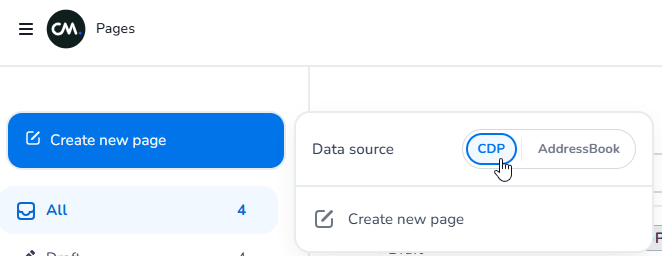
Set the page to use CXP as a data source instead of the old Address book logic when creating a page.
-
Select a CXP definition, for who is the page? (can also be left empty if no CXP data needs to be used in the page)
-
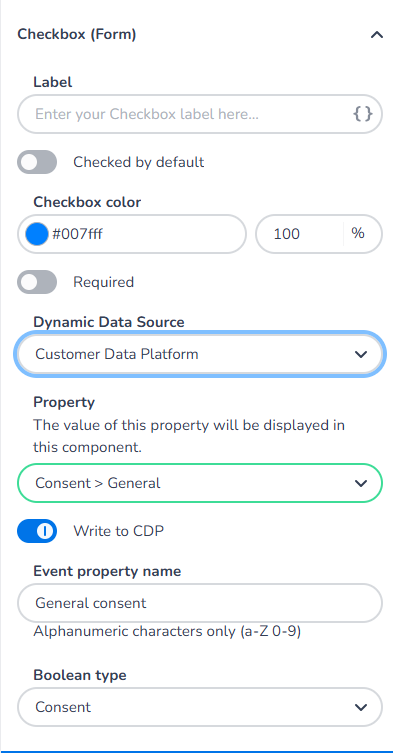
To add consent fields that can dynamically show CXP and also update accordingly, use the checkbox form field
-
To dynamically show data from the CXP, select CXP as dynamic data source and the property you want the data to show from
-
If on save you want this field to be created in the CXP, select write to CXP and enter the name you want it to get in the CXP
-
Later you can map this event field in the CXP to the object property you want.
-
-
Make sure you set the Boolean type to consent so it easily recognizable as consent property.
-
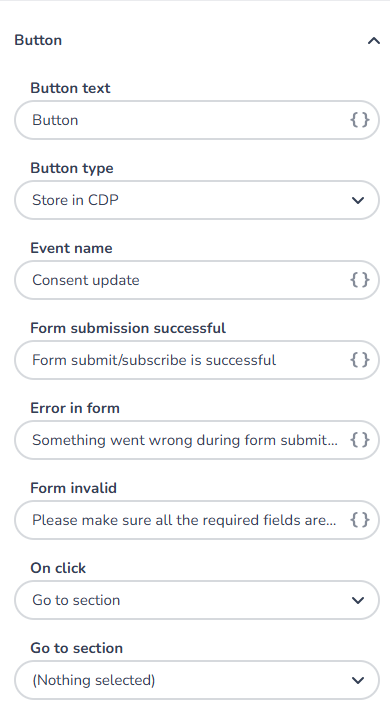
Now add a button field, so on user submit, the changes are sent to the CXP
-
Select 'store in CXP' as button type and enter the event name as it will be created in the CXP
-
When you save & publish this page, the event type and it’s properties (if marked write to CXP) will be created in the CXP
-
On the CXP side you can decide how you want to map this event and its properties to an object.
-
Good to know
-
If you use this consent page in email campaigns (most likely), then the definition of the page and the email must match in order to determine the right property values of the fields
-
When sending an email we have access to the recipient data and we use this underwater to fill the page values and on submit, submit it using the right unique identifier.