
Our Voice product can be used with your current PBX, but is is also possible to set up and to answer calls in Mobile Service Cloud using our Native Voice integration. This way you can have all CM.com’s communication channels in one place.
Setting up Native Voice
To answer phone calls in MSC, you will need a number. You can either purchase a new number or port your current number to the CM.com Voice platform. Please visit our number page for more information.
Once you have a number you can navigate to the numbers page in the Voice Management app, select the number and click “Configure”.
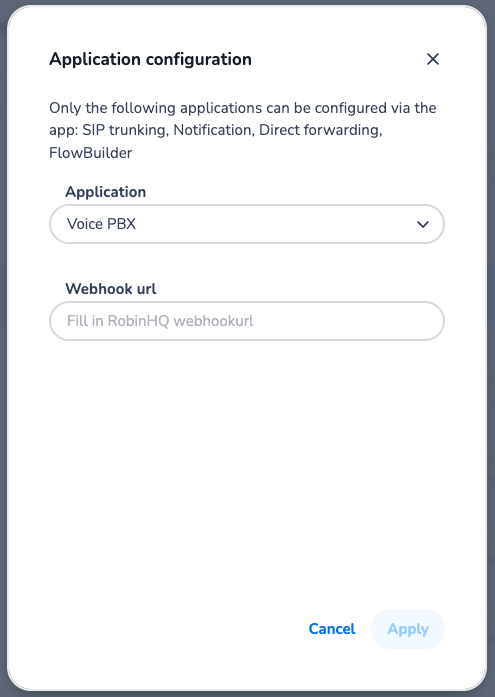
Select “Voice PBX” as application and enter the webhook url including the API key of the MSC webstore you want to answer calls in.
Please contact supprt for the correct webhook URL. You will find your API key in Mobile Service Cloud.
Using Native Voice
For information on how to use Native Voice in MSC, please visit https://knowledgecenter.cm.com/knowledge-center/mobile-service-cloud/user-guides/native-voice-for-msc