
What is the Activity log
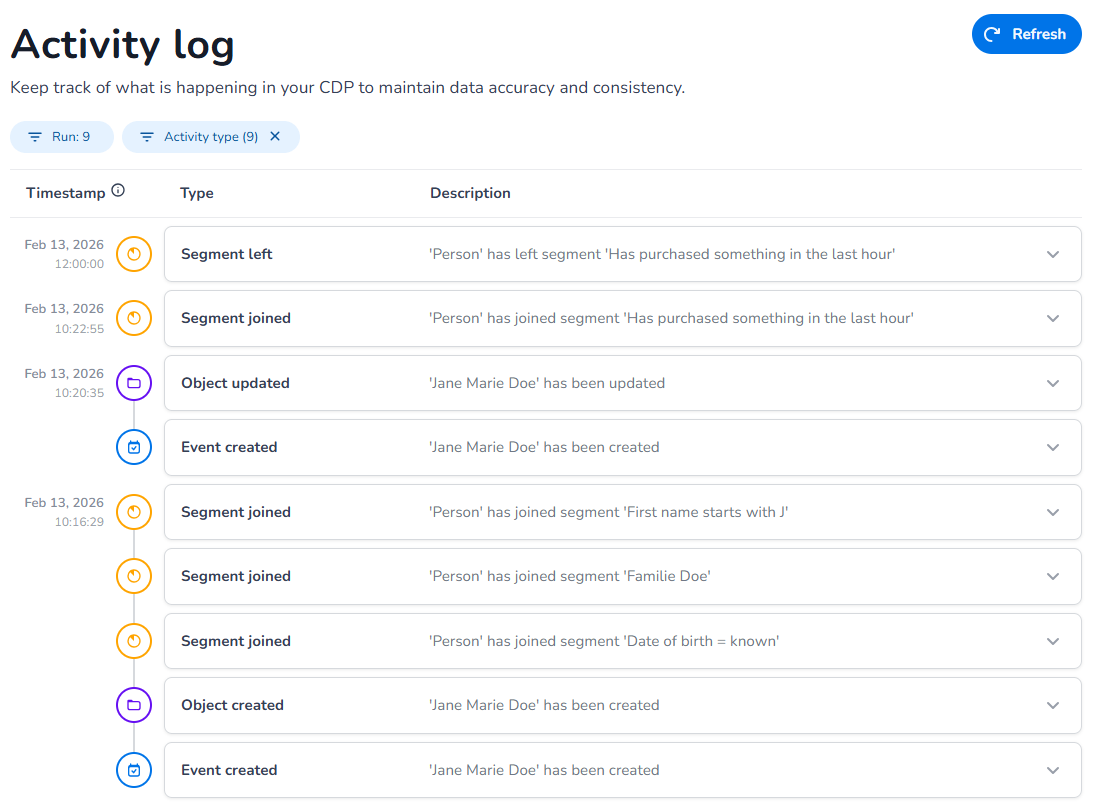
An activity log is essentially a detailed record of all activities occurring within the CXP grouped by unique timestamp. It captures every action, from incoming (raw) data, to how it is created, updated, related, triggered or merged.
By logging all activities, the CXP becomes a transparent environment where operations are traceable and auditable. When issues or errors arise in data processing, the log serves as a diagnostic tool, hosting the exact actions that may have led to potential problems, speeding up resolution.
Pre-requisites
-
An active run needs to be present to explore your data
What is logged
Event Failed
Description: When an event enters the system and the incoming data does not match the settings of the property as setup in the definition, the event can fail and result in an error.
-
Date format specified in definition does not match data format sent in event
-
Boolean is not sent as a valid Boolean value (we expect true/false, not 0/1, ja/nee etc.)
-
Email not containing an @
-
Phone number is not in a valid format, for example '+99999 634567824'
-
Locale is not sent in the locale format, for example 'Dutch' instead of 'nl-NL'
Benefits: Troubleshoot why an event has failed or gave an error. We can only process data based on the definition setup, this ensures clean and clear data you can use to work with.
Event Created
Description: Captures events entering the system, including raw data. These events can standalone in case there is no transformation behind it or if there are transformations behind it they result in an object created or updated activity.
Benefits: Helps in understanding what has been sent to the CXP and helps in debugging why for example a certain property is not present in the outcome (mismatch in incoming format vs. format as set in the definition)
Event Linked
Description: Inform the user that an event has a transformation behind it and is linked to an object.
Benefits: Helps in understanding what has been sent to the CXP and resulted in a link to an object. For example, a newsletter subscription event was linked to the person object. This makes it possible to query this link (has event): 'I am looking for all persons who have a newsletter subscription'.
Object Created
Description: When there is a transformation behind an incoming event, it will result in an object created activity when no existing object has been found (based on unique identifiers)
Benefits: You can clearly see how the object has been created, based on which incoming event and what data has been processed and which object was created based on the transformation.
Object Updated
Description: When there is a transformation behind an incoming event, it will result in an object updated activity when an existing object has been found (based on unique identifiers)
Benefits: : You can clearly see how the object has been updated, based on which incoming event and what data has been processed and which object was created based on the transformation.
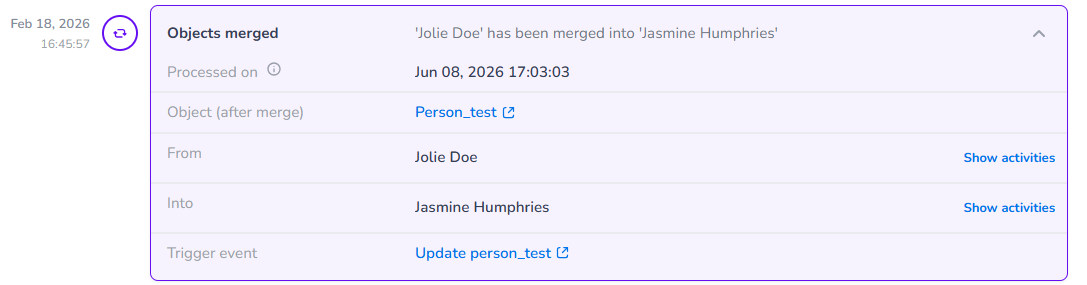
Object Merged from/into
Description: When there is a transformation behind an incoming event, it can result in an object merged if based on that incoming event 2 existing profiles are merged into 1 based on unique identifiers.
Example: Email and phone are unique identifiers
Profile A. - Profile B.
email: [email protected] - email: [email protected]
phone: 0612345678 - phone: 0611111111
Incoming event
We receive the phone of profile B and the email of profile A in 1 event and they are unique identifiers, now these profiles are merged into one as based on the event they belong to the same person/object.
{
  "Phone": "0611111111",
  "Email": "[email protected]"
}
Benefits: It makes it easier to troubleshoot why objects are merged and based on which unique identifiers.
We show a merged into activity and also have a merged from activity for troubleshooting. The merged from activity is particularly helpful when you need to drilldown several merges as merges can go multiple layers deep. On object details level you can drilldown from the current root profile into the different levels of merges and view the merge history of all the objects related to the merge.
Good to know - When profiles are merged, the resulting profile (called the "root profile") is updated based on all the activities associated with the profiles being merged. The system ensures that the root profile reflects the most recent information for each field, based on the timeline of activities.
For example, let's say two profiles are being merged: the "root" profile and the "merge-from" profile. If the name of the "merge-from" profile was updated after the name of the "root" profile, the root profile will adopt the name from the "merge-from" profile because it is the most recent activity related to that field. Essentially, the root profile always displays the latest value for each field, regardless of whether the update came from the root profile or the merge-from profile.
Relation created/updated
Description: When there is a transformation behind an incoming event, it can result in a relation that has been created or updated. For example when you sent in and event containing person and company data and you have a 'works at' relation specified, it will show you this relation created.
Benefits: Enhances understanding of customer connections and data relations, which can improve personalization and recommendation systems.