
It is mandatory by telecom regulations to have your business name, address, postal code and location registered for every phone number purchased at CM.com.
As such, it is mandatory to create a Company Profile which includes your business name, address, postcode and city. Once created and approved, you must assign your phone number to this Company Profile to finalize the process.
-
Please note, that the area code of Dutch Company Profiles', which is based on the postal code, must match with the area code that is defined by the ACM: Telefoonnummers zoeken | ACM.nl. If they do not match, you are not allowed to assign the range to the Voice Account and you have to create a new Company Account with the matching address
For EXISTING/OPERATIONAL Numbers:
To register your existing numbers correctly, please do the following:
-
Please assign your phone numbers to the correct and complete company profile within Voice Management.
-
-
Please go to your Voice Management App: https://www.cm.com/en-gb/app/voice-management
-
Select Numbers in the left menu.
-
Select My Numbers at the top menu.
-
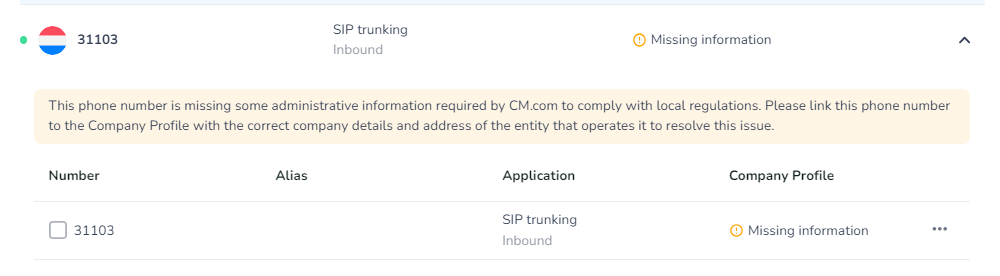
Numbers that are not linked to a Company Profile are indicated with 'Missing information':
-
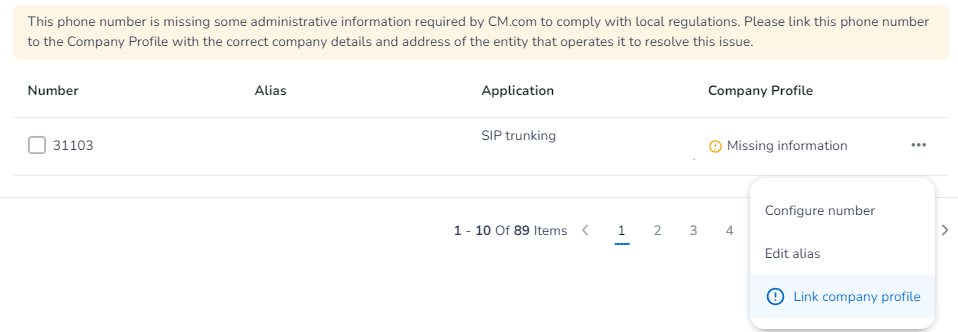
Select a Number with the the indication Missing Information and select the three dots. Thereafter select Link company profile:
-
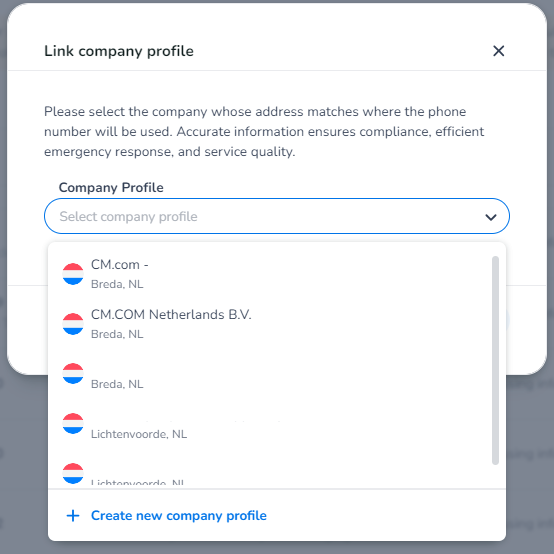
Select the correct Company Profile. If you have not created a Company Profile before, please select Create new company profile and create a new Company Profile:
-
If you selected an existing Company Profile with the correct address and registration you're done!
-
-
If you had to create a new Company Profile, please await the approval from our side.
-
Once the Company Profile is approved, you can assign the numbers to the respective Company Profile as described above.
-
-
For NEWLY requested Numbers:
To register new numbers correctly, please do the following:
-
The Company Profile must be approved before a number (range) can be assigned to the Voice Account. You cannot assign a number (range) to a Voice Account where its Company Profile has not been verified yet!
For Dutch, Belgium, French, and German Numbers:
-
Based on the number you are trying to assign, the number type must be selected within the Company Profile to be selected, for example:
-
-
Toll-Free numbers can only be assigned to a Company Profile where Toll-Free has explicitly been selected as Number Type.
-
For NL numbers specifically:
-
The Company Profiles' area code, which is based on the postal code, must match with the area code that is defined by the ACM: Telefoonnummers zoeken | ACM.nl. If they do not match, you are not allowed to assign the range to the Voice Account and you have to create a new Company Account with the matching address.
-
-
As an example: You cannot assign a number starting with +3178x (Dordrecht, NL) to a Company Profile that has an address in Belgium. The Company Profile must be located in the Netherlands. Additionally, you cannot assign a number starting with +3178x (Dordrecht, NL) to a Company Profile with an address in Breda, NL (+3176x).
-