
CM.com supports digest authentication and IP based authentication.
Digest authentication for outbound calling is supported with SIP INVITE and SIP REGISTER. Digest authentication using SIP INVITE is advised. CM.com does not support SIP REGISTER for inbound calling and as such, there is no benefit in using SIP REGISTER for outbound calling. Most PBX systems and clients support digest authentication.
The SIP Account username and password for digest authentication can be found in the Voice Management App when you edit the setting of your SIP Account or when you download the techform.
When IP based authentication is desired, this can be configured per SIP Account IP endpoint in the Voice Management App (link). Check the checkbox “Disable authentication”. Be advised that all calls originating from this IP address will be automatically authenticated and billed to your account.
Detailed authentication flows
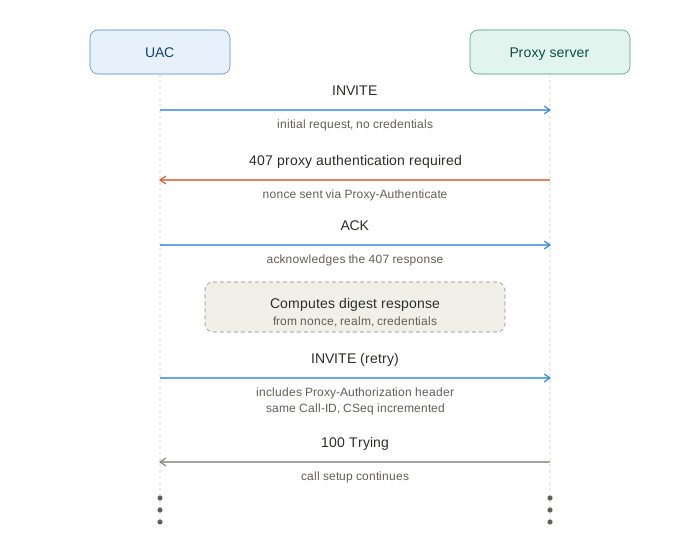
SIP INVITE + digest authentication
-
INVITE – the UAC sends the initial request with no credentials.
-
407 Proxy Authentication Required – the proxy rejects the INVITE, returning a
Proxy-Authenticateheader containing a freshnonce,realm, and supported algorithm. -
ACK – the UAC acknowledges the 407 to close out that transaction.
-
The UAC computes the digest response.
-
New INVITE – sent with the same
Call-IDand a freshCSeq(incremented) and aProxy-Authorizationheader carrying the computed digest response. -
Assuming the credentials check out, the call proceeds normally from here (100 Trying / 180 Ringing / etc).
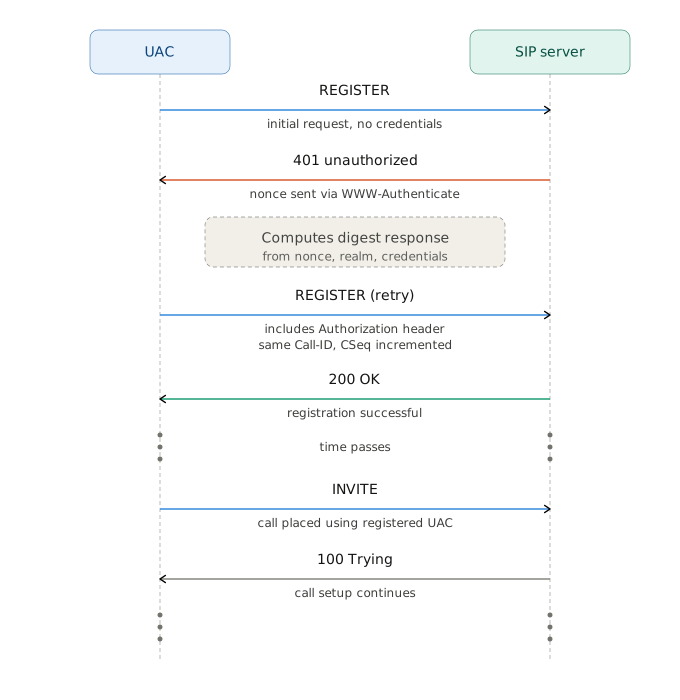
SIP REGISTER + digest authentication
-
REGISTER – the UAC sends an initial registration request with no credentials, just its AOR (Address of Record) and contact info.
-
401 Unauthorized – the CM.com SIP gateway rejects it and returns a
WWW-Authenticateheader containing a freshnonce,realm, and the algorithm it expects (e.g. MD5 or SHA-256). -
The UAC computes the digest response.
-
New REGISTER – sent with the same
Call-IDand a freshCSeq(incremented), this time carrying anAuthorizationheader with the computed digest response. -
200 OK – the gateway validates the digest and confirms the registration, echoing back the
Contactheader with anexpiresvalue. -
Time passes – the registration is now active. UAC should periodically re-REGISTER before
expiresruns out to keep the binding alive. -
INVITE – later, the now-registered UAC places a call. Because it's already registered, the CM.com SIP gateway can route this without a fresh registration challenge.
-
The call proceeds normally from here (100 Trying / 180 Ringing / etc).
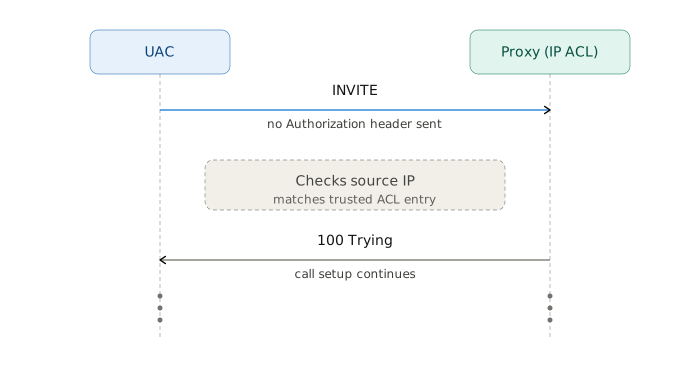
IP Based authentication
-
INVITE – the UAC sends the request with no
Authorizationheader at all — no digest credentials are attached because none are expected. -
The CM.com SIP gateway checks the source IP. If the source IP matches an entry on the list, the request is implicitly trusted — no challenge is ever issued, so there's no 401/407 round trip like in digest auth.
-
The CM.com SIP gateway immediately starts processing the call, and the call proceeds normally from here (100 Trying / 180 Ringing / etc).