
With the Handover Tool Step, you can easily configure your Text and Voice handovers from HALO to some other system. This is useful for situations where HALO cannot properly help the user, and human assistance is required. Next to this, Handovers managed via Handover Tool Steps will automatically be logged for Analytics purposes. You can read more about HALO Analytics here.
The Handover Tool Step is another type of Tool Step:
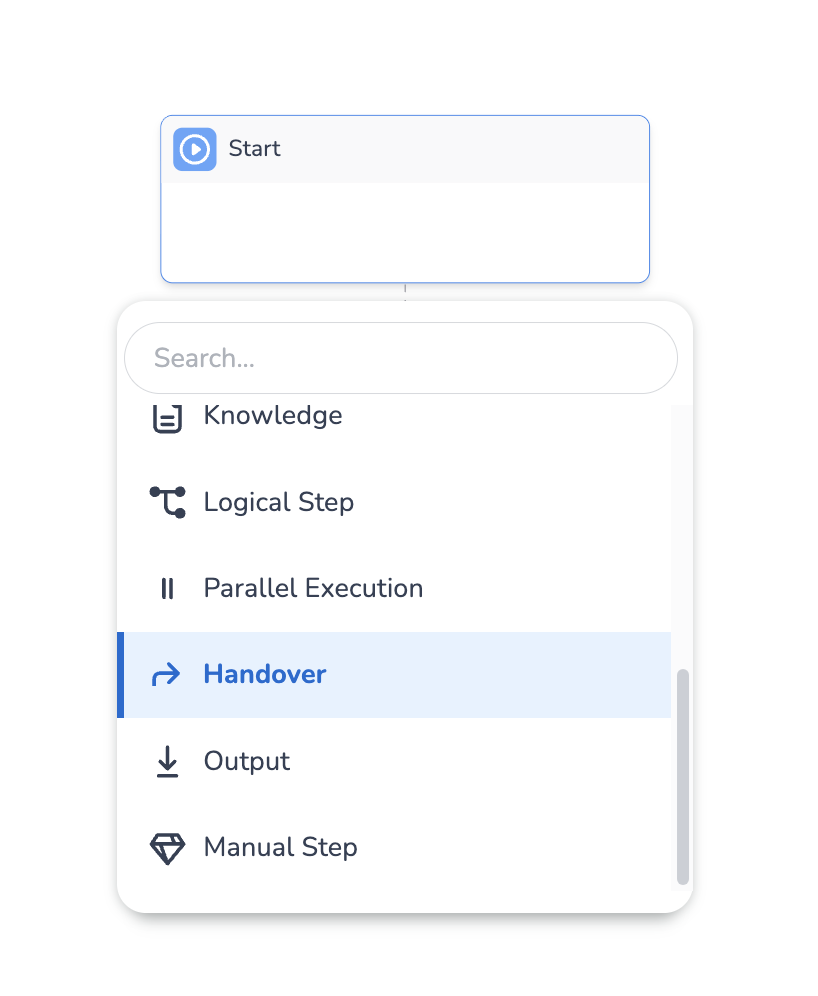
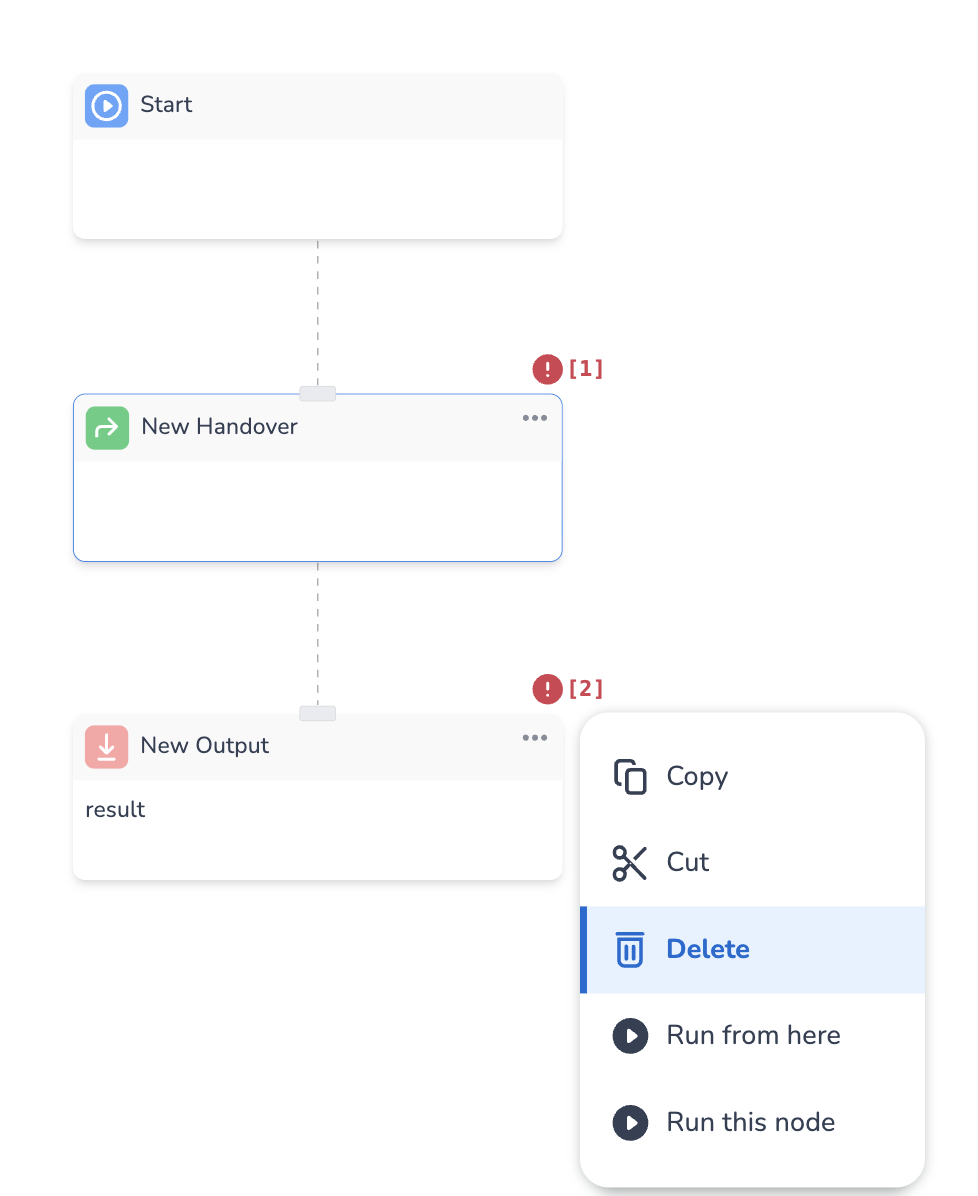
When you add the Handover step, you are immediately warned about the fact that the Handover Tool Step can only be the final Step in a tool. This makes sense, as a Handover from HALO to another system implies the processing of the conversation in HALO is finished. To make the tool valid, remove the output node in the following way:
The Configuration of the Handover Tool Step looks as follows:
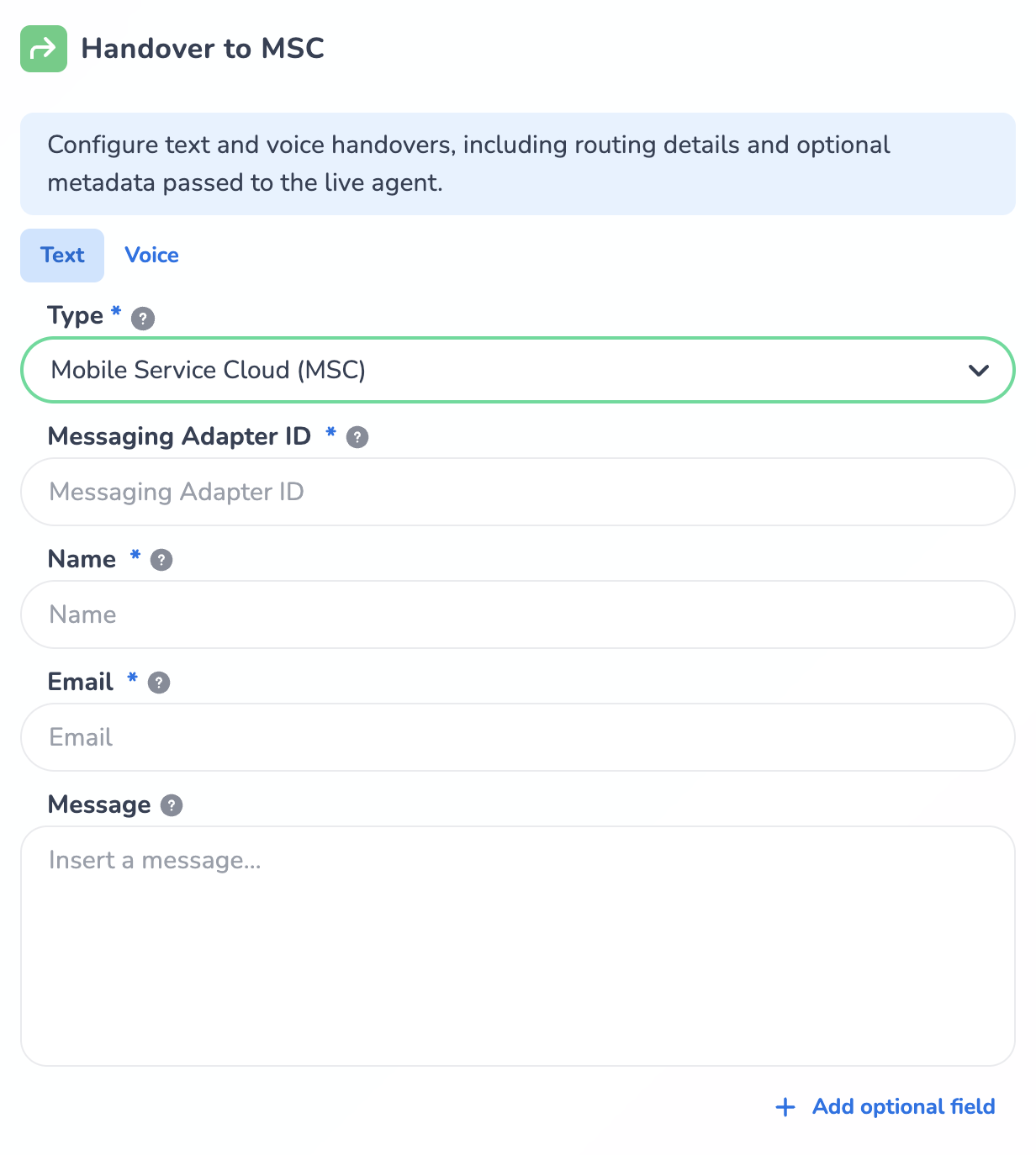
Note that within the Configuration, you can configure handover settings for both Text and Voice channels in the same tool step. This allows you to use the same Tool Step for both your Text and Voice Handovers. If you handle only Text or only Voice conversations with HALO, you can simply leave the channel you’re not using to Logging Only type.
All Handover Types share one configuration settings: Message. This is the final message that is sent to the user just before triggering the Handover.
The Message you can configure in your Handover Tool Step is sent back to the user directly, and the output of the tool is not returned to the Agent that called the tool. This is very useful, as it allows you to setup a text you always want to send to the user just before performing the handover, e.g. “You will now be helped by a Live Agent!”. You can also use a dynamic (context) variable in this field. This Message will automatically be translated into the detected conversation language.
You can leave the Message field empty if you do not want HALO to return a message before the Handover.
Text handover types
Text MSC (Mobile Service Cloud)
Transfers the text conversation to a live agent in Mobile Service Cloud.
Since this is the most commonly used type of Handover, a special guide has been added to the bottom of this page on how to transition your current Tool Handover to MSC to use the new Handover Step.
Configuration
-
Messaging adapter – Adapter that is used for messaging. You can find this under CM.com > Scripted Chatbot >Router > configured Adapters > this is the Web Conversations / other channel adapter (required)
-
User name – Name of the user shown to the agent (required)
-
User email – Email of the user shown to the agent (required)
-
Phone number – User phone number (optional)
-
Webstore referrer – Route to a specific webstore in MSC (optional)
-
Routing keywords – Keywords used for agent routing (optional)
-
MSC profile – Customer profile routing data (optional)
-
Message – Final message sent by HALO just before performing the handover (optional)
Text Marketplace
Transfers the text conversation to a CM Marketplace product.
Configuration
-
Messaging adapter – Adapter that is used for messaging. You can find this under CM.com > Scripted Chatbot >Router > configured Adapters > this is the Web Conversations / other channel adapter (required)
-
Marketplace adapter – Marketplace Adapter that you want to handover to. You can find this under CM.com > Scripted Chatbot >Router > configured Adapters > this is the Marketplace adapter
-
Routing – Marketplace routing configuration (optional)
-
Context – Extra data to pass along with the handover (optional)
-
Message – Final message sent by HALO just before performing the handover (optional)
Text Logging only
It could be that you handle your Text Handovers in a custom way, outside of the CM product scope. Still, for these cases it may be valuable to log these Handover for Analytics purposes. For this scenario, you can use the Logging Only Handover type.
Configuration
-
Message – Final message sent by HALO just before performing the handover (optional)
Voice handover types
Voice MSC (Mobile Service Cloud)
Transfers a voice call to Mobile Service Cloud.
Configuration
-
MSC API key – API key for the voice environment (required)
-
Webstore referrer – Route to a specific webstore in MSC (optional)
-
Routing keywords – Keywords used for agent routing (optional)
-
Message – Final message spoken out by HALO just before performing the handover (optional)
Voice forward
Forwards the call to another phone number or call target.
Configuration
-
Phone Number – Who the call should be forwarded to (required)
-
Message – Final message spoken out by HALO just before performing the handover (optional)
Voice Custom voice handover
You can use this if you have a custom way of handling your Voice handovers, that was tailored for your use case.
Configuration
-
Custom type – Name of the custom handover type (required)
-
Custom configuration – Key–value settings for that handover (required)
Voice Logging only
It could be that you handle your Voice Handovers in a custom way, outside of the CM product scope. Still, for these cases it may be valuable to log these Handover for Analytics purposes. For this scenario, you can use the Logging Only Handover type.
Transitioning your current Tool managed Handovers to MSC to use the new step
If you’re currently performing your Handovers to MSC in Tools via an API call, below explanation will tell you how to transition to the new Handover Tool Step.
If you’re using a Handover to MSC in a tool, it will probably look something like this:
To transition this to use the new Handover Tool Step, take the following steps:
-
Find your current Handover Tool, it will probably look something like this:
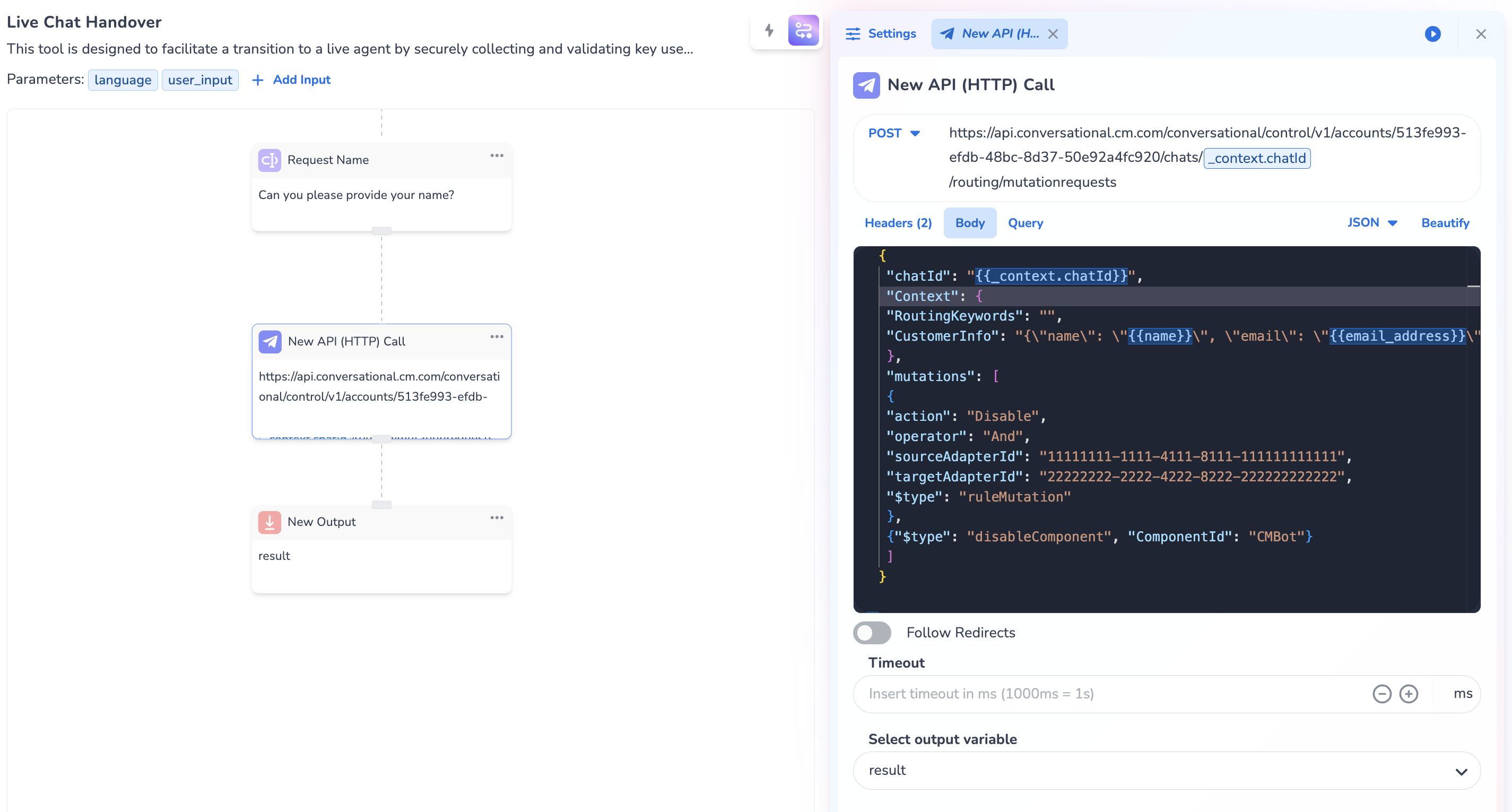
Note that the tool ends with an API step and after that the Output step. It may be smart to duplicate your current Handover Tool and change that duplicate tool to simplify testing. You can ofcourse also choose to simply edit your current tool.
-
Find the sourceAdapterId in the API step. To this, check the body of the API step, which will look something like this:
{
 "chatId": "{{_context.chatId}}",
 "Context": {
 "RoutingKeywords": "",
 "CustomerInfo": "{\"name\": \"{{name}}\", \"email\": \"{{email_address}}\"}"
 },
 "mutations": [
 {
 "action": "Disable",
 "operator": "And",
 "sourceAdapterId": "11111111-1111-4111-8111-111111111111",
 "targetAdapterId": "22222222-2222-4222-8222-222222222222",
 "$type": "ruleMutation"
 },
 {"$type": "disableComponent", "ComponentId": "CMBot"}
 ]
}
From this step, copy the sourceAdapterId (11111111-1111-4111-8111-111111111111 in this example)
-
Add the new Handover Step between the API step and the output:
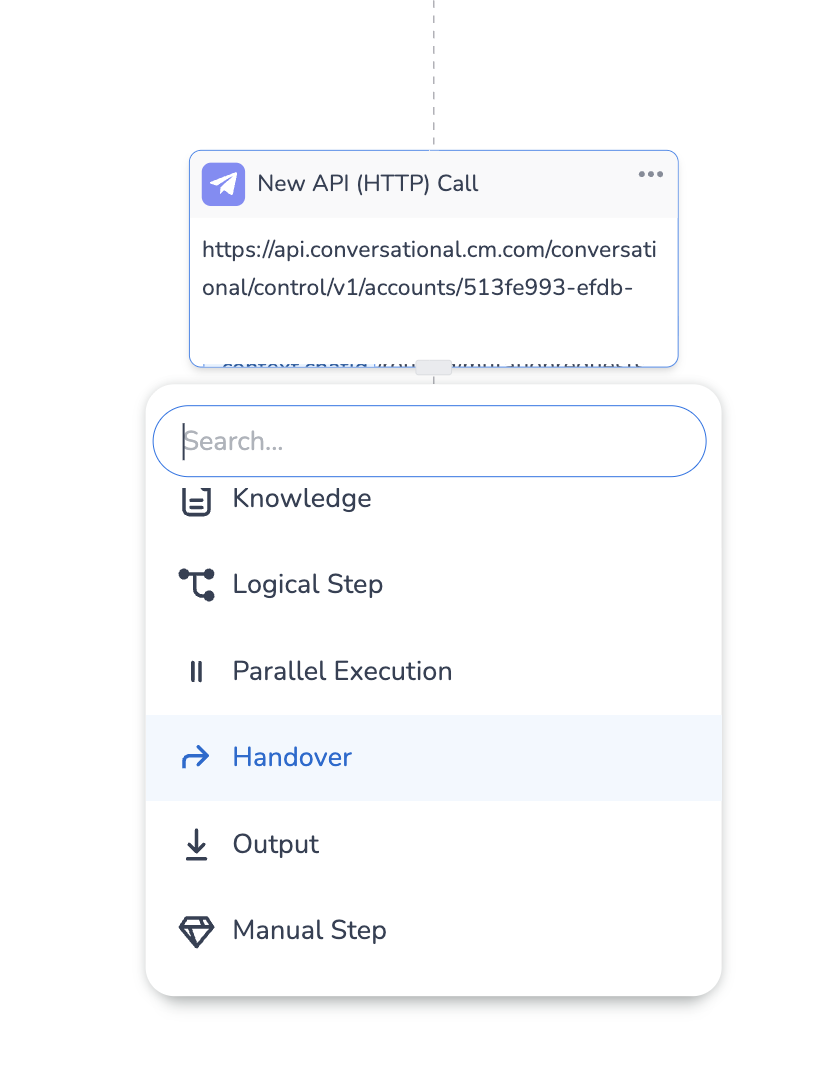
-
Switch the Text Handover Type to Mobile Service Cloud (MSC):
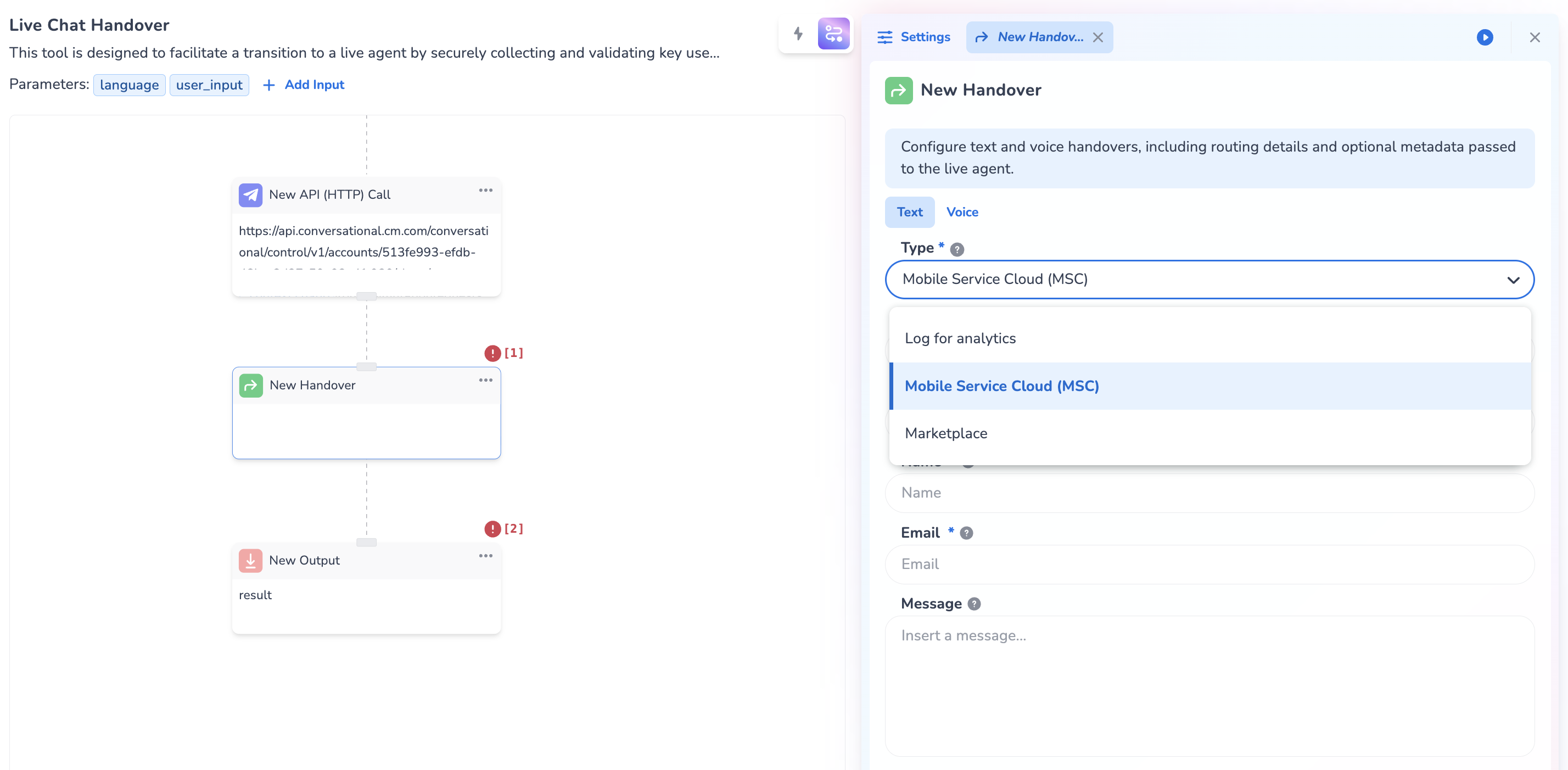
-
Setup the Configuration:
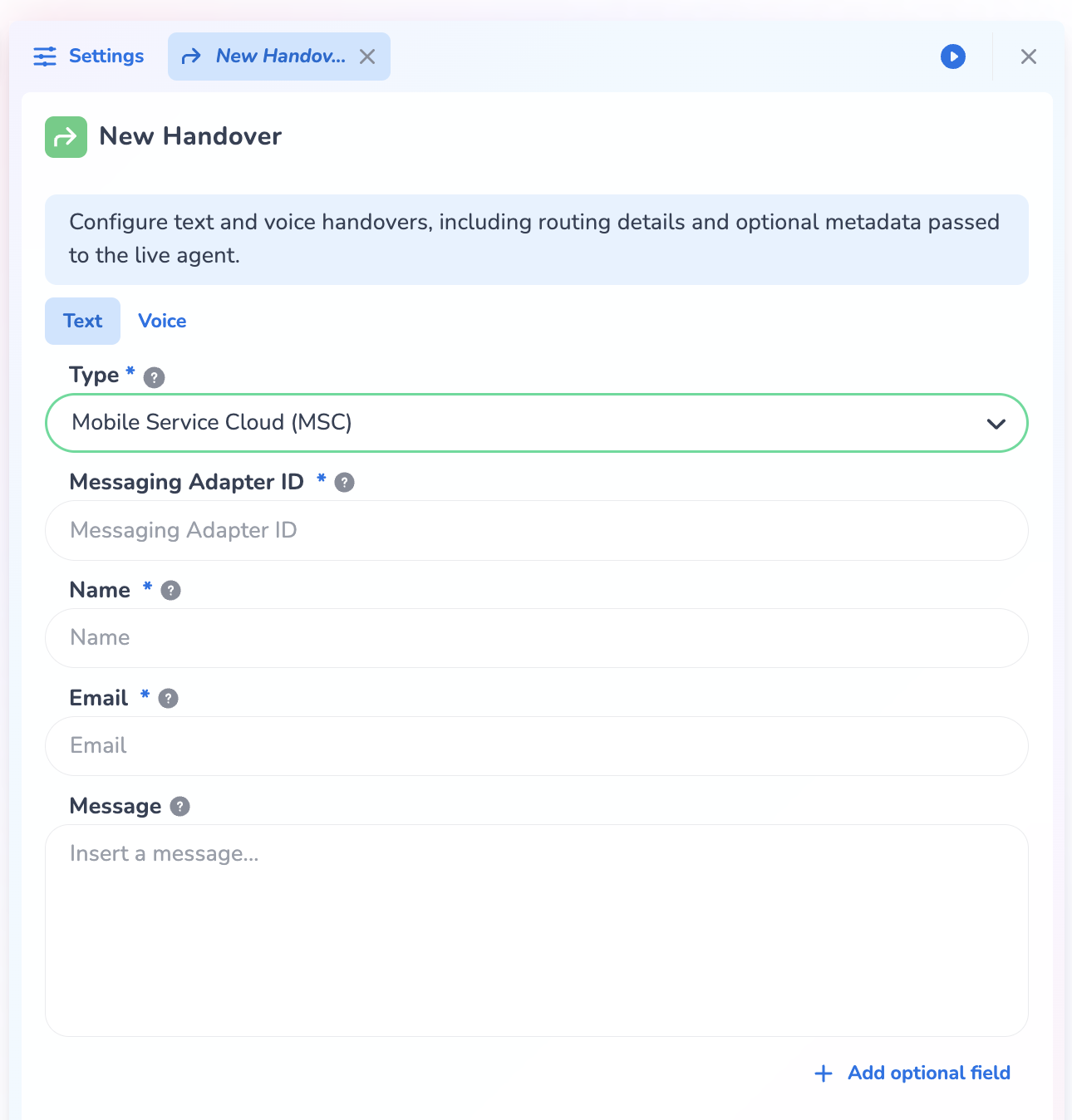
Messaging Adapter ID: The sourceAdapterId you just copied (11111111-1111-4111-8111-111111111111 in the example)
Name: The name of the user ({{user}} in the example)
Email: The email of the user ({{email_address}} in the example}}
Message: The message you’d like to send to the user just before performing the Handover to MSC (e.g. “You’re now being transferred to a live agent!”). Note this message will be translated to the detected language of the user.
Next to that more configuration can be setup using the ‘Add optional field’ button in the bottom right. These additional configurations include Web Store Referrer, Routing Keywords, Phone Number and MSC Profile.
-
Delete both the API step and the output step:
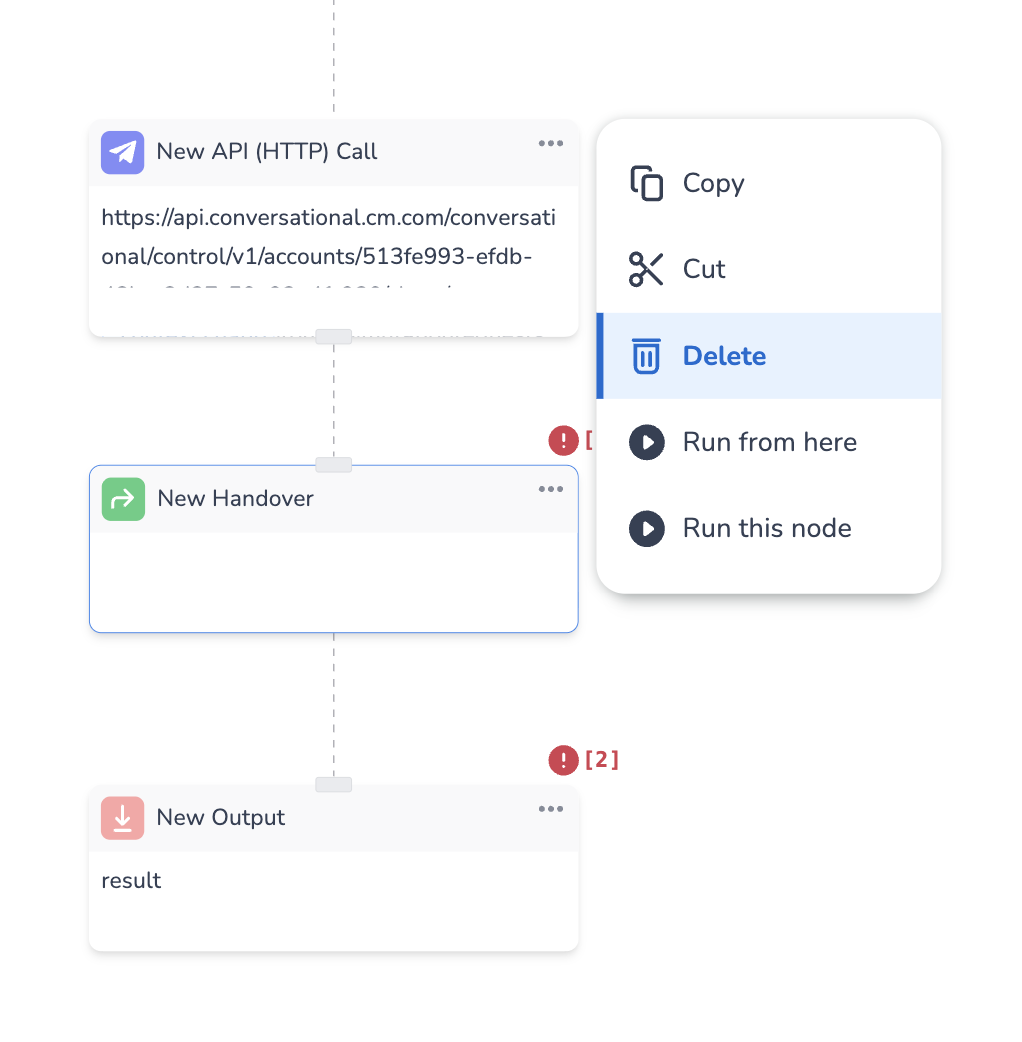
-
Test if your Handover is still working as expected, and the Handover Message is returned to the user just before performing the Handover!
Want to know more about the Handover Tool Step in HALO?
Watch the E-learning below.