
The Recognition Analysis dashboard is intended to help you improve all aspects of the AI Cloud’s Intent and Entity recognition.
Improving Intent Recognition
Check questions answered by Intent
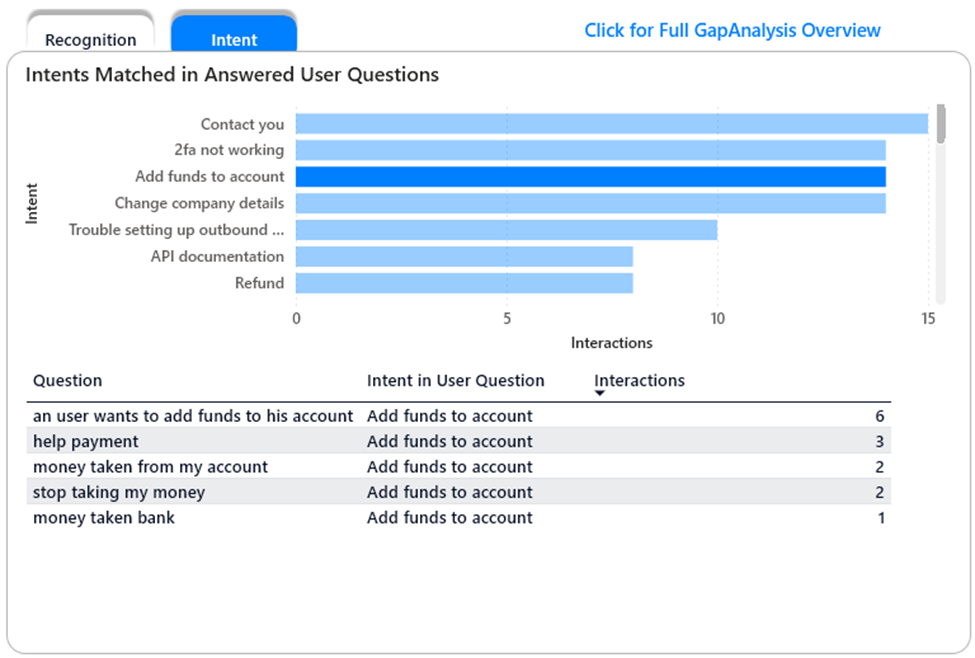
The Intent tab on the Recognition Analysis dashboard shows you the Intents that were matched in user questions. Click on one of the Intents to focus the dashboard and see the questions activating that intent
Refine Intents by adding or removing questions as utterances
In this case, it appears that the Intent ‘Add funds to account’ is also activated by questions about money taken from the account.
So it would appear that there are Utterances in the ‘add funds’ intent that are similar enough to these ‘money taken’ questions that the Intent would be activated.
Looking at the intent in the CMS we can see that quite a few of the utterances do reference money in ‘my account’ and the questions are not much longer that the user questions we see in the dashboard.
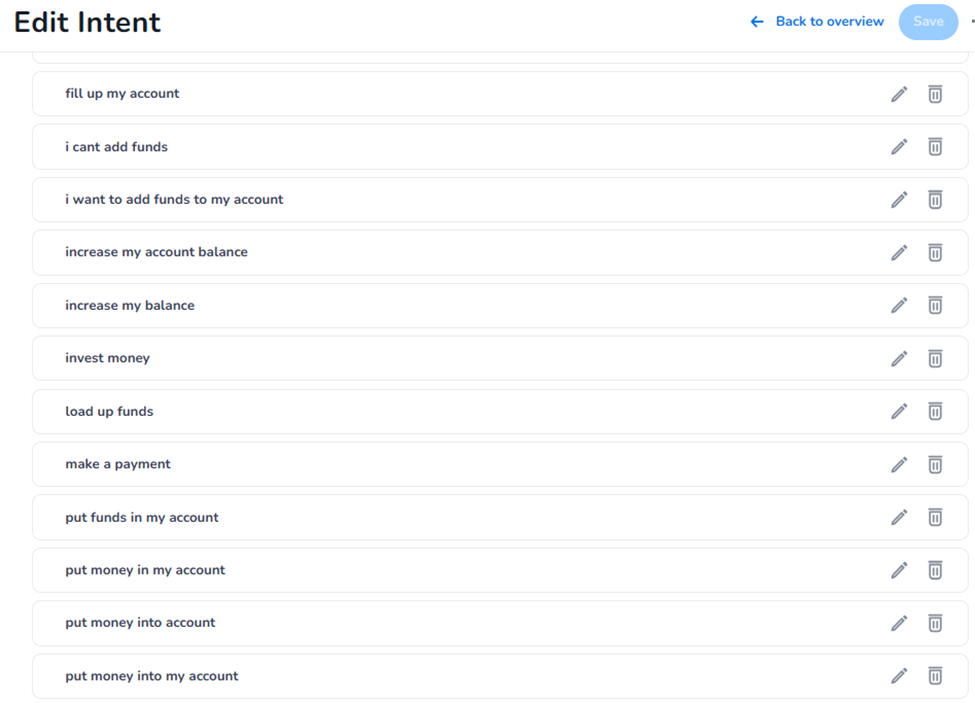
We would normally advise adding quite long phrases to utterances for intents. The match to the Intent model involves a similarity check. For short questions, length is a significant contribution to similarity. So ideally, we would be adding much longer utterances to this intent and making sure they all concern adding funds (or money) to the account.
We could add some of the short questions to the Test phrases to ensure they still activate the Intent.
In this case, however, there are very many of these short utterances and we can’t discern exactly which would be responsible for the intent match. While that is all good advice, it won’t fix this intent quickly.
Change the Confidence threshold
Another way to influence which questions get answered by Intents in to adjust the Confidence threshold. Only those questions that match an intent with a confidence higher than the threshold will actually use that intent to answer the question. By raising the confidence threshold, we will ensure fewer questions will use an Intent, but the ones that do should be more similar to the defined utterances for the Intent.
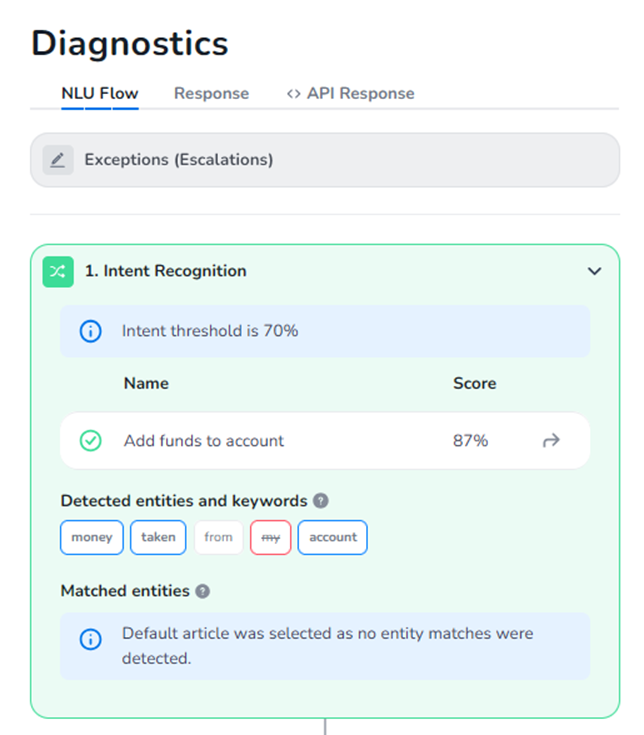
When we look in the Test Center, we see that for these questions, the Intent match was made with very high confidence, so changing the confidence threshold is unlikely to be productive.
There is a third way to improve recognition within your Intents: leveraging Entities.
Refine Intents by adding Entity Recognition within an Intent
Taking another look at the user questions, one common denominator is that they all speak about money being taken from their account.
In the Diagnostics, we see that ‘taken’ is part of an Entity. This is the entity TAKE.
So we can go to the Intent, and add another article there that can be activated when this Intent is found in the user question and the user question contains a match from the entity.
With that set up, the question now receives a better answer while still using Intent recognition
Improving Entity Recognition
The Entity Recognition Tab on the Recognition Analysis dashboard gives you a general overview of the quality of recognition for your Entities.
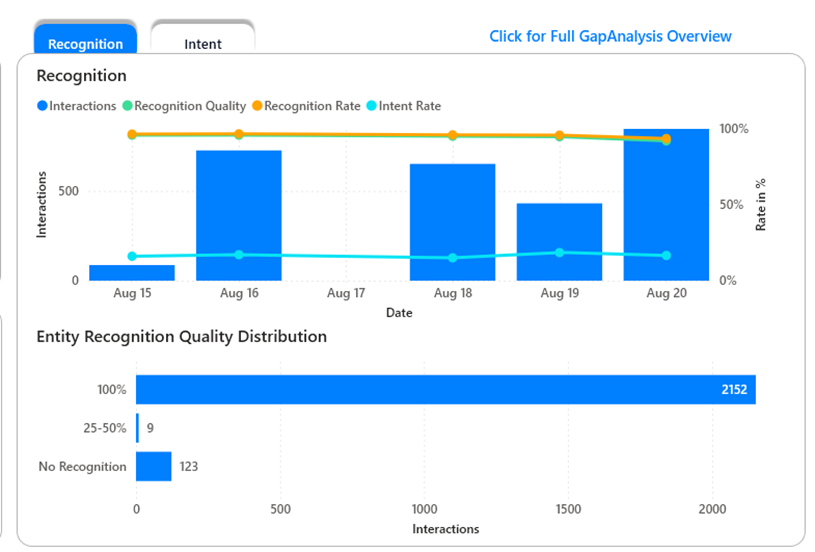
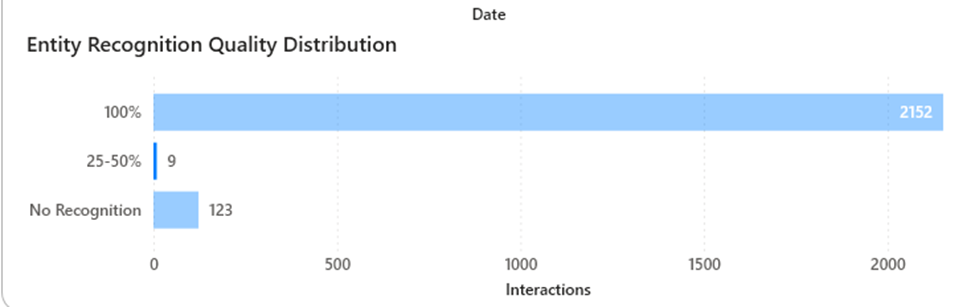
In this case we see that a lot of questions were recognised exactly as specified (Recognition Quality = 100%) but there are still some where we can improve the recognition (Recognition Quality between 25-50%) and some that were not recognised at all (No Recognition)
Check questions with poorly matching recognition
By selecting the ‘Recognition Quality bar we can focus the dashboard on the interactions with a low recognition quality.
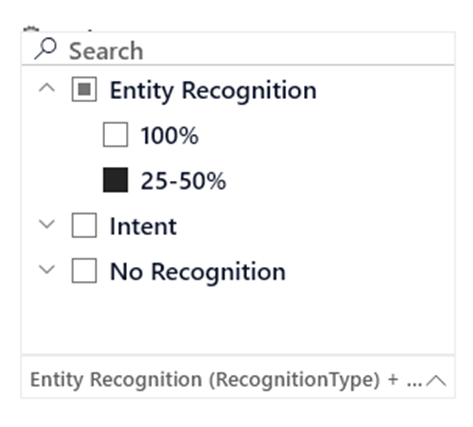
We can also filter the dashboard using the ‘Recognition Type & Recognition Quality filter on the right.
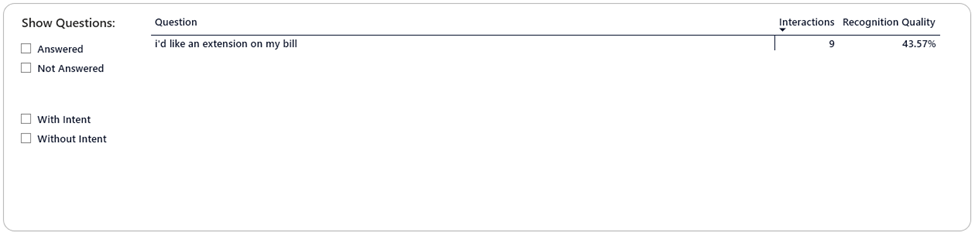
The questions that were recognised poorly are now shown in the question overview at the bottom of the dashboard:
Even if we have mostly perfectly matching questions right now, however, there are still actions we can take to ensure we keep recognising user questions over time.
Expand Stopwords or create Entities
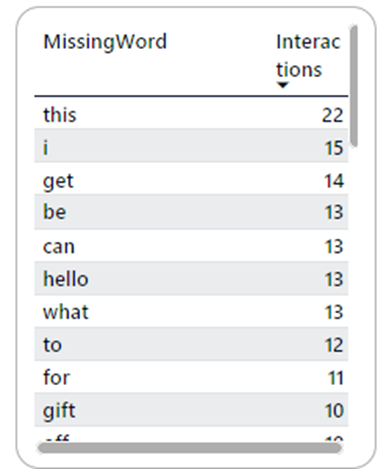
The dashboard shows a table with ‘Missing Words’ , which are words in your questions that are neither Stopwords nor defined in your entities. Adding the top words from this list to Entities or Stopwords should help improve your recognition
When you add a question to an Article in AI Cloud, this question will be used in the Entity Recognition. But even if you do not create any Entities, this exact question will still be recognised properly!
This is because in the absence of Entities, AI Cloud will still try to match a question based on the (normalised) exact words in the question. So this will match some questions, but it does mean that the only questions that will be recognised by this article are the ones that contain all the exact words that are also in a question you added to the article.
Please note: It also means that very short questions – such as those consisting of a single word -- on an article cause the recognition for that article to be quite general. As long as that word is in the user’s question it can potentially be matched. This is usually desirable unless HALO needs to answer everything not properly matched or unless the word potentially matching is a nonspecific one. You should only use single-word questions on articles for important terms specific to your project.
To make these matches more general, you have two options:
Define Stopwords
By designating some words such as auxiliary verbs, politeness words and circumlocutions as Stopwords, you can keep these in your example questions to make them easier to read and more demonstrative of the kind of question you are expecting to match, while still not mandating that they are in the user’s question.
Create (or expand) Entities
An Entity can be thought of as a list of synonymous terms. These are words (or short phrases) that, in your project, essentially mean the same thing most of the time, and therefore should be responded to in the same way. As a very basic example: In an entity CAR, we might also expect the word ‘automobile’. If your users refer to their cars by their brands, also the car brand names.
Another option for this can be spelling variations. Conversational AI Cloud applies autocorrect before trying to recognize a question but this may not always be successful. If a spelling variation is included in the Entity, it will always be recognized as if it were the correctly spelled word.
Refine Entities
In the Gap Analysis Overview, you can see the entities that were found in your user question. If an Entity you were expecting there is missing, adding a term from the question to an Entity can help with recognition.
There may also be Entities there that you are not expecting, in which case there may be a term in that entity that is not in fact a synonym of all the other terms collected in that entity. If so, you should remove that term from the entity so the recognition is less general.
The dashboard also shows you a table with the entities matched in most interactions. You can click in this table to focus the dashboard on questions containing this entity and check that the questions match your expectations.
Add representative questions to your articles
Perhaps the question that is asked is recognized by an article, but because it contains some more terms than just the ones in the question on the article that now provides the answer, another article would actually provide a better answer. In that case you can add a representative question to the other article. A representative question in this case would be a question that has terms in it that would match to the important entities in the question.
Check which questions receive no Answer at all
The entire dashboard can be filtered on ‘No Recognition’ to see all the questions that were not recognized at all. This will also show you the entities and words specifically included in those questions.
If there are answers to be given, you should create articles using some of these terms as the example questions, or add representative questions to existing articles with the answers to these questions.