
Overview
This knowledge agent provides guidance about the Realtime Sales view inside the event dashboard of the NXT Gen ticketing platform.
When a user creates or selects an event, they are taken to the event dashboard, where different statistics and operational insights about ticket sales can be viewed.
At the top of the dashboard, several tabs are available:
-
Ticket sales
-
Finance
-
Realtime sales
-
Sharing center
This article describes the Realtime Sales tab.
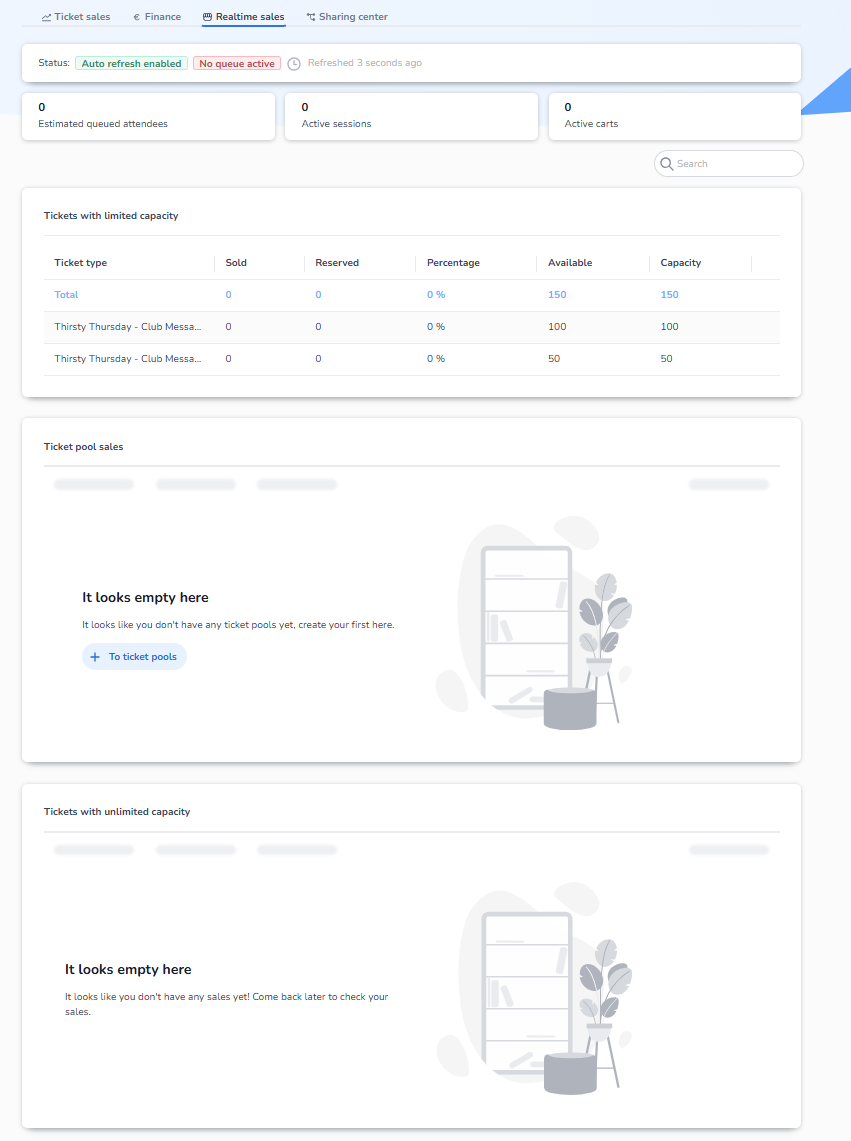
The Realtime Sales dashboard focuses on live ticket sales activity, allowing event organizers to monitor what is happening in the ticket shop at that exact moment.
How to Access the Realtime Sales Dashboard
To view real-time sales information:
-
Open the ticketing platform.
-
Select or create an event.
-
You will arrive at the event dashboard.
-
At the top of the dashboard, click Realtime sales.
This opens the live sales monitoring view for the selected event.
What You See in the Realtime Sales Dashboard
At the top of the page, the dashboard displays the current system status, including:
-
Auto refresh status
-
Queue status
-
Last refresh time
This ensures that the data displayed reflects the current activity in the ticket shop.
Live Sales Indicators
The Realtime Sales dashboard shows several key live metrics:
Estimated queued attendees
Shows the number of people currently waiting in the queue to access the ticket shop.
This is useful when a queue system is active for high-demand events.
Active sessions
Displays the number of users currently browsing the ticket shop.
This represents visitors who are actively interacting with the sales flow.
Active carts
Shows the number of users who currently have tickets in their shopping cart.
These users are in the checkout process but have not yet completed their purchase.
Ticket Availability Overview
The dashboard also provides a live overview of ticket availability.
Tickets with limited capacity
This section shows ticket types that have a maximum capacity.
For each ticket type, the dashboard displays:
-
Tickets sold
-
Tickets reserved
-
Percentage sold
-
Available tickets
-
Total capacity
This allows organizers to monitor how quickly specific ticket types are selling.
Ticket Pool Sales
If ticket pools are configured, this section displays sales progress within each pool.
Ticket pools allow multiple ticket types to share a combined capacity, and this section helps monitor the usage of that shared capacity.
If no pools are configured, this section will display an empty state message.
Tickets with Unlimited Capacity
This section displays ticket types that do not have a capacity limit.
These tickets are typically used for products such as:
-
registrations
-
donations
-
non-limited access tickets
If no sales have occurred yet, the dashboard will display a message indicating that no data is available.
Purpose of the Realtime Sales Dashboard
The Realtime Sales dashboard is primarily used for live monitoring of ticket sales activity.
It helps event organizers:
-
monitor current traffic in the ticket shop
-
see how many users are purchasing tickets
-
track queue activity
-
observe ticket sales progress in real time
-
quickly identify high demand or potential issues during ticket launches
This view is particularly useful during ticket launches, presales, and high-traffic events, where understanding real-time activity is critical.