
Overview
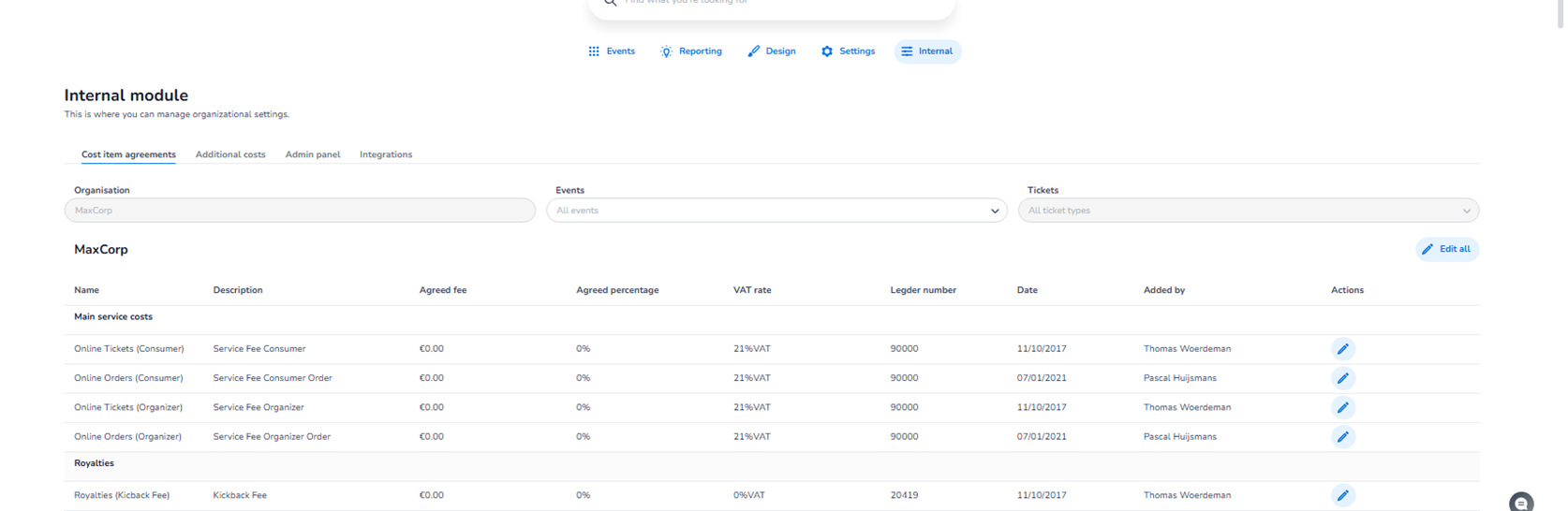
The Cost item agreements section is located in:
Dashboard → Internal → Cost item agreements
This section is used to manage organisation-level financial agreements and fee structures within the platform.
It defines how costs are calculated, distributed, and registered in the system.
This section is primarily used by:
-
Finance administrators
-
Platform administrators
-
Internal operations teams
It directly impacts revenue logic, accounting exports, and settlement calculations.
Top Filters
At the top of the page, you can filter the agreements by:
-
Organisation
-
Events
-
Tickets
These filters allow you to:
-
View agreements at organisation level
-
Narrow down to specific events
-
Filter by ticket types
This makes it possible to review how cost agreements apply across different scopes.
Main Table Overview
The section displays a structured table of cost items.
Columns typically include:
-
Name
-
Description
-
Agreed fee (fixed amount)
-
Agreed percentage
-
VAT rate
-
Ledger number
-
Date
-
Added by
-
Actions
Each row represents a financial agreement.
On the right side of each row, you will find:
-
Edit (pencil icon) → Used to modify that specific agreement.
At the top-right of the section:
-
Edit all → Allows bulk editing of agreements.
Cost Categories Within This Section
The agreements are grouped into logical financial categories.
Main Service Costs
Defines core service fee agreements between platform and organiser.
Examples of what this category governs:
-
Consumer service fees
-
Organiser service fees
-
Order-level service agreements
This impacts base revenue structure.
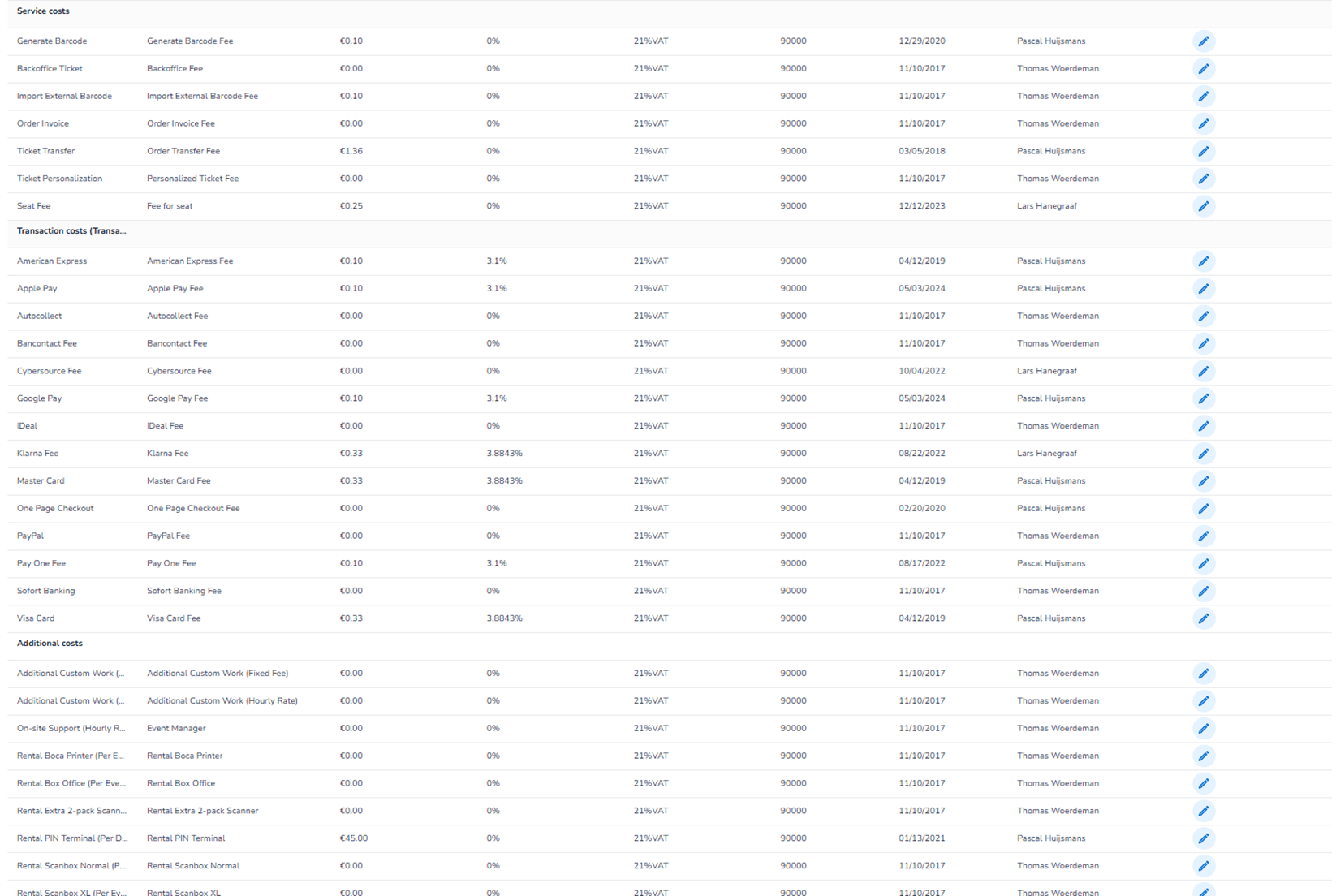
Service Costs
Covers operational platform fees such as:
-
Barcode generation
-
Backoffice ticket handling
-
Ticket transfer fees
-
Personalisation fees
-
Seat fees
These relate to platform features and operational usage.
Transaction Costs
Defines payment provider fee agreements.
This category governs:
-
Card processing fees
-
Wallet payments
-
Online banking methods
-
Alternative payment methods
This impacts:
-
Payment cost calculations
-
Settlement logic
-
Financial reconciliation
Additional Costs
Used for custom or operational service agreements such as:
-
Custom development work
-
On-site support
-
Hardware rentals
-
Special service items
These are organisation-specific cost structures.
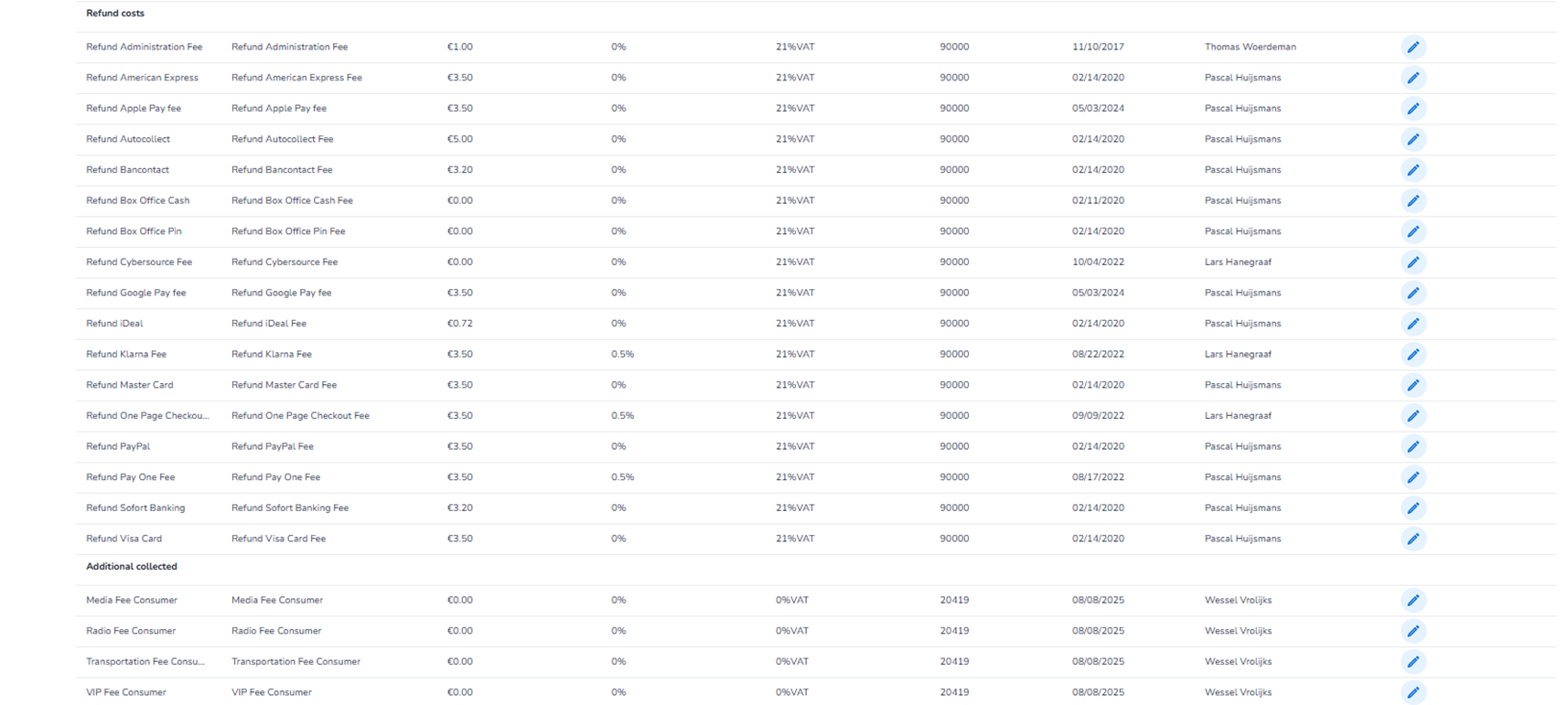
Refund Costs
Defines cost agreements related to refunds.
This includes:
-
Refund administration fees
-
Payment-provider-specific refund costs
-
Processing fees
This affects how refunds are financially processed and accounted for.
Additional Collected Costs
Used for extra charges collected alongside ticket sales, such as:
-
Regulatory fees
-
Media-related fees
-
Special consumer charges
These are additional structured cost items.
Editing Agreements
Each agreement can be edited individually by clicking the pencil icon.
When editing, you can typically configure:
-
Fixed fee amount
-
Percentage-based fee
-
VAT rate
-
Ledger number
-
Financial structure
The Edit all button allows broader configuration updates.
What This Section Controls
The Cost item agreements section controls:
-
Platform service fee logic
-
Revenue calculation structure
-
Payment provider cost mapping
-
Refund cost logic
-
VAT handling
-
Accounting ledger mapping
It directly influences:
-
Settlement calculations
-
Financial exports
-
Accounting integrations
-
Revenue reporting
Important Considerations
-
Changes affect financial calculations platform-wide.
-
Incorrect configuration can impact revenue distribution.
-
VAT rates must align with accounting compliance.
-
Ledger numbers are used for financial bookkeeping and ERP systems.
This section is financial infrastructure and should be managed carefully.
Functional Summary
Within Internal → Cost item agreements, the user can:
-
View all financial agreements
-
Filter by organisation, event, or ticket
-
Edit individual cost items
-
Bulk-edit agreements
-
Configure service, transaction, refund, and additional costs
This section forms the financial backbone of the platform’s revenue and cost structure.