
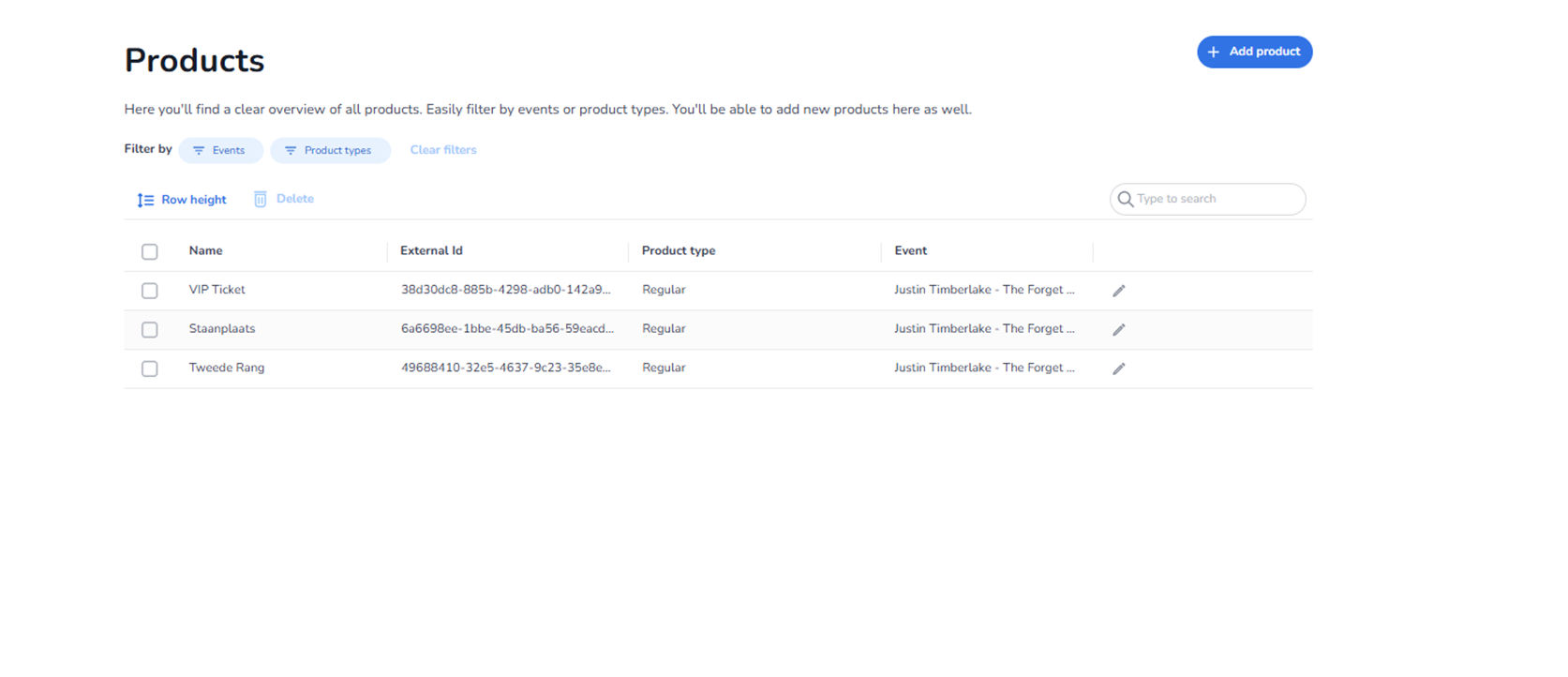
Description
The Products section provides an overview of all ticket products within the selected organisation.
A product represents a ticket type that is linked to an event. Examples of product types may include general admission, VIP access, seated tickets, or other access variations.
From this page, users can:
-
View all existing products
-
Filter products
-
Search for specific products
-
Add new products
-
Edit existing products
-
Delete selected products
All names and identifiers shown in the screenshot are example data and differ per organisation.
Top Right Action
Add Product
Blue button located in the top-right corner.
Function:
-
Opens the product creation workflow.
-
Allows users to define a new ticket product.
-
Links the product to a specific event.
Products must exist before tickets can be issued or scanned.
Filter Section
Located below the page title.
Filter By
Events
Filters products by the event they belong to.
Product Types
Filters products by category (e.g., regular, VIP, special access).
Clear Filters
Removes active filters and restores the full product list.
Action Controls (Above Table)
Row Height
Adjusts the visual density of the table.
Allows:
-
Compact display
-
Expanded view
Delete
Deletes selected products.
To use:
-
Select one or more products via checkboxes.
-
Click Delete.
-
Confirm deletion if required.
Important:
Deleting a product may affect:
-
Existing tickets
-
Entrance plans
-
Scan rules
Search Field (Right Side)
Allows direct searching within the product list.
Users can search by:
-
Product name
-
External ID
-
Event association
Search works together with filters.
Products Table
Each row represents one product.
Checkbox (Left Side)
Used to select products for bulk actions.
Name
Displays the product name.
Represents:
-
The ticket type visible in event configuration.
-
The product referenced in entrance plan rules.
Clicking the product name or edit icon allows modification.
External ID
Unique identifier for integration purposes.
Used for:
-
API mapping
-
External sales systems
-
Synchronisation
Product Type
Indicates the category of the product.
Examples may include:
-
Regular
-
VIP
-
Special access
This classification can affect:
-
Reporting
-
Filtering
-
Business logic
Event
Displays the event linked to the product.
Each product is associated with one specific event.
Edit Icon (Pencil)
Located at the end of each row.
Function:
-
Opens the product edit configuration.
-
Allows modification of product settings.
What This Page Does
The Products page defines the ticket types available for events.
Products are essential for:
-
Ticket issuance
-
Access differentiation
-
Entrance rule targeting
-
Reporting segmentation
Without products:
-
Tickets cannot be categorised.
-
Entrance validation rules cannot target specific ticket types.
What You Can Do Here
From this page, users can:
-
Create new ticket types
-
Modify existing ticket products
-
Remove unused products
-
Filter products by event
-
Prepare ticket structures before sales or import
This section is typically used by:
-
Event managers
-
Ticketing administrators
-
Operations teams