
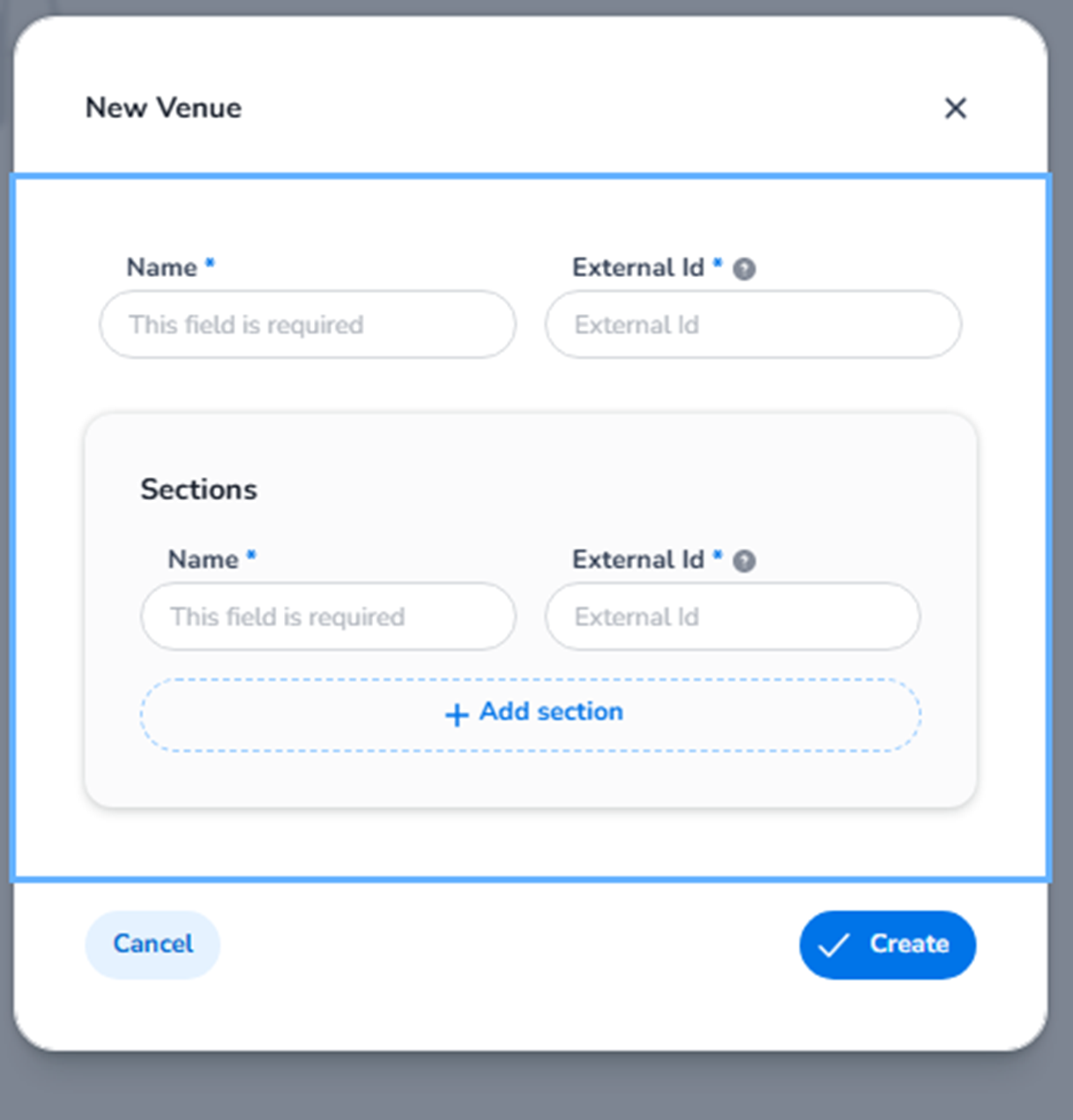
This screen appears when the user clicks:
Entrance Management → Venues → + Add new venue
The Venues overview is shown in the Settings section
Venues – Overview (Settings Sec…
, and from there the blue + Add new venue button opens the venue creation modal.
A venue defines the physical or logical location where events take place and where entrance plans can be linked.
Without a venue, entrance plans cannot be properly tied to a scanning location.
EM – New Venue Modal Overview
The New Venue modal allows users to define:
-
The venue identity
-
External system reference (optional)
-
Venue sections (sub-locations within the venue)
This is the structural layer that connects:
-
Events
-
Entrance plans
-
Scan validation rules
-
Venue-specific access control
EM – Venue Name
Field: Name (Required)
Purpose:
-
Defines the venue’s display name.
-
Appears in:
-
Event configuration
-
Entrance plans
-
Reporting
-
Scanning logic
-
Examples:
-
“Ziggo Dome”
-
“Festival Grounds Eerp”
-
“Main Hall”
This field is mandatory.
EM – External ID
Field: External Id (Optional)
Purpose:
-
Used for API integrations.
-
Links the venue to an external system.
-
Supports synchronisation with third-party tools.
If not using integrations, this field can remain empty.
EM – Sections
The Sections block allows you to subdivide the venue into logical entry zones.
Each section contains:
-
Name (Required)
-
External ID (Optional)
Sections are used for:
-
Creating multiple entrance gates
-
Defining scanning areas
-
Applying rule-based validation per zone
-
Restricting access to specific parts of the venue
Example sections:
-
“Main Entrance”
-
“VIP Entrance”
-
“Backstage”
-
“North Gate”
-
“Section A”
EM – Add Section
Button: + Add section
Function:
-
Adds additional section rows.
-
Allows multiple venue subdivisions.
-
Enables advanced entrance plan configuration.
Sections become especially important when:
-
Multiple scanning points exist
-
Different ticket types allow access to different areas
-
Validation rules must differ per zone
EM – Action Buttons
Cancel
Closes the modal without creating the venue.
Create
Button: Create
Function:
-
Saves the venue.
-
Adds it to the Venues overview list
Venues – Overview (Settings Sec…
.
-
Makes it available for:
-
Linking to events
-
Assigning to entrance plans
-
Applying scan rules
-
EM – Why Venues Matter in Entrance Management
In Entrance Management, venues act as the physical layer of access control.
Venues allow you to:
-
Assign entrance plans to specific locations
-
Apply scan rules per section
-
Control where tickets are valid
-
Structure multi-gate or multi-stage events
Without a venue:
-
Entrance plans cannot be properly scoped
-
Section-based validation cannot exist
-
Physical access logic remains undefined
EM – Functional Summary
Within Entrance Management → + Add new venue, the user can:
-
Define a new location
-
Structure it into sections
-
Link it to events
-
Enable section-based validation
-
Prepare entrance scanning logic
This section forms the physical access layer of the entrance control system.