
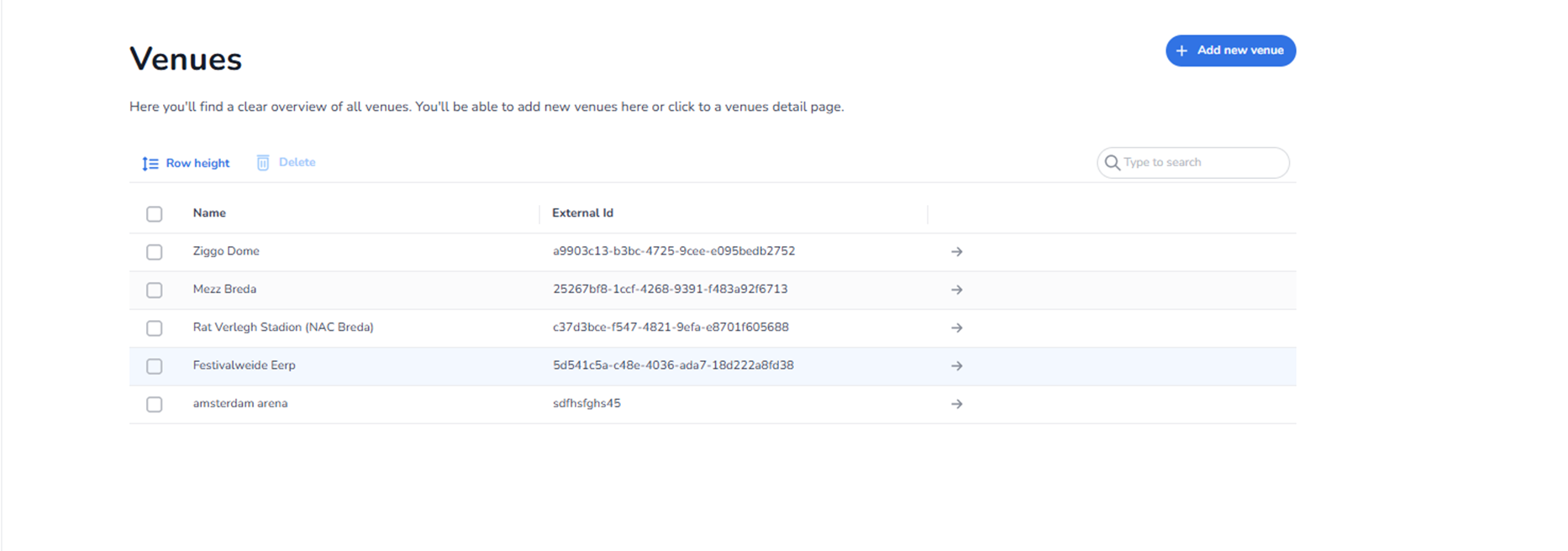
Description
The Venues page within Settings provides an overview of all venues available in the selected organisation.
From this page, users can:
-
View existing venues
-
Search for a venue
-
Select venues for bulk actions
-
Delete venues
-
Add new venues
-
Open detailed venue configuration
All venue names and identifiers shown in the screenshot are examples and differ per organisation.
Top Right Action
Add New Venue
Blue button located in the top-right corner.
Function:
-
Opens the venue creation workflow.
-
Allows users to define a new venue.
-
Required when setting up new events that need a physical or logical location.
Typical configuration includes:
-
Venue name
-
Address information
-
Venue type
-
Seating or general admission configuration
Action Controls (Above Table)
Row Height
Adjusts the visual density of the venue table.
Allows:
-
Compact view
-
Expanded view
Used for improved readability depending on user preference.
Delete
Deletes selected venues.
To use:
-
Select one or more venues using the checkboxes.
-
Click Delete.
-
Confirm removal (if required).
Important:
Deleting a venue may impact:
-
Linked events
-
Entrance plans
-
Venue sections
Search Field (Right Side)
Allows users to search for a specific venue.
Can search by:
-
Venue name
-
External ID
-
Other searchable attributes
Search works in combination with the full venue list.
Venues Table
Each row represents one venue.
Checkbox (Left Side)
Used to select venues.
Enables:
-
Bulk deletion
-
Future batch actions
Name
Displays the venue name.
Clicking the name typically:
-
Opens the venue detail page
-
Allows editing of venue configuration
External ID
Displays a unique identifier for the venue.
Used for:
-
API integrations
-
External system linking
-
Synchronisation purposes
Arrow Icon (Right Side)
Located at the end of each row.
Function:
-
Opens the detailed venue configuration page.
-
Provides access to deeper venue settings.
This is the primary way to manage venue structure and configuration.
What This Page Does
The Venues overview acts as the location management layer of the platform.
Venues are used for:
-
Assigning events to physical locations
-
Structuring seating or general admission setups
-
Configuring entry logic
-
Linking entrance plans to physical spaces
What You Can Do Here
From this page, users can:
-
Create new venues
-
Modify existing venues
-
Remove unused venues
-
Access detailed venue configuration
-
Prepare locations before linking them to events
This page is typically used by:
-
Event planners
-
Operations teams
-
Venue administrators
-
Access control managers