
Overview
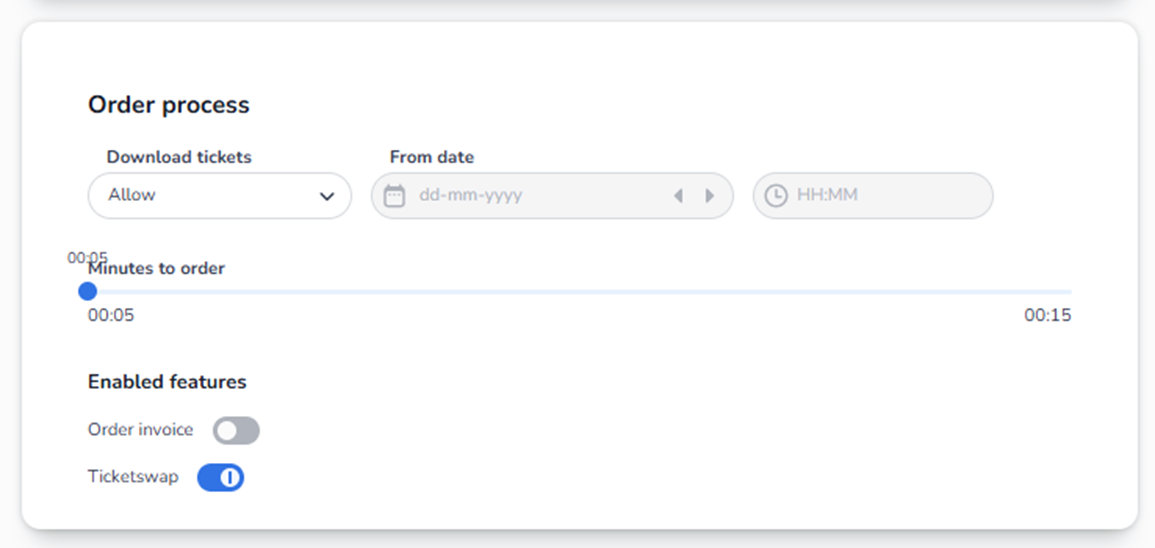
The Order process section controls how ticket purchasing behaves during checkout.
This section determines:
-
When tickets can be downloaded
-
How long tickets are reserved during checkout
-
Whether invoices are enabled
-
Whether resale (Ticketswap) is allowed
These settings directly affect customer experience and ticket availability.
Section Breakdown
-
Download Tickets
Field: Dropdown (e.g. “Allow”)
This controls whether customers can download their tickets.
What You See:
-
A dropdown menu
-
Options such as “Allow” (and possibly other configurations depending on platform setup)
What It Does:
If set to Allow:
-
Customers can download their tickets after purchase.
-
Tickets become available via email or account.
If disabled or restricted:
-
Tickets may not be downloadable immediately.
-
You may control when access becomes available.
-
From Date (Ticket Availability Timing)
Fields:
-
Date picker (calendar icon)
-
Time selector (HH:MM)
This defines when ticket download becomes available.
What You See:
-
Calendar input field
-
Arrow buttons to move date forward/backward
-
Time input field
-
Timezone indicator
How It Works:
If a date and time are set:
-
Customers can only download tickets starting from that moment.
If left empty:
-
Tickets are typically downloadable immediately after purchase (depending on other configuration).
Why This Is Important:
Used for:
-
Preventing early ticket distribution
-
Security control
-
Coordinating release timing for high-demand events
-
Minutes to Order (Reservation Timer)
Control: Slider
This is one of the most critical settings.
What It Controls:
How long tickets remain reserved in a customer’s cart during checkout.
Example:
If set to 5 minutes:
-
Customer selects tickets.
-
Tickets are locked for 5 minutes.
-
If payment is not completed within 5 minutes:
-
Reservation expires.
-
Tickets return to available inventory.
-
What You See:
-
A slider with a time range (e.g., 00:05 to 00:15)
-
Current selected time displayed above the slider
Why This Matters:
Short time (e.g., 5 minutes):
-
Prevents inventory being blocked too long
-
Good for high-demand events
Long time (e.g., 15 minutes):
-
More comfortable for buyers
-
Higher risk of inventory being temporarily locked
This directly impacts:
-
Conversion rate
-
Fair ticket distribution
-
Scalping risk
-
Sales speed during launches
-
Enabled Features
This section contains toggle switches.
Blue toggle = Enabled
Grey toggle = Disabled
A. Order Invoice
Toggle: On / Off
When enabled:
-
Buyers can request an invoice for their order.
-
Additional invoice details may be collected.
When disabled:
-
Invoice functionality is not available during checkout.
Use this if:
-
You sell to business customers
-
You need formal invoicing support
B. Ticketswap
Toggle: On / Off
When enabled:
-
Ticket resale integration is activated.
-
Customers may resell tickets through supported resale platforms (if integrated).
When disabled:
-
Resale functionality is blocked.
Important:
This impacts:
-
Secondary market behavior
-
Customer flexibility
-
Fraud prevention strategies
How All Settings Work Together
The order process controls the entire checkout flow:
-
Customer selects tickets.
-
Tickets are reserved for X minutes.
-
Customer completes payment.
-
Tickets become downloadable (based on availability timing).
-
Optional features (invoice / resale) apply.
Risk Awareness (For Agent Understanding)
If users report:
-
“My tickets disappeared during checkout”
→ Check Minutes to Order timer. -
“Customers cannot download tickets”
→ Check Download Tickets setting and From Date. -
“Customers cannot request invoices”
→ Check Order Invoice toggle. -
“Tickets are being resold unexpectedly”
→ Check Ticketswap toggle.
Summary
Order Process = Checkout Logic Controller
It determines:
-
Reservation behavior
-
Download timing
-
Invoice availability
-
Resale permissions
Misconfiguration here can cause:
-
Lost sales
-
Inventory blocking
-
Customer frustration
-
Operational confusion