
Overview
This knowledge agent provides guidance about the Sharing Center view inside the event dashboard of the NXT Gen ticketing platform.
When a user creates or selects an event, they are taken to the event dashboard, where several tabs provide insights and operational tools for managing the event.
At the top of the dashboard, the following tabs are available:
-
Ticket sales
-
Finance
-
Realtime sales
-
Sharing center
This article describes the Sharing Center tab.
The Sharing Center is used to create and manage share links that allow external parties to sell or distribute tickets for an event.
How to Access the Sharing Center
To open the Sharing Center:
-
Open the ticketing platform.
-
Select or create an event.
-
You will arrive at the event dashboard.
-
At the top of the dashboard, click Sharing center.
This opens the share link management interface for the selected event.
What the Sharing Center Is Used For
The Sharing Center allows event organizers to generate share links that can be distributed to partners or external sellers.
These links provide controlled access to ticket sales and allow the organizer to track activity through those links.
This functionality is commonly used when:
-
partners promote ticket sales
-
affiliates sell tickets
-
marketing teams distribute sales links
-
organizations provide ticket links to specific groups
Each share link acts as a tracked access point to the ticket shop.
What You See in the Sharing Center
The main screen displays an overview of existing share links.
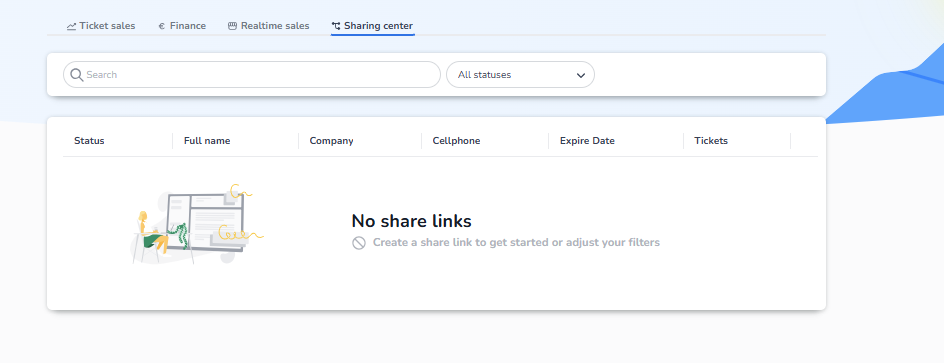
The table can contain information such as:
-
Status – whether the share link is active or inactive
-
Full name – the name of the person or partner using the link
-
Company – the organization associated with the share link
-
Cellphone – contact information
-
Expire date – the date when the share link expires
-
Tickets – tickets sold or associated with the link
Users can also search and filter share links using the search field and status filter at the top of the page.
When No Share Links Exist
If no share links have been created yet, the page will display an empty state message:
“No share links”
This indicates that no external ticket distribution links have been configured yet.
Users can then create their first share link to start distributing tickets through partners or affiliates.
Purpose of the Sharing Center
The Sharing Center is designed to support controlled ticket distribution through external channels.
It allows event organizers to:
-
create shareable ticket sales links
-
distribute ticket access to partners
-
monitor ticket distribution activity
-
manage expiration and status of share links
This helps organizers expand ticket sales through partnerships while maintaining visibility and control over the distribution process.