
Overview
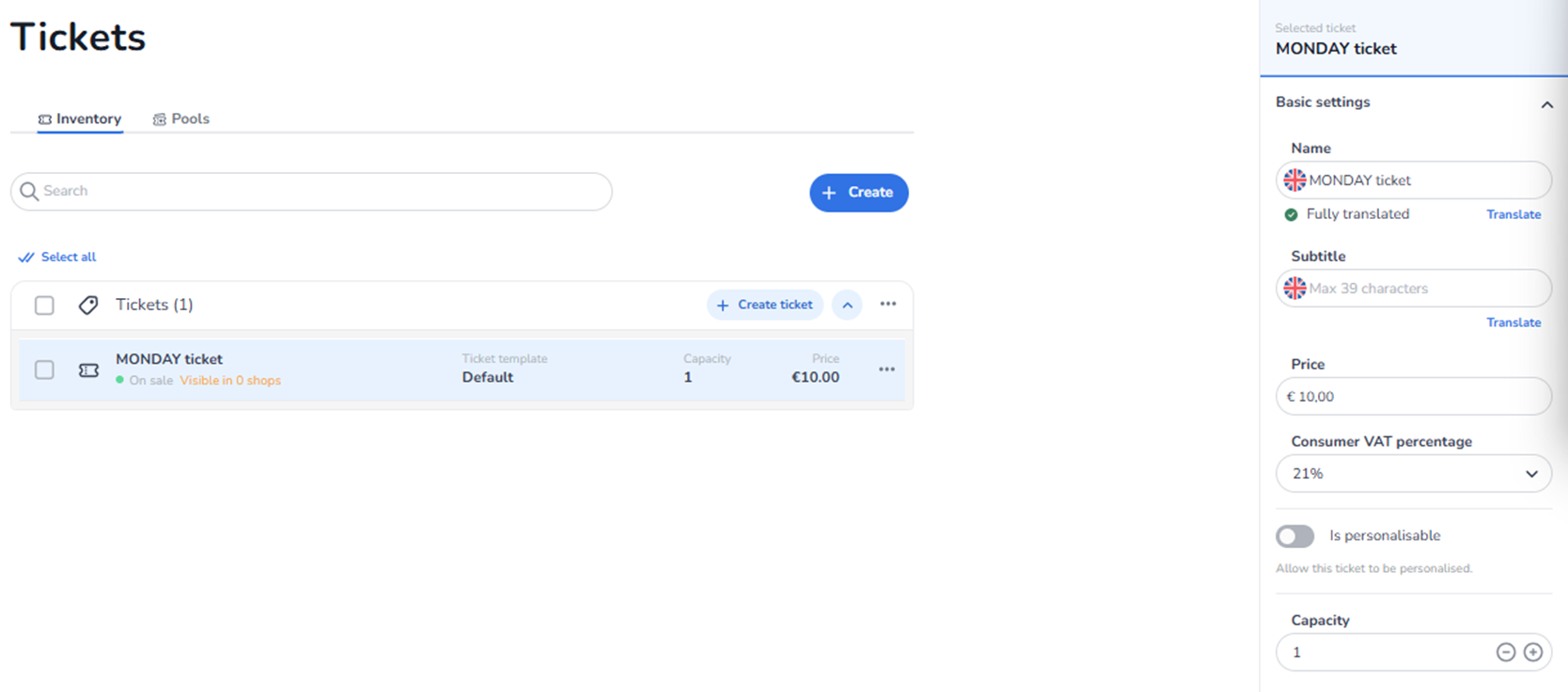
This side panel appears when a user selects an existing ticket from Ticketing → Tickets → Inventory.
It allows editing of the ticket’s basic commercial and structural settings.
This section controls core ticket properties such as:
-
Name
-
Subtitle
-
Price
-
VAT percentage
-
Personalisation setting
-
Capacity
Changes made here directly affect how the ticket behaves in sales and reporting.
What You See in This Section
Selected Ticket Context
At the top of the side panel, the selected ticket is displayed.
This confirms:
-
Which ticket is currently being edited.
-
That changes apply only to this ticket.
Basic Settings
-
Name
Field label: Name
Purpose:
-
Edit the ticket’s public-facing name.
-
This name appears in shops, checkout, confirmations, and reporting.
Additional functionality:
-
Translation support (if multilingual setup is enabled).
-
Ability to translate into other languages.
Impact:
-
Affects how the ticket is displayed to customers.
-
Used in order and reporting data.
-
Subtitle
Field label: Subtitle
Purpose:
-
Add additional descriptive text under the ticket name.
-
Provide extra information to customers (e.g., restrictions, inclusions, dates).
Character limitation may apply (e.g., max character count).
Additional functionality:
-
Translation support.
-
Editable per language.
Impact:
-
Improves clarity in the shop.
-
Helps differentiate similar ticket types.
-
Price
Field label: Price
Purpose:
-
Set or adjust the ticket’s selling price.
-
Defines the amount charged during checkout.
Impact:
-
Directly affects revenue.
-
Updates sales value for future purchases.
-
Influences financial reporting.
Changing price does not automatically update past orders.
-
Consumer VAT Percentage
Field label: Consumer VAT percentage
Purpose:
-
Define the VAT rate applied to this ticket.
-
Used for tax calculation and compliance.
Impact:
-
Affects gross/net price calculation.
-
Impacts financial reports and invoicing.
-
Must align with local tax regulations.
Changing VAT may affect tax reporting but not historical transactions.
-
Is Personalizable
Toggle option: Is personalisable
Purpose:
-
Enable or disable ticket personalisation.
-
When enabled, buyer details may be required per ticket.
Example use cases:
-
Named tickets
-
ID verification events
-
Personal attendee information collection
Impact:
-
Affects checkout flow.
-
May require buyer to fill in attendee details.
-
Influences compliance and event access control.
If disabled:
-
No personal attendee data required per ticket.
-
Capacity
Field label: Capacity
Numeric input with plus (+) and minus (–) controls.
Purpose:
-
Adjust the maximum quantity available for this ticket.
-
Controls how many units can be sold.
Impact:
-
Directly influences availability.
-
Prevents overselling (unless managed by pools).
-
Works independently unless the ticket is assigned to a pool.
If the ticket is part of a pool:
-
Pool logic may override individual capacity limits.
What This Section Actually Controls
Basic Settings controls:
-
Ticket naming and display
-
Base pricing
-
VAT calculation
-
Personalisation behaviour
-
Individual ticket capacity
It does NOT control:
-
Sales channels
-
Pool allocation
-
Checkout design
-
Marketing tracking
-
Advanced rules or automation
This section defines the core commercial properties of the ticket.
Important Considerations
-
Changing pricing impacts future sales only.
-
VAT must comply with applicable tax laws.
-
Capacity adjustments affect live availability.
-
Personalisation changes may affect checkout complexity.
Incorrect configuration here may result in:
-
Pricing errors
-
Tax reporting issues
-
Over- or under-selling
-
Checkout friction
Functional Summary
Within Ticketing → Tickets → Inventory → Ticket Detail → Basic Settings, the user can:
-
Edit ticket name
-
Add or modify subtitle
-
Adjust price
-
Set VAT percentage
-
Enable or disable personalisation
-
Modify capacity
This section influences:
-
Revenue
-
Availability
-
Tax compliance
-
Checkout data requirements
-
Ticket display
It is the primary control panel for editing an existing ticket’s fundamental properties.