
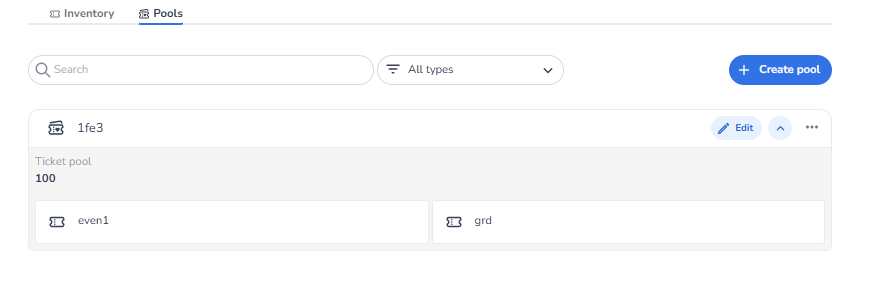
Knowledge Agent — Ticket Pools (Editing) — NXT Gen
This knowledge article explains how users can edit an existing ticket pool within the NXT Gen ticketing platform.
A ticket pool allows multiple ticket types to share the same capacity. This means several ticket types can draw from the same inventory limit, ensuring that the total number of tickets sold across those tickets does not exceed the defined pool capacity.
How to Edit a Ticket Pool
To edit a ticket pool:
-
Open the ticketing platform.
-
Click on the specific event you want to manage.
-
Navigate to the Inventory section.
-
Select the Pools tab.
-
Locate the ticket pool you want to modify.
-
Click the blue Edit button on the right side of the pool card.
After clicking Edit, the ticket pool configuration screen will open.
What Can Be Edited
Inside the edit view, users can modify two main things:
-
Tickets inside the pool
Users can adjust which ticket types belong to the pool.
Tickets can be added or removed so that different ticket types share the same pool capacity.
-
Pool capacity
Users can increase or decrease the total capacity of the pool.
This determines the maximum number of tickets that can be sold across all ticket types connected to the pool.
When Users Typically Edit a Ticket Pool
Users usually edit ticket pools when they want to:
-
Change which tickets share the same inventory
-
Increase or decrease the shared capacity
-
Rebalance ticket availability between ticket types
-
Adjust inventory allocation during ticket sales
Important Concept
A ticket pool controls shared inventory.
If multiple ticket types belong to the same pool, they will all draw from the same capacity limit.
Example:
Pool capacity = 100
Ticket A = 60 sold
Ticket B = 30 sold
Remaining pool capacity = 10 tickets
What Happens When a Pool Runs Out of Capacity
If a ticket pool reaches its maximum capacity, no additional tickets connected to that pool can be sold. This means that all ticket types that belong to the pool will become unavailable for purchase once the pool capacity is fully used.
Even if an individual ticket type still appears to have availability, sales will stop because the shared pool limit has been reached.
To allow more sales, the event organizer must either:
-
Increase the pool capacity, or
-
Adjust the tickets included in the pool, for example by removing tickets or assigning them to a different pool.
Once the pool capacity is increased or adjusted, ticket sales can continue again for the ticket types connected to that pool.