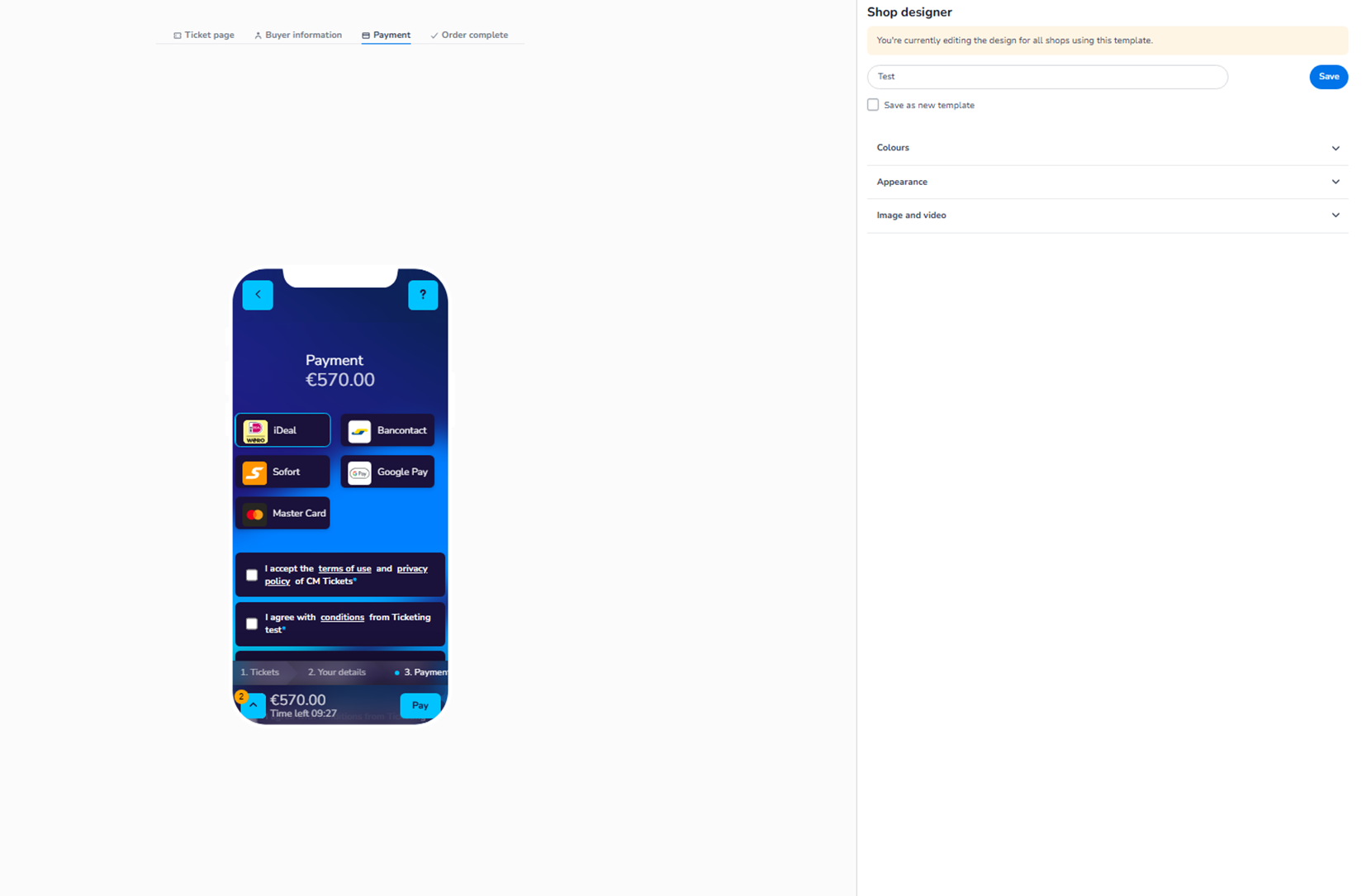
This section appears inside:
Design → Shop design → Edit → Payment
It controls the visual styling of the Payment step in the checkout flow.
This is the page where customers:
-
See the total amount
-
Select a payment method
-
Accept terms & conditions
-
Complete the payment
It does not control which payment methods are available — only how this page looks.
What This Section Controls
Within the Payment step you can style:
-
Background
-
Payment method buttons
-
Consent checkboxes
-
Total price section
-
Primary payment button
-
Text colours
All styling applies to both Mobile and Desktop.
Only the layout changes between devices, not the configuration.
Available Configuration Sections
Inside the Payment tab you will typically find:
-
Colours
-
Appearance
-
Image and video
These function similarly to the other checkout steps but apply specifically to the payment page.
Colours
The Colours section allows you to define the visual hierarchy of the payment page.
You can control:
Background
Defines the overall page background colour behind all payment elements.
Payment Blocks / Containers
Defines the styling of:
-
Payment method tiles (iDeal, Bancontact, etc.)
-
Consent checkbox blocks
-
Total summary area
Primary Button
Controls the styling of the final action button (e.g. Pay).
This is the most important conversion element in the checkout flow.
Text colour ensures readability and accessibility.
Secondary Elements
If present, these control styling for:
-
Back buttons
-
Supporting actions
Opacity percentage allows subtle blending with background designs.
Appearance
The Appearance section controls structural styling such as:
-
Font selection
-
Button shapes (round, rounded, square)
-
Blending behaviour
-
Overall UI feel
This ensures consistency across:
-
Ticket page
-
Buyer information
-
Payment
-
Order complete
Appearance settings affect the entire template consistently.
Image and Video
You can configure:
-
Background image
-
Background video (YouTube)
-
Header image
-
Card image
These visuals help reinforce branding during the payment step.
Important:
-
Background visuals should not reduce readability.
-
Payment information must remain clear and trustworthy.
What This Section Does NOT Control
The Payment design section does NOT control:
-
Available payment providers
-
Payment fees
-
Transaction processing
-
Currency settings
-
Payment logic
Those settings are managed elsewhere in the platform.
Functional Summary
Within Shop design → Payment, the user can:
-
Style the payment page background
-
Design payment method tiles
-
Configure button styling
-
Adjust consent block appearance
-
Maintain brand consistency across checkout
This section ensures that the final and most critical step in the checkout flow is:
-
Clear
-
Professional
-
Brand-aligned
-
Conversion-optimised
It controls visual presentation — not payment configuration logic.