
Overview
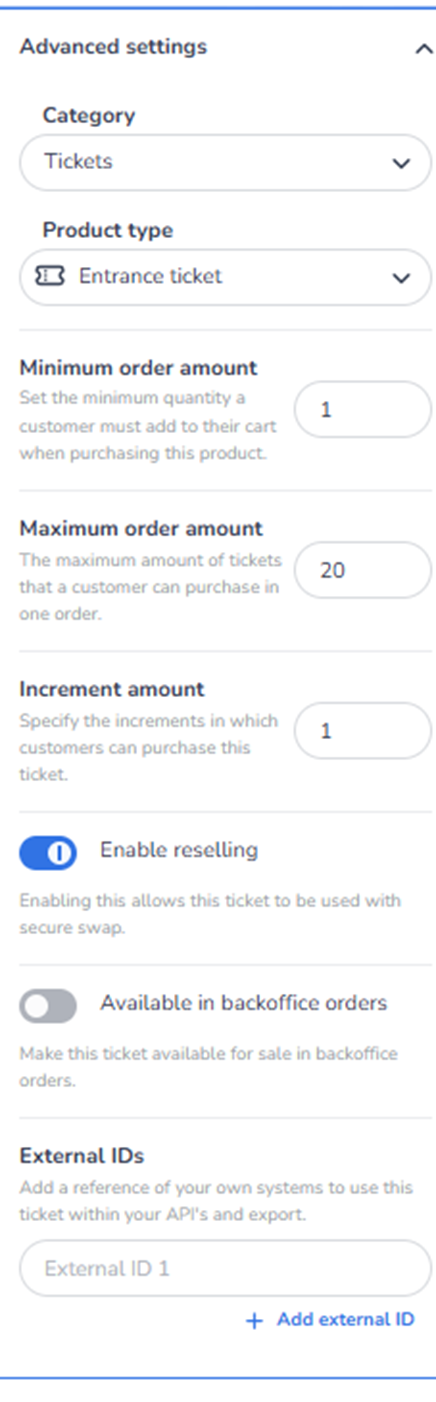
This section appears in the right-side ticket detail panel under Advanced settings when a ticket is selected.
It controls advanced configuration options that influence ordering logic, resale behaviour, backoffice availability, and system integrations.
Advanced Settings define operational and commercial rules beyond basic pricing and visibility.
What You See in This Section
-
Category
Field label: Category
Dropdown (example: Tickets)
Purpose:
-
Reassign the ticket to a different category.
-
Adjust structural grouping within Inventory.
Impact:
-
Changes where the ticket appears in the inventory structure.
-
Does not affect pricing or availability directly.
-
Product Type
Field label: Product type
Dropdown (example: Entrance ticket)
Purpose:
-
Define or change the type of product.
-
Determines whether the ticket is treated as an entrance ticket or another product type.
Impact:
-
Influences behaviour within the system.
-
May affect access logic, validation, or integrations.
-
Minimum Order Amount
Field label: Minimum order amount
Description:
Set the minimum quantity a customer must add to their cart when purchasing this product.
Purpose:
-
Require customers to purchase at least a specific number of tickets.
Example:
If set to 2:
-
Customers must buy at least 2 units per order.
Impact:
-
Useful for bundled sales or minimum attendance rules.
-
Influences checkout validation.
-
Maximum Order Amount
Field label: Maximum order amount
Description:
The maximum amount of tickets that a customer can purchase in one order.
Purpose:
-
Limit the number of tickets per transaction.
Impact:
-
Prevents bulk buying.
-
Helps reduce scalping or unfair distribution.
-
Controls per-order sales limits.
-
Increment Amount
Field label: Increment amount
Description:
Specify the increments in which customers can purchase this ticket.
Purpose:
-
Define purchase step size.
Example:
If increment is 2:
-
Customers can only purchase 2, 4, 6, etc.
Impact:
-
Enforces grouped sales.
-
Useful for paired tickets or table seating.
-
Enable Reselling
Toggle: Enable reselling
Description:
Allow this ticket to be used with secure swap.
Purpose:
-
Enable official resale functionality.
-
Allow ticket holders to resell through controlled mechanisms.
Impact:
-
Supports secondary market management.
-
Improves buyer confidence.
-
Reduces unofficial resale risks.
If disabled:
-
Ticket cannot be used in secure resale flow.
-
Available in Backoffice Orders
Toggle: Available in backoffice orders
Description:
Make this ticket available for sale in backoffice orders.
Purpose:
-
Allow internal staff to sell or create orders manually.
-
Enable administrative sales.
Impact:
-
Useful for customer service or partner allocations.
-
Does not automatically make it public in shops.
-
External IDs
Section: External IDs
Field: External ID 1
Button: + Add external ID
Purpose:
-
Link this ticket to external systems.
-
Store internal references for API, reporting, or integrations.
Use cases:
-
ERP integration
-
CRM reference
-
Accounting systems
-
Partner platform sync
Impact:
-
Enables system interoperability.
-
Supports custom reporting and data exports.
What This Section Actually Controls
Advanced Settings control:
-
Structural classification
-
Order quantity rules
-
Purchase limits
-
Resale eligibility
-
Backoffice sales availability
-
External system integration
It governs operational and policy-level behaviour of the ticket.
It does NOT control:
-
Visual presentation
-
Marketing tracking
-
Shop assignment
-
Pricing (directly)
It defines advanced commercial logic.
Important Considerations
-
Incorrect order limits may block legitimate customers.
-
Reselling should align with event policy.
-
External IDs must match external system configuration.
-
Backoffice availability should align with internal sales processes.
Changes here can significantly affect:
-
Purchase behaviour
-
Distribution fairness
-
Integration workflows
-
Administrative control
Functional Summary
Within Ticketing → Tickets → Inventory → Ticket Detail → Advanced Settings, the user can:
-
Change ticket category
-
Adjust product type
-
Define minimum and maximum order limits
-
Configure purchase increments
-
Enable or disable resale
-
Allow backoffice sales
-
Link ticket to external systems
This section influences:
-
Purchase rules
-
Sales policy enforcement
-
Integration architecture
-
Operational flexibility
It is the control panel for advanced commercial and operational configuration of the ticket.