
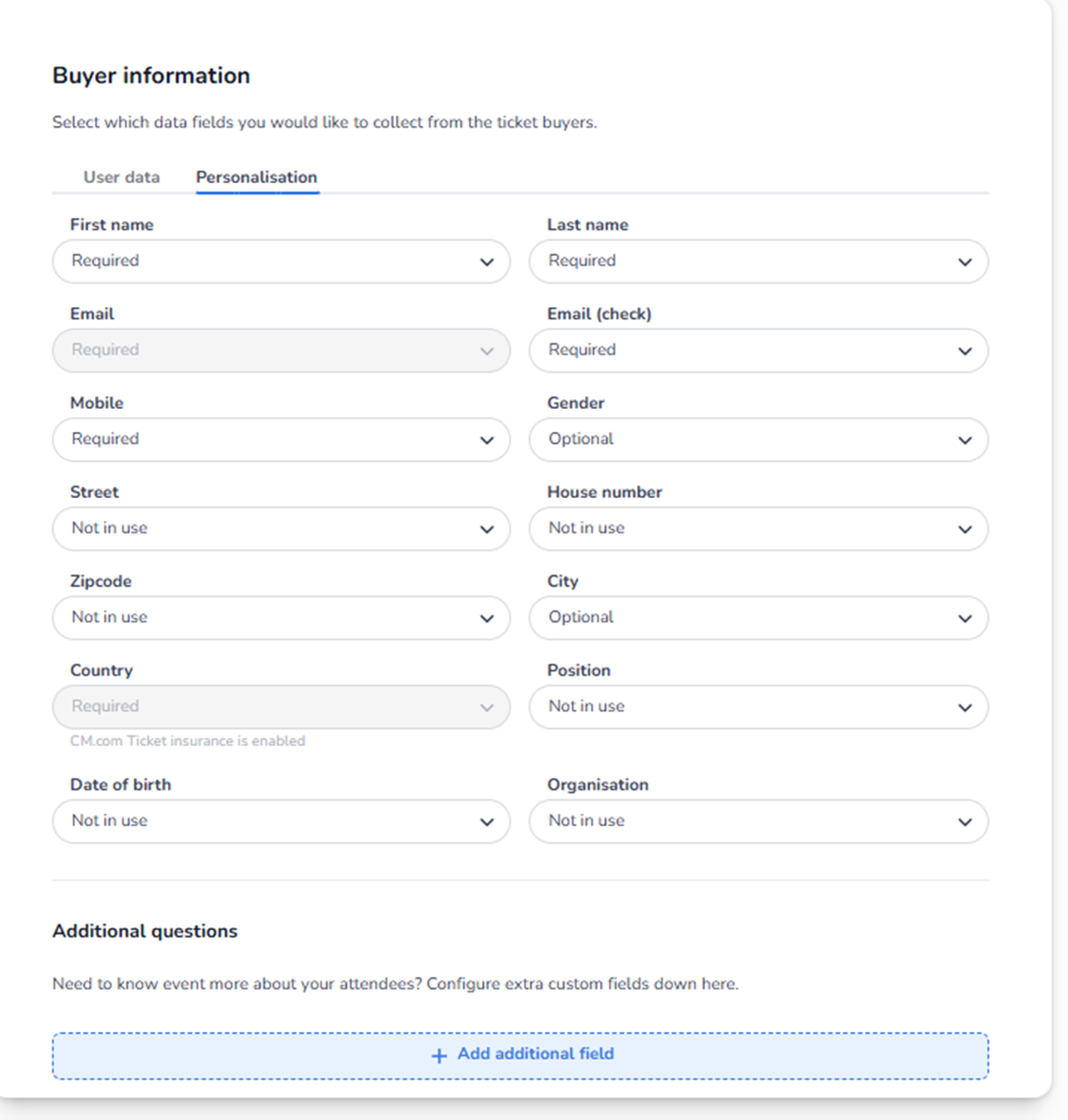
Overview
The Personalisation tab controls which data you collect per ticket (per attendee), not per order.
This is fundamentally different from User data:
-
User data = 1 buyer per order
-
Personalisation = 1 attendee per ticket
If someone buys 4 tickets:
-
Buyer information is filled in once.
-
Personalisation fields can appear 4 times (once per ticket).
This section determines what attendee information must be provided before tickets are issued.
Structure of the Personalisation Tab
You see the same types of fields as in User data, such as:
-
First name
-
Last name
-
Email
-
Email (check)
-
Mobile
-
Gender
-
Street
-
House number
-
Zipcode
-
City
-
Country
-
Position
-
Date of birth
-
Organisation
For each field, you can select:
-
Required
-
Optional
-
Not in use
These apply per ticket.
What Each Setting Means in Personalisation
Required (Per Ticket)
If a field is set to Required:
-
The field appears for each ticket.
-
The buyer must fill it in for every attendee.
-
Ticket issuance cannot complete without it.
Example:
If First name is Required:
-
Buying 5 tickets → 5 first names must be entered.
Use Required for:
-
Named tickets
-
Security-controlled events
-
ID-based entry
-
Age-restricted events
Optional (Per Ticket)
If a field is Optional:
-
The field appears per ticket.
-
The buyer may fill it in.
-
The ticket can still be issued if left empty.
Use Optional for:
-
Marketing analysis
-
Demographic insights
-
Non-critical attendee profiling
Not in Use
If set to Not in use:
-
The field does not appear during personalisation.
-
No attendee-level data is collected for that field.
Use this when:
-
Tickets are not name-bound.
-
Speed of checkout is more important.
-
Minimal attendee data is required.
Why Personalisation Is Important
Personalisation affects:
-
Ticket validation logic
-
Scan app behavior
-
Security compliance
-
Transferability of tickets
-
Resale control
-
CRM attendee accuracy
For example:
If personalisation is Required:
-
Tickets become name-bound.
-
Changes may require formal transfer process.
-
Duplicate names can be prevented.
If personalisation is minimal:
-
Tickets are easier to transfer.
-
Checkout is faster.
-
Less data is available for analysis.
Operational Impact
If users report:
-
“We need names on tickets”
→ Ensure First name and Last name are Required in Personalisation. -
“Attendees can enter without ID match”
→ Check if name fields are Required. -
“Checkout takes too long”
→ Reduce Required personalisation fields. -
“We don’t know who is actually attending”
→ Increase Required fields in Personalisation.
Difference Between Buyer Information and Personalisation
|
Buyer Information |
Personalisation |
|
Order-level |
Ticket-level |
|
One per order |
One per ticket |
|
Contact & billing |
Attendee identity |
|
Used for payment |
Used for entry control |
Never confuse these two layers.
Additional Questions (Below Personalisation)
You also see:
Additional questions → + Add additional field
These allow you to create custom attendee questions such as:
-
Dietary preference
-
T-shirt size
-
Accessibility needs
-
Membership number
-
Marketing source
These can apply to:
-
Buyer (order-level)
-
Attendee (ticket-level)
Configuration depends on how they are created.
We will define additional fields separately if needed.
Strategic Recommendations
Low-security event:
-
Personalisation minimal or Optional
High-security / corporate event:
-
First name → Required
-
Last name → Required
-
Possibly Date of birth → Required
Age-restricted event:
-
Date of birth → Required
Summary
Personalisation controls:
-
What data is collected per attendee
-
Whether tickets are name-bound
-
Entry-level validation detail
-
Attendee analytics depth
This section directly influences:
-
Security
-
Operational control
-
Scan process
-
Transferability
-
Customer friction