
Overview
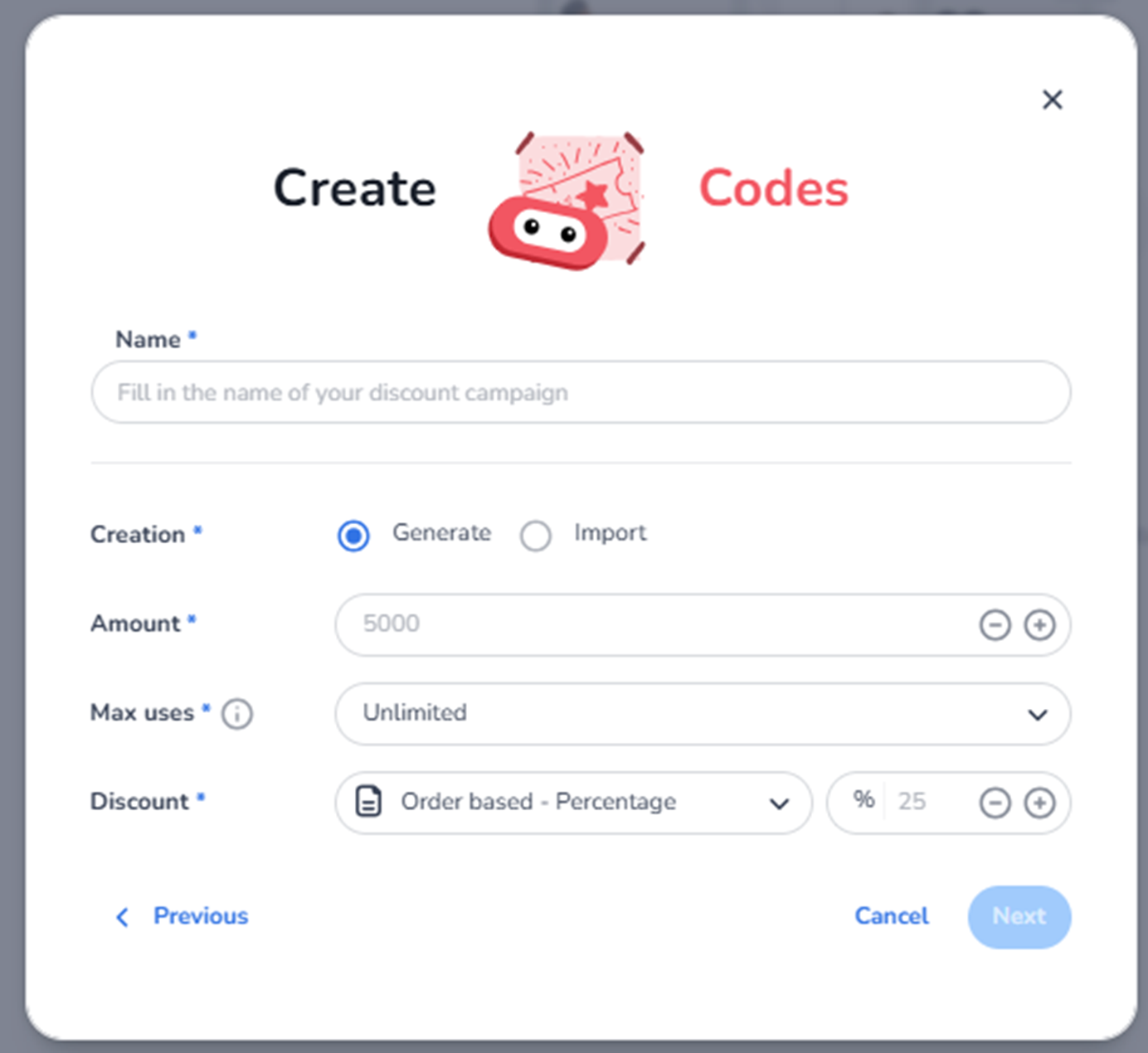
This screen appears after selecting Setup multiple codes in the New Discount modal.
It is used to configure a bulk discount campaign where multiple unique codes are created or imported.
Each code can be distributed individually (e.g., to partners, influencers, or invited guests).
This screen defines:
-
Campaign name
-
Code creation method (generate or import)
-
Number of codes
-
Usage limits per code
-
Discount logic
What You See in This Screen
Modal Header
Title: Create Codes
Top-right corner:
-
X (close icon) → Closes the modal without saving.
-
Name (Required)
Field label: Name*
Placeholder: Fill in the name of your discount campaign
Purpose:
-
Define the internal campaign name.
-
Used in the promotions overview.
Examples:
-
Influencer Batch
-
Partner Allocation Q1
-
VIP Invite Codes
Important:
-
Required field.
-
Internal reference, not the actual codes.
-
Creation Method (Required)
Field label: Creation*
Two selectable options:
-
Generate
-
Import
Generate
Purpose:
-
Automatically generate unique discount codes.
-
System creates the specified number of codes.
Used when:
-
You need a batch of unique codes quickly.
-
Codes do not need predefined values.
Import
Purpose:
-
Upload predefined codes from a file.
-
Use externally prepared codes.
Used when:
-
Codes are pre-assigned.
-
Integrated with external systems.
-
Specific code patterns are required.
Selecting Import will typically require a file upload in the next step.
-
Amount (Required)
Field label: Amount*
Numeric field (example: 5000)
With minus (–) and plus (+) controls.
Purpose:
-
Define how many unique codes will be created (if using Generate).
-
Represents the total number of individual discount codes.
Impact:
-
Determines campaign scale.
-
Affects distribution capacity.
Example:
If amount = 1000:
-
1000 unique codes will be created.
-
Max Uses (Required)
Field label: Max uses*
Dropdown (example: Unlimited)
Purpose:
-
Define how many times each individual code can be used.
Options may include:
-
Unlimited
-
Limited to X uses
Important distinction:
This applies per code, not to the entire campaign.
Example:
If max uses = 1:
-
Each code can only be used once.
-
Discount (Required)
Field label: Discount*
Includes:
-
Discount type dropdown
-
Value field (percentage or amount)
Example shown:
-
Order based – Percentage
-
25%
Purpose:
-
Define how the discount is calculated.
-
Applies the same discount logic to all generated/imported codes.
Possible discount types:
-
Order-based percentage
-
Fixed amount
-
Ticket-based discount
Impact:
-
Directly affects revenue.
-
Applies uniformly across all codes in this batch.
Navigation & Actions
Previous
Returns to the discount type selection screen.
Cancel
Closes the modal without saving.
Next
Proceeds to the next configuration step.
The Next button may remain disabled until required fields are completed.
What This Screen Actually Controls
This screen defines:
-
Batch campaign identity
-
Code creation method
-
Number of codes
-
Usage limits per code
-
Discount calculation logic
It establishes the structure for bulk discount campaigns.
It does NOT yet control:
-
Validity period
-
Ticket restrictions
-
Shop restrictions
-
Advanced campaign rules
Those may be configured in subsequent steps.
Important Considerations
-
Large code batches increase campaign reach.
-
Max uses per code affects exclusivity.
-
Generated codes are random and system-defined.
-
Imported codes must follow required formatting rules.
-
Discount value applies to all codes in the batch.
Incorrect setup may result in:
-
Revenue impact
-
Over-redemption
-
Distribution mismanagement
-
Tracking difficulties
Functional Summary
Within Ticketing → Promotions → Create Discount → Multiple Codes, the user can:
-
Define campaign name
-
Choose between generating or importing codes
-
Set number of codes
-
Define usage limits per code
-
Configure discount logic
-
Proceed to further campaign configuration
This section influences:
-
Campaign distribution scale
-
Code uniqueness
-
Revenue adjustments
-
Promotional tracking granularity
It is the configuration screen for bulk discount campaigns using unique codes.